
Best AI Writing Tools Under $20 a Month
I spent three months testing AI writing tools that claim to fit under a $20 a month budget, from free browser extensions to apps billed by the API call. Free tools cap you at a handful of checks a day or bury the good features behind an upsell prompt. The setup that actually held under budget skipped subscriptions: a Mac app paid for once, fed with my own API key.
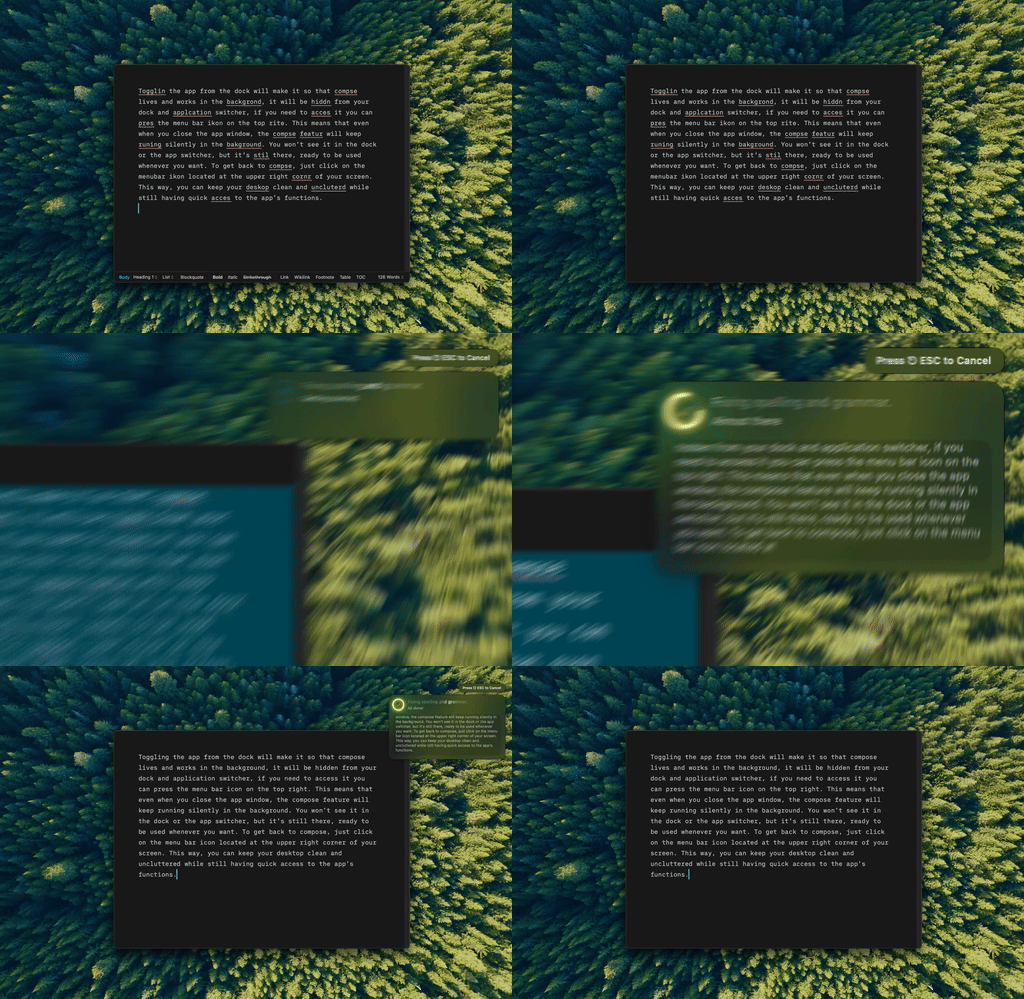
Type Mac — select the typo, hit the shortcut, done before my hand leaves the keyboard.
What a BYOK setup actually costs
A native Mac app with BYOK (bring your own key) support runs $4.99 a month, $49.99 a year ($4.17 a month), or $249.99 once for a lifetime license, with a 7-day free trial on the yearly plan. On top of that you pay only for the API calls you make:
| Usage | API cost per month |
|---|---|
| Light | $0.50–$2 |
| Medium | $2–$10 |
| Heavy (300+ uses/mo) | $5–$25 |
Even at heavy use, the whole setup lands under $20 to $30 a month, running current frontier models instead of whatever sits behind a subscription tool's paywall.
Standalone budget tools worth knowing
| Tool | Price | Good for | Limit |
|---|---|---|---|
| Hemingway Editor | $19.99 one-time | Readability, sentence complexity, adverbs | Doesn't rewrite, own window only |
| iA Writer | $19.99–$49.99 | Clean Markdown writing environment | No AI, no system-wide reach |
| LanguageTool | Free, or $5/mo premium | Grammar in 30+ languages | Browser-focused |
Setting up BYOK takes five minutes
I signed up at platform.openai.com, console.anthropic.com, and aistudio.google.com, added a payment method, then pasted each key into the app. Most providers hand out free starting credit, and Gemini's free tier alone covers plenty of bulk editing.
Or skip paid tools entirely
macOS's built-in spell check, LanguageTool's free tier, and a chat app's free tier cover occasional needs. Clunky and fragmented, but free.
The real cost comparison
| Subscription | Annual cost | BYOK equivalent |
|---|---|---|
| Grammarly Premium | $144/yr | $50–$110 in year one, app included |
| Jasper | $468/yr | $100–$150 for the same setup |
| Wordtune | $120/yr | $20–$40/yr in API calls |
Why cheap wins anyway
- BYOK models read grammar in context instead of flagging what's technically wrong and missing what you meant
- Claude's rewrites read more natural than most subscription tools I tried
- A native app reaches every app on the Mac, past where browser extensions stop working
A tool you reach for daily beats a free one you avoid because it's clunky.
The cheap pick I still use
Three months in, the app still open in my menu bar is Type Mac. A few reasons it stuck over the free alternatives I tried:
- I pay $4.17 a month on the yearly plan, or $249.99 once for the lifetime license, and my API usage adds a few dollars on top instead of a second subscription
- One shortcut fixes grammar or rewrites a paragraph in whatever app I'm already in, so I stopped keeping a browser tab open for Grammarly
- I switch models depending on the task: Gemini for bulk edits, Claude for anything that needs a careful rewrite, same app either way
It isn't free. If your budget is genuinely zero, macOS's spell check and LanguageTool's free tier are still the honest floor. Type Mac is for when you're ready to spend a little on something you'll actually keep open.
Try Type Mac free for 7 days on the yearly plan, then $4.17 a month, or pay $249.99 once and be done with it.