
Best AI Models for Different Writing Tasks (GPT vs Claude vs Gemini)
Not all AI models write the same. Months of switching between GPT-5.6, Claude Opus 5, and Gemini 3.6 taught me which one to reach for, and picking right changes the output.
The current lineup
| Model | Best for |
|---|---|
| GPT-5.6 Sol | The hardest rewrites, complex reasoning |
| GPT-5.6 Terra | Everyday editing, most tasks |
| GPT-5.6 Luna | Fast, cheap, bulk work |
| Claude Opus 5 | Nuanced tone and rewriting |
| Gemini 3.6 Flash | Fast, cheap, long documents |
| Grok 4.5, Kimi K3 | Newer entrants, worth testing for your workflow |
Grammar and spelling: use the cheapest model you have
GPT-5.6 Luna and Gemini 3.6 Flash both catch errors reliably, and grammar checking doesn't need sophisticated reasoning. Save the premium models for tasks that do.
Rewriting and tone: Claude Opus 5 pulls ahead
It preserves your voice when text needs to get better, not rewritten, closer to what a human editor would produce. GPT-5.6 Terra is a solid second choice. On tone, Claude shifts formal to casual and back without overcorrecting; GPT-5.6 tends to turn casual robotic or formal stuffy.
Shortening text: GPT-5.6 cuts harder, Claude preserves nuance
Both work well but differ in approach. Use GPT-5.6 for maximum compression, Claude Opus 5 if you want the result to still sound like you.
Expanding text: verify facts regardless of model
Claude adds relevant detail to bullet points or notes with less padding and fewer hallucinations than GPT-5.6, but every model can invent details when expanding. Check facts in expanded text before you send it.
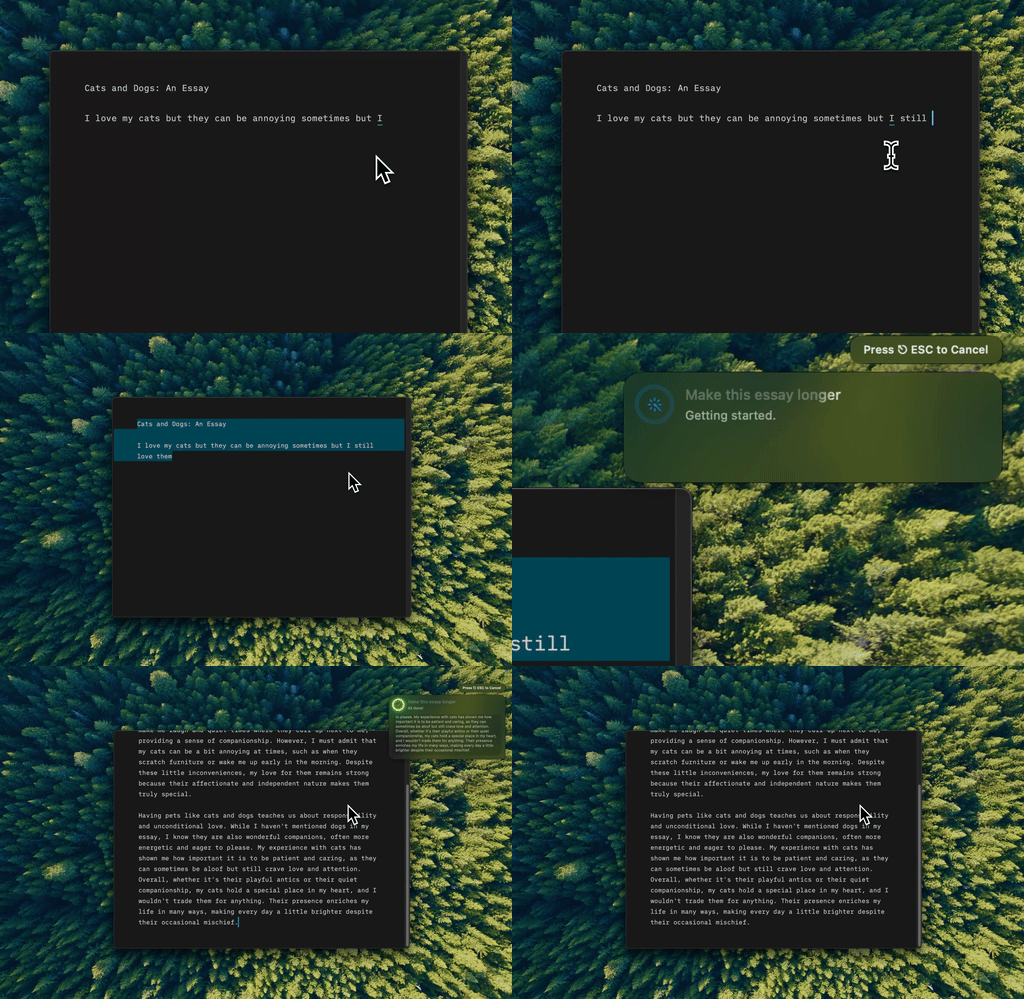
That's Type Mac. Expand, rewrite, or fix text in any Mac app with one shortcut, and switch models on the fly.
Creative, technical, and translation work
- Creative writing: Claude Opus 5 leans literary and thoughtful, less clichéd. GPT-5.6 is more energetic but drifts generic. Start with Claude for fiction, GPT-5.6 for marketing copy.
- Technical writing: Claude Opus 5 handles precision well and rarely introduces errors.
- Translation: GPT-5.6 covers more language pairs reliably, though Claude wins on literary translation where nuance matters. I go deeper on this in comparing translation tools on Mac.
- Summarization: Claude's long context window and accuracy give it an edge on long documents.
- Email: Claude Opus 5 for a professional tone that's less robotic and stiff. GPT-5.6 Luna with good prompting works fine for bulk email that needs less nuance, and I've written up the full routine in writing professional emails faster with AI.
Keep two models in rotation
A daily driver (GPT-5.6 Luna) for grammar checks and basic rewrites, a quality mode (Claude Opus 5 or GPT-5.6 Sol) for anything that'll be published. I broke down what that costs over a real month in multiple AI APIs without breaking the bank.
Your prompt matters more than model choice
"Fix this" gets mediocre results from any model. "Fix grammar and spelling, keep my casual tone, don't rewrite sentences that are already clear" gets great results from almost any model. Tell it what the document is for, who reads it, and what should stay unchanged.
How I stopped picking a model every time
Model rankings shift with every update, so I stopped picking a favorite and started picking an app that doesn't care which model wins this month. Type Mac is what's still open on my Mac:
- One shortcut works in Mail, Slack, Notion, Xcode, and every other app I write in, so I never touch which model I'm using mid-task.
- Switching from Luna to Opus 5 for a task that suddenly matters takes a dropdown, not a new subscription.
- BYOK means my text goes straight to whichever provider I picked, not through a third server.
The honest limitation: it edits text you already wrote. It's not a ghostwriter that produces a draft from a blank page, and if that's what you need, a chat app is still the right tool. For editing, rewriting, and fixing what's already on the page, it's what I open. Try Type Mac.
Stop guessing which model to open. Type Mac puts GPT-5.6, Claude Opus 5, and Gemini 3.6 behind one shortcut on your Mac.