
Best Email Writing Tools for 2026
I spent three weeks testing every email tool against my real inbox: Gmail, Outlook, Apple Mail, Grammarly, LanguageTool, and a shortcut-based rewriter. A two-paragraph reply still took fifteen minutes with most of them. The problem was never willpower. None of them rewrote anything, they only underlined it.
Built-in AI in Gmail, Outlook, and Apple Mail catches typos, not confusion
| Tool | AI feature | The catch |
|---|---|---|
| Gmail | Smart Compose, "Help me write" | Generic, boilerplate suggestions |
| Outlook | Copilot | Needs a Microsoft 365 subscription, still generic |
| Apple Mail | Writing Tools | Good for proofreading, won't rewrite a confusing paragraph |
| Grammarly | Grammar underline | Browser-only, flags problems instead of fixing them |
| LanguageTool | Grammar underline | Free, 30+ languages, same limitation as Grammarly |
Every one of these stops at the underline. None rebuilds a rambling paragraph into something I'd actually send.
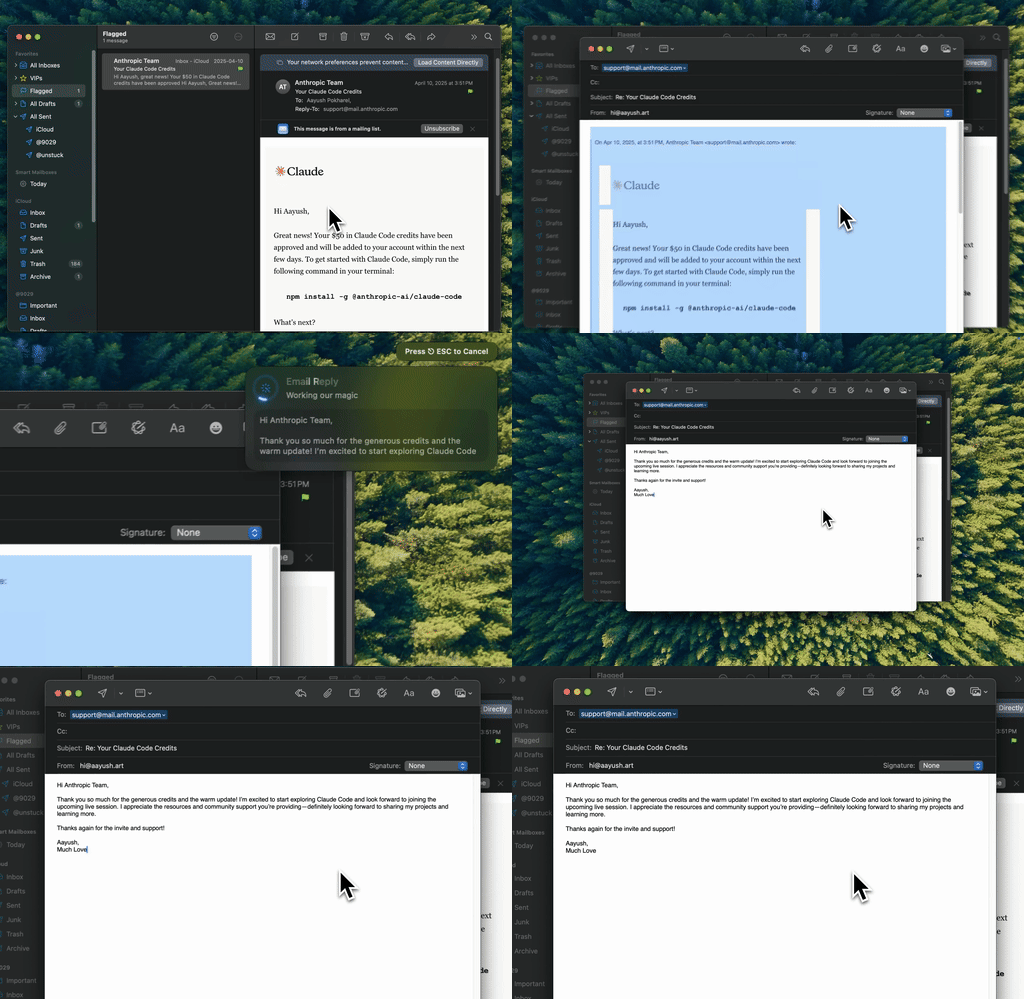
Type Mac — turning a three-sentence ramble into something sendable, without leaving Apple Mail.
A system-wide shortcut beats an app-specific one
Email doesn't live in one app for me: Apple Mail, the Gmail web app, sometimes a note I start before I've even opened my inbox. A tool tied to one app misses most of where I actually write. What worked was a shortcut that doesn't care where the text is: select it, press ⌘⌥R, done in place.
Grammarly and LanguageTool live in the browser, so Apple Mail and Outlook's desktop app never see them. A BYOK app connected to Claude or GPT rewrites and adjusts tone instead of flagging errors, turning "hey just checking in on that thing we talked about" into something a professional would send.
Short emails get replies
- Put your ask in the first sentence.
- Add a TL;DR at the top if the email runs past five sentences.
- Use a specific subject line: "Q1 Budget Review," not "Quick question."
Small, but they compound over a week of email.
Superhuman costs $30 a month, SaneBox costs less
| Tool | Price | Best for |
|---|---|---|
| Superhuman | $30/mo | Living in email all day: keyboard shortcuts, fast AI triage |
| SaneBox | Cheaper | Filtering the inbox so you only see what matters |
| Free tools + a writing app | Free, cents per use | Covers most of what people actually need |
Neither fixes your writing, only how fast you get through the inbox. If Slack is where the rest of your typos end up, the same shortcut habit works there too.
Where your email text actually goes
Grammarly processes text on its own servers. Gmail reads your mail for ad targeting. For anything sensitive, I stick to a BYOK app that sends straight to the API: my text reaches OpenAI or Anthropic and nothing else touches it. Worth ruling out the free options first.
What's running when I answer email
After three weeks I deleted the Copilot trial and turned Grammarly off everywhere. One thing stayed: the shortcut-based rewriter, the only one that worked inside Apple Mail without a browser tab open. Why:
- Rewrites in place in Apple Mail and Gmail's web app, no copying between windows.
- BYOK means the same model I use for everything else, Claude or GPT, handles email too.
- Saved context keeps rewrites sounding like me, so I still edit, but never from scratch.
The honest limitation: it's Mac only. Need this on an iPhone or a work Windows laptop, that's a different tool, and this one only covers the Mac.
Type Mac is the one I kept. For rough drafts before you even open your inbox, here's what worked on the drafting side.
Stop underlining your own emails. Type Mac rewrites in place, in Apple Mail, Gmail, and Outlook alike.