
Best Translation Tools for Mac in 2026
For a long time, translating a Japanese tweet on my Mac meant right-click, Translate, and a sentence that technically contained English words but communicated nothing. I ran the same test again this year with the current generation of models, and the gap wasn't close.
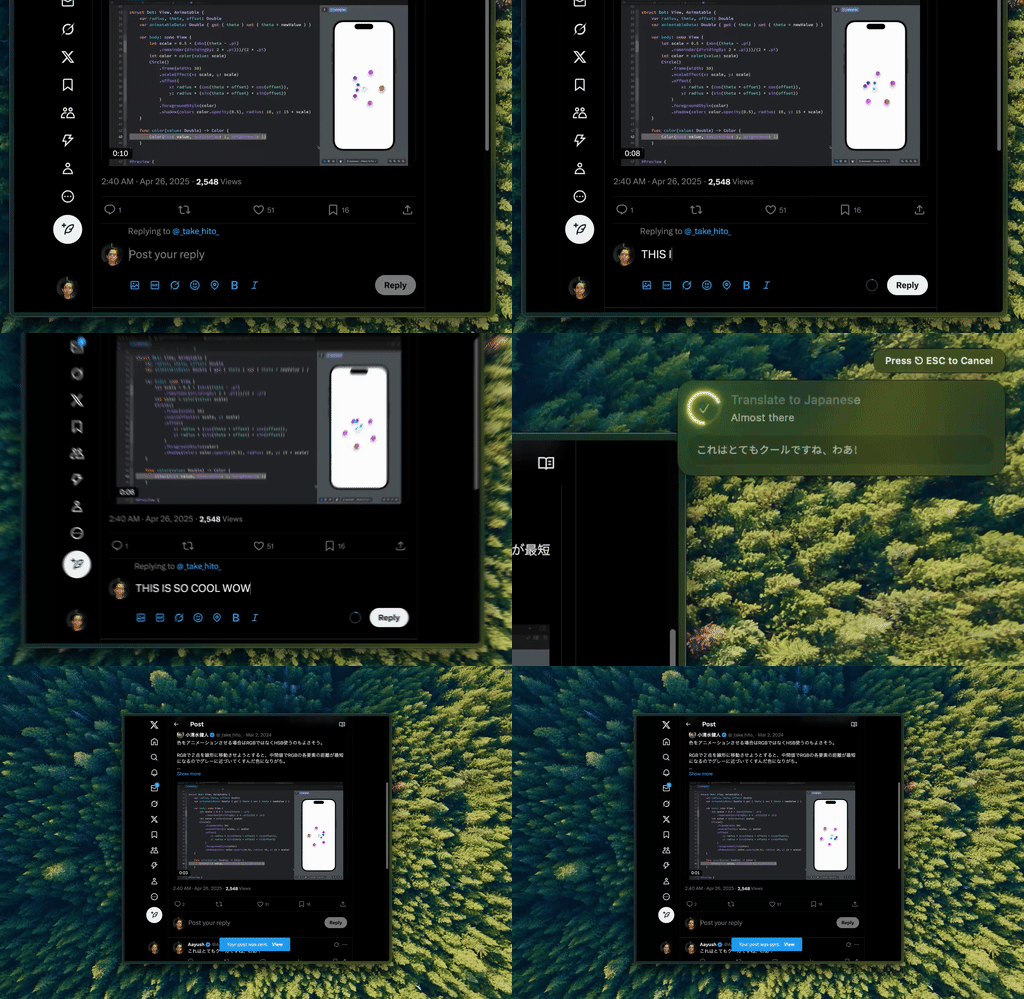
Type Mac: select the tweet, press the shortcut, get back something that reads like a person wrote it, not a phrasebook.
What changed: models read intent now, not word order
Traditional translators work word by word; they don't know if a line is a joke, a formal request, or slang. Frontier models, Claude Opus 5, GPT-5.6, Gemini 3.6 Flash, read the whole sentence for intent. Ask one to translate a formal Japanese email and it handles keigo correctly; ask it to translate a casual Spanish message and it drops the stilted usted form on its own.
Four ways to translate on a Mac in 2026
| Tool | Best for | Free tier | Weak spot |
|---|---|---|---|
| AI model via BYOK app | Tone, register, formal vs. casual | Cents per use | Copy-paste unless the app is system-wide |
| macOS built-in | Quick lookups, 18 languages | Free | Gist only, misses tone and nuance |
| DeepL | French, German, Spanish, Italian | 500K characters/mo | Asian languages are an afterthought |
| Google Translate | Rare pairs like Tagalog and Swahili | Free | Reads like a machine wrote it |
Skip the copy-paste: select, shortcut, done
Using ChatGPT or Claude directly in a browser tab means opening a tab, pasting, waiting, copying the result back. Fine for one document, not for fifteen tweets over morning coffee. A system-wide app hits the same models but the workflow is instant, and BYOK means API prices instead of a subscription. For the wider "best translation app" question outside the 2026-model angle, I answer that separately.
DeepL Pro still wins for long documents
It preserves formatting: upload a PDF, get a translated PDF back, real for contracts or reports. I go deeper on the document case in a separate breakdown. For tweets, emails, and quick lookups, a system-wide AI app is faster and reads better.
Where your text goes matters more as models get better
macOS built-in sends to Apple, DeepL to its own servers, Google to Google. A BYOK app sends straight to whichever provider you picked, no middleman. Picking the right model matters beyond translation too, covered in this rundown.
What I translate with now
Type Mac is what I kept after running all four for a month:
- The model reads intent, so keigo, register, and slang land correctly instead of literally
- One shortcut works in the tweet, the Slack message, and the email, no tab-switching
- BYOK means I pay API rates for translation, not a fixed fee on top of what the model already costs
The honest limitation: it's paid. There's a free trial on the yearly plan, but past that you're paying for the app on top of whatever the model costs through your API key.
Translate anywhere on your Mac, in the tone it was meant to have. Type Mac runs on GPT, Claude, or Gemini, BYOK, one shortcut.