
ChatGPT Option+Space Not Working on Mac? How to Fix It
If ChatGPT Option+Space is not working on your Mac, check four things: whether another app owns ⌥Space, whether ChatGPT is running, whether the new ChatGPT app changed the shortcut, and whether your workspace turned the feature off. Raycast and Alfred both use ⌥Space as their default hotkey, so check them first.
Why ChatGPT Option+Space is not working after an update
On July 9, 2026, OpenAI released a new ChatGPT desktop app and renamed the earlier Mac app ChatGPT Classic. In the new app, Option+Space shows the floating controls and opens Quick Chat. In ChatGPT Classic, Option+Space opens the Chat Bar. The fixes below cover both apps. They come from OpenAI's help pages and from the docs of the apps that compete for the shortcut.
Fix 1: Find out which ChatGPT app you use
Open Finder > Applications. If you see both ChatGPT and ChatGPT Classic, you have both apps. OpenAI says the new app can install next to the old one, and that ChatGPT Classic still gets model updates, bug fixes, and security patches.
The two apps use ⌥Space for different things, and only one app can own the shortcut. If both run at the same time, quit the one you do not use, or give one of them a different shortcut (Fix 6).
Fix 2: Make sure ChatGPT is running
The shortcut works only while the app runs. OpenAI's docs say the floating controls appear "with the desktop app running." If you quit ChatGPT, or it did not open after a restart, ⌥Space does nothing.
In ChatGPT Classic, turn on the Launch at Login option so the shortcut is ready after each restart. OpenAI added that option in the Mac app's August 2024 update, and it is off by default.
Fix 3: Free ⌥Space from Raycast or Alfred
Raycast's default hotkey on a Mac is ⌥Space, and Alfred's default is ⌥Space too. If either app is installed, it takes the shortcut first.
- Raycast: press ⌘, to open Settings, go to General, click the Raycast Hotkey field, and press a new combination.
- Alfred: click the bowler hat in the menu bar, choose Preferences, open the General tab, and click the Alfred Hotkey field.
Then press ⌥Space again.
Fix 4: Check the Siri shortcut
The Raycast Manual notes that Siri can be set to "hold ⌥ Space," which can add a delay when another app shares that shortcut. Open System Settings > Apple Intelligence & Siri and change or turn off the keyboard shortcut if it uses ⌥Space.
Fix 5: Check macOS keyboard shortcuts
Open System Settings > Keyboard > Keyboard Shortcuts, then look at Spotlight and Input Sources. If you or an app assigned ⌥Space there, change it.
Fix 6: Reset or change the ChatGPT shortcut
New ChatGPT app
- Press ⌘, to open Settings.
- Open Keyboard Shortcuts.
- Search for Show pet. That is the command behind ⌥Space.
- Set the shortcut you want, or reset it to the default.
You can switch the search field to keystroke mode and press ⌥Space to see which command uses it.
ChatGPT Classic
Choose ChatGPT > Settings > Keyboard Shortcut and set the Chat Bar shortcut.
Fix 7: Turn on the floating controls
In the new app, ⌥Space belongs to the floating Pets controls. Open Settings > Pets and choose a pet, or choose Mini to show the chat controls without one. To show them, enter /pet or choose Show pet in the command menu.
On a ChatGPT Business or Enterprise account, your admin can restrict Pets. OpenAI's docs say that if the controls are not available, update the app and check whether your workspace allows pets.
Fix 8: Update, then restart
Check for updates in the app, then quit it and open it again. OpenAI's release notes show it has fixed ⌥Space bugs before: a November 2024 update "fixed an issue that prevented the Option + Space shortcut from opening the Companion Window." The Mac app also needs macOS 14 or later, on Apple silicon (M1 or later) or Intel.
If the ChatGPT Mac app is not working at all, install a fresh copy from chatgpt.com/download, which detects your Mac's chip and gives you the right installer.
ChatGPT Mac app keyboard shortcuts
Defaults from OpenAI's docs for the new app:
| Action | Shortcut |
|---|---|
| Show floating controls and focus Quick Chat | ⌥Space |
| Quick chat inside the app | ⌘⌥N |
| New chat | ⌘N |
| New temporary chat | ⌘⇧N |
| Open the command menu | ⌘K |
| Open Settings | ⌘, |
| List every shortcut | ⌘/ |
| Send an Appshot of the current app | Press both ⌘ keys |
When the shortcut works but the job is still slow
Once ⌥Space works, Quick Chat opens a chat. You type a request, and the answer appears in ChatGPT. To fix an email you are writing in Mail, you still copy the text in, then copy the answer back.
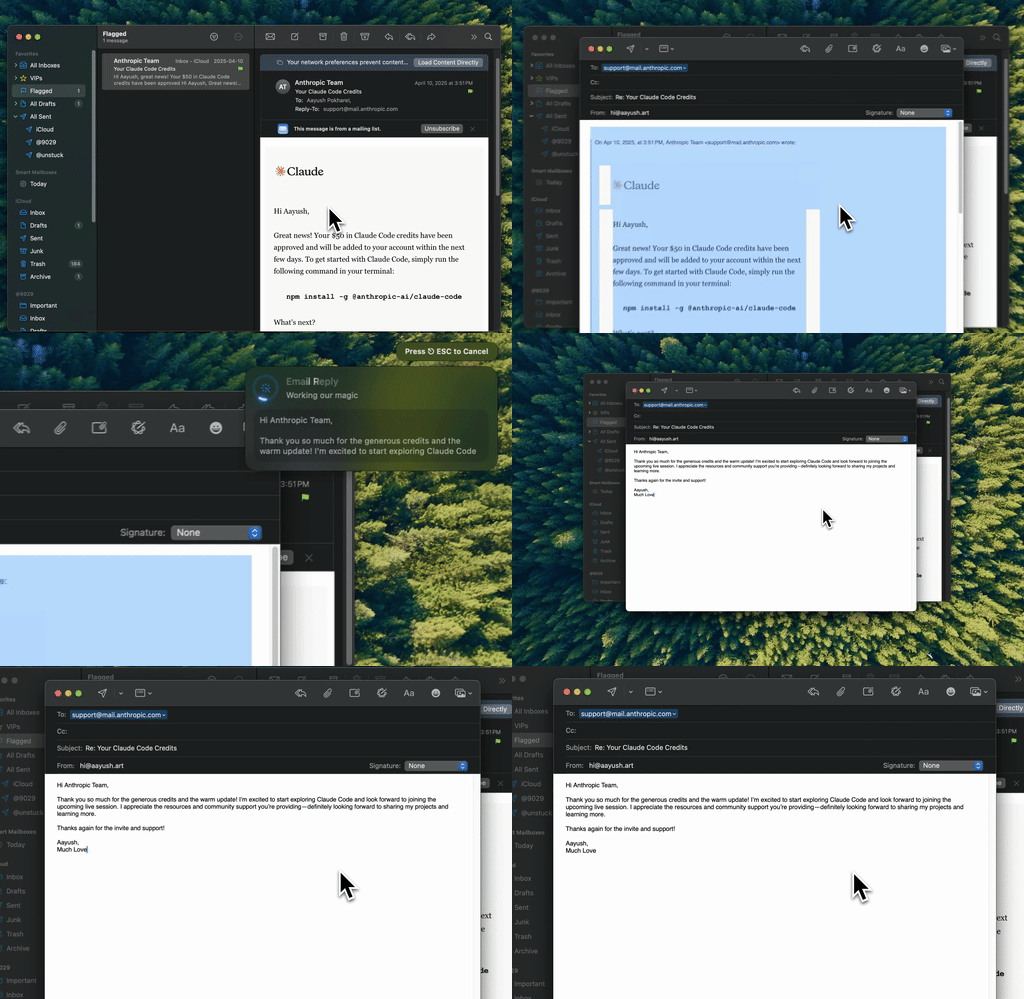
Type Mac: select the draft, press the shortcut, and the rewrite replaces it. No chat window.
Type Mac does that job with one shortcut. Select text in any Mac app, press a shortcut, and an AI model replaces the selection with the fixed, rewritten, or translated version.
- Fix Writing uses ⌘⇧Return, so it never fights ChatGPT, Raycast, or Alfred for ⌥Space.
- Custom shortcuts save your own instructions, such as "make this friendlier."
- Models: a built-in model on every plan, or your own OpenAI API key, with Anthropic, Gemini, Groq, and OpenRouter also supported.
Type Mac costs $4.99 a month, or $49.99 a year with a 7-day free trial. It does not answer questions or browse the web, so keep ChatGPT for that. For how the two approaches compare on editing, read Grammarly vs ChatGPT, or see the AI writing assistant for Mac page. If Raycast was the app that took ⌥Space, our Raycast AI alternatives post compares the two for writing.
FAQ
What does Option+Space do in the new ChatGPT app?
It shows the floating Pets controls and focuses Quick Chat. Press it again and the controls stay open with Quick Chat in focus. The command name in Settings is Show pet.
Can I still use the ChatGPT Chat Bar?
Yes, in ChatGPT Classic. OpenAI says you can keep using Classic, and its Chat Bar opens with ⌥Space by default.
Why does Option+Space open Raycast instead of ChatGPT?
Raycast uses ⌥Space as its default hotkey on a Mac. Change the Raycast Hotkey in Raycast's General settings, or give ChatGPT a different shortcut.
Does the ChatGPT Mac app work on Intel Macs?
Yes. OpenAI says the app needs macOS 14 and runs on Apple silicon (M1 or later) or an Intel processor.
Sources
- Downloading the ChatGPT macOS app (OpenAI Help Center)
- Moving to the new ChatGPT desktop app (OpenAI Help Center)
- How to launch the Chat Bar (OpenAI Help Center)
- Work with Apps on macOS (OpenAI Help Center)
- ChatGPT macOS app release notes (OpenAI Help Center)
- Pets (ChatGPT docs)
- Commands and keyboard shortcuts (ChatGPT docs)
- Raycast settings and hotkey (Raycast Manual)
- Alfred General preferences (Alfred Help)
Want the edit to land in the app you are writing in? Try Type Mac free for 7 days on the yearly plan.