
Copilot Not Showing in Outlook for Mac? Fixes and Options
If Copilot is not showing in Outlook for Mac, one of five things blocks it: the signed-in account has no Copilot access, you use legacy Outlook, the mailbox is not supported, connected experiences are off, or Outlook needs an update or a license refresh. Microsoft's support pages give a fix for each one.
Do the checks below in order. Most take a minute. If you do not have Copilot and do not want to pay for it, the last section shows another way to draft replies and change their tone in Outlook for Mac.
Note: Microsoft renamed Microsoft 365 Copilot to Microsoft Copilot. Its support pages use both names.
Why Copilot is not showing in Outlook for Mac
| Cause | What you see | Fix |
|---|---|---|
| No Copilot access on this account | No Copilot button | Fix 1 |
| Legacy Outlook | No Copilot button | Fix 2 |
| Unsupported account or mailbox | Button missing or greyed out for one account | Fix 3 |
| Connected experiences off | Button greyed out | Fix 4 |
| Old build or stale license | Button missing after you buy a plan | Fix 5 |
Fix 1: Get Copilot access on the account in Outlook
Outlook does not unlock Copilot. Your plan does.
- Home accounts: Microsoft 365 Personal, Family, and Premium include Copilot. On Family and Premium, only the subscription owner gets the AI features. Microsoft 365 Basic has no AI features.
- Work or school accounts: you need a Microsoft Copilot license on top of a qualifying Microsoft 365 plan. Your admin assigns it.
US list prices on 21 November 2026: Microsoft 365 Personal is $99.99 a year, Family is $129.99 a year, and Premium is $199.99 a year. Microsoft lists the Copilot Business add-on from $21 per user per month on a yearly plan, with a lower first-year offer through December 31, 2026.
Fix 2: Switch from legacy Outlook to new Outlook
Microsoft says: "Copilot in Outlook is only available in the latest version of Outlook for Mac. Legacy Outlook isn't supported." If you still use legacy Outlook on your Mac, this is the cause.
- Open Outlook.
- Turn off the Legacy Outlook switch.
- If you do not see the switch, choose Help > Check for Updates, or get the newer version from the App Store.
Legacy Outlook support for Microsoft 365 Personal, Family, and Exchange Online accounts ended in October 2026.
Fix 3: Use a supported account and mailbox
- Home accounts: Microsoft's January 2025 announcement says Copilot in Outlook applies to @outlook.com, @hotmail.com, @live.com, and @msn.com addresses.
- Work accounts: the mailbox must be on Exchange Online. Copilot does not work in group mailboxes.
- Gmail, Yahoo, and iCloud accounts: Microsoft says Copilot features extend to these connected accounts when a qualifying account is signed in to Outlook on the same device.
Copilot is greyed out on some messages for another reason: Microsoft does not support it on signed or encrypted email, on email with IRM, or on some email with sensitivity labels.
Fix 4: Turn on connected experiences
Copilot works only when two privacy settings are on.
- In Outlook, choose Outlook > Settings > Privacy. On older macOS versions, the menu item is Preferences.
- Turn on Experiences that analyze your content.
- Turn on All connected experiences.
- Quit and open Outlook again.
If your company manages Microsoft 365, your IT admin controls these settings.
Fix 5: Update Outlook and refresh the license
- Choose Help > Check for Updates and install all Microsoft updates.
- In a Microsoft 365 app, open the app menu and choose About (for example Word > About Word). Click More Info, then click Refresh License.
- Close all Microsoft 365 apps and open Outlook again.
For work accounts, ask your admin to run Microsoft's Copilot License Details diagnostic on your account.
How to enable and use Copilot in Outlook for Mac
When Copilot works, here is how to activate it in a message:
- Click New Message, then click the Copilot icon in the toolbar.
- Choose Draft with Copilot, type your prompt, and click Generate.
- Change the tone (for example Neutral) or the length (for example Short), or choose Regenerate draft.
- Insert the draft, edit it, and send.
To reply, select a message, click the Copilot icon, and choose Reply with Copilot. To change text that you wrote, select it, click the Copilot button, and choose an option or type a request.
AI in Outlook for Mac without a Copilot license
Copilot does a lot: it summarizes threads and drafts email from a prompt. If you only want to fix and rewrite what you write, a smaller tool does that job.
Type Mac is a menu bar app that works on selected text in any Mac app. It does not need an Exchange Online mailbox, a Microsoft plan, or new Outlook.
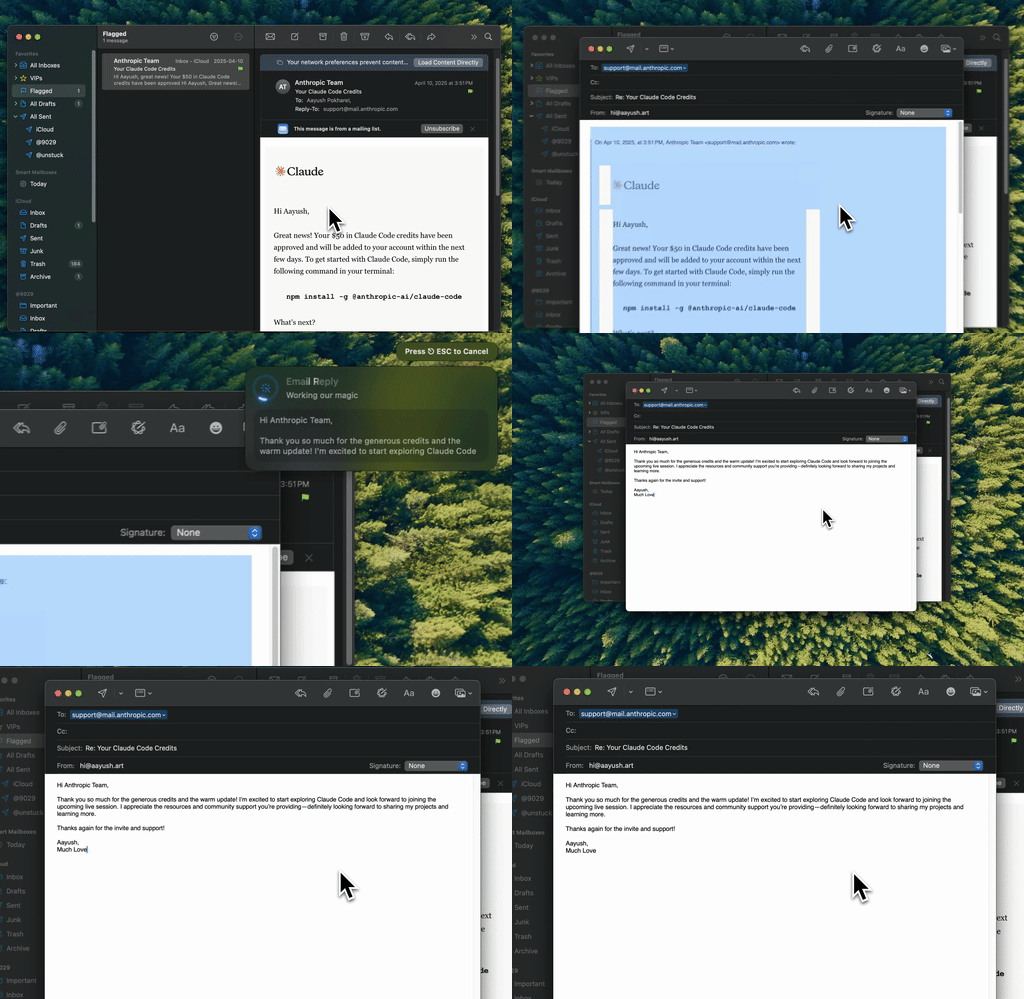
Type Mac: select the reply in Outlook, press the shortcut, and send the clean version.
- Write your reply in Outlook in your own words.
- Select the text.
- Press Command-Shift-Return to fix grammar, or press your own shortcut for a tone change, such as "more formal" or "shorter."
- Read the result and send.
Type Mac costs $4.99 a month, or $49.99 a year with a 7-day free trial. You can use the built-in model or your own API key from OpenAI, Anthropic, Gemini, Groq, or OpenRouter.
Know the limits: Type Mac does not summarize threads or read your inbox. It works on the text you select. See how the email rewriter for Mac works, and read how to make an email sound professional for examples.
Other Outlook problems have their own guides: Grammarly not working in Outlook for Mac and Outlook for Mac spell check not working. If Copilot is also missing in Word, see Copilot in Word for Mac.
FAQ
Why is Copilot greyed out in Outlook for Mac?
Copilot is greyed out when connected experiences are off, when the current account has no Copilot access, or when the message is signed, encrypted, or protected with IRM. Do fixes 1, 3, and 4.
Does Copilot work in legacy Outlook for Mac?
No. Microsoft supports Copilot only in the latest version of Outlook for Mac. Turn off the Legacy Outlook switch to use it.
Does Copilot in Outlook work with a Gmail or iCloud account?
Microsoft says Copilot features extend to connected accounts such as Gmail, Yahoo, and iCloud when an account with Copilot access is signed in to Outlook on the same device.
Is Copilot in Outlook for Mac free?
No. It comes with Microsoft 365 Personal, Family, or Premium for the subscription owner, or with a Microsoft Copilot license on a work account.
Sources
- Draft an email message with Copilot in Outlook (Microsoft Support)
- Frequently asked questions about Copilot in Outlook (Microsoft Support)
- Sharing Copilot in Outlook (Microsoft Support)
- End of support for legacy Outlook for Mac (Microsoft Support)
- How to find and enable missing Copilot button in Microsoft 365 apps (Microsoft Support)
- Microsoft Copilot requirements (Microsoft Learn)
- Copilot is now included in Microsoft 365 Personal and Family (Microsoft)
- Compare Microsoft 365 plans and Copilot for business pricing (Microsoft)
No Copilot license? Try Type Mac and fix each Outlook reply with one shortcut.