
Email Tone Checker: How to Check and Fix Tone on Mac
An email tone checker tells you how your email will sound to the reader before you send it: rude, cold, unsure, or friendly. You can check tone free with a 2-minute manual test, ask an AI chatbot to describe it, or use a tool such as Grammarly or Apple Writing Tools.
A label is only half the job. When the check says "too blunt," you still need a better version. This guide covers both: how to check the tone of your email, and how to change it.
How does my email sound? The 2-minute manual check
Run these six checks on any email that matters:
- Read it as the recipient on a bad day. Tone problems show up when the reader is tired or under pressure.
- Read only the first and the last line. Many readers skim. Those two lines set the tone.
- Look for the trigger phrases in the table below.
- Count the asks and the thanks. Three requests and no "thanks" reads as an order list.
- Check the punctuation. Several exclamation marks, "???", all caps, and "..." each change the tone.
- Read it aloud. If you would not say a sentence to the person's face, rewrite it.
Email tone signals and fixes
| The email sounds | Phrases that cause it | Fix |
|---|---|---|
| Annoyed | "Per my last email," "As I already said," "ASAP" | State the fact again and give a date |
| Bossy | "You need to," "Make sure you," "Send me" | Start with "Could you" and add a reason |
| Cold | "Noted." "Fine." No name, no greeting | Add the person's name and one thank-you line |
| Unsure | "Just," "I think maybe," "Sorry to bother you" | Delete the softeners and state the request |
| Too casual | "Hey guys," "lol," "np," a row of emoji | Use full words and one greeting |
| Too formal | "Kindly be informed," "Please be advised," "Herewith" | Use plain words: "Here is," "I'm writing to" |
AI email tone checker: a free prompt
Any AI chatbot can act as an email tone checker free of charge. The prompt matters. Ask it to describe, not to rewrite, so you see the problem:
Read this email as my manager, who is busy and direct. Describe its tone in three words. Quote the exact phrases that create that tone. Do not rewrite it.
Then ask a second question: "Which one change would make it sound more confident?" One change is easier to judge than a full rewrite.
Before you paste a work email into a web tool, check what the tool does with your text and what your company allows.
Grammarly tone detector
Grammarly calls this feature a tone detector. Its tone page says it identifies the tone of your writing from word choice, phrasing, punctuation, and capitalization. On Grammarly's plans page:
- Free includes "See your writing tone."
- Pro adds "Adjust your writing tone."
So the free plan labels the tone, and the paid plan helps you change it. Grammarly works in the browsers and apps it supports.
Apple Writing Tools
On a Mac with Apple Intelligence, Writing Tools rewrites the selected text in a different tone. In macOS 27, select the text, Control-click it, and choose Writing Tools > Show Writing Tools. Then choose Friendly, Professional, or Concise, or click Describe a change to ask for something else.
Writing Tools changes the text rather than labeling it. Apple notes that Apple Intelligence is not available in all languages or regions.
Change the tone of an email: three before-and-afters
Annoyed to professional
- Before: "Why haven't you sent the report yet? I needed it yesterday."
- After: "Could you send the report today? I need it to finish the client deck by 4 PM."
Unsure to direct
- Before: "Sorry, I just wondered if maybe it would be possible to push the deadline a little, if that's ok?"
- After: "Could we move the deadline to Friday? The two extra days let me include the final test results."
Cold to friendly
- Before: "Noted. Will do."
- After: "Thanks, Maria. I'll take care of it today."
The facts stay the same in each pair. Only the words around them change. For 12 more pairs, read make an email sound professional.
Type Mac changes the tone instead of labeling it
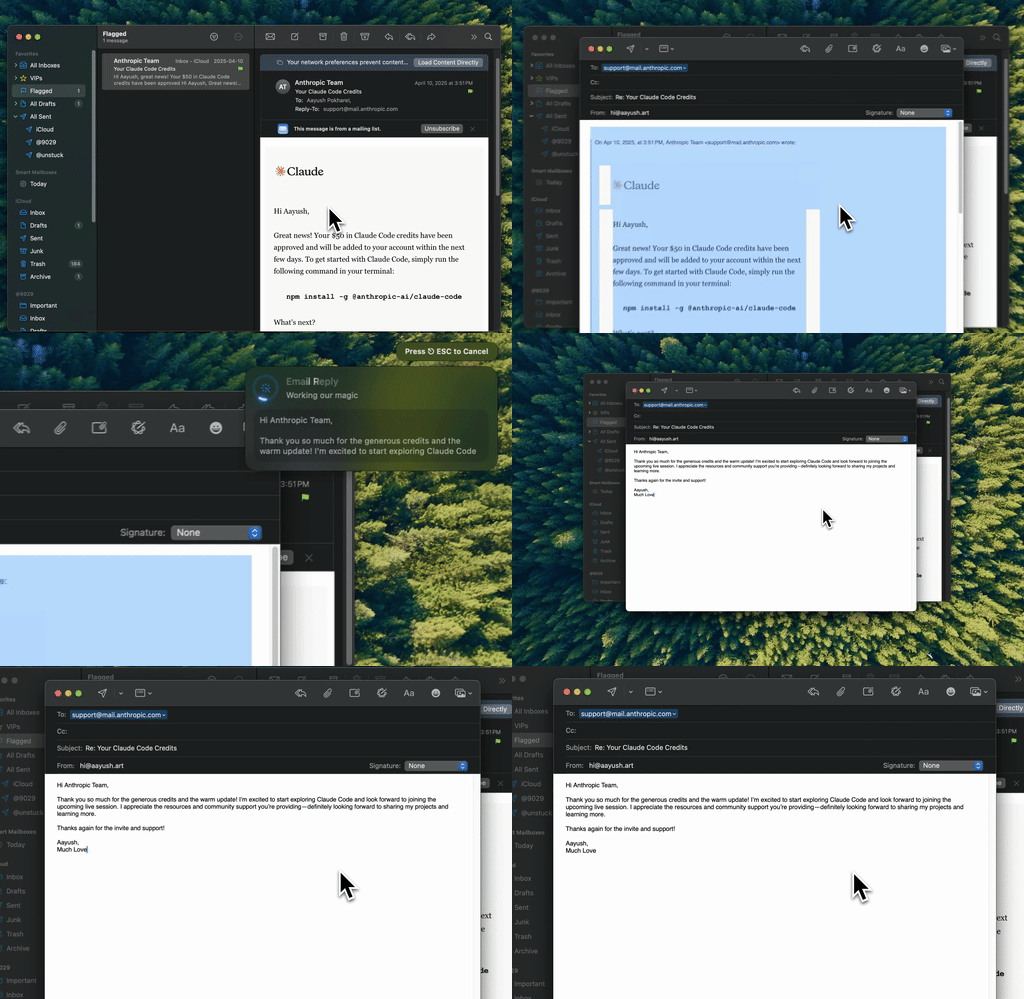
Type Mac: select the email, press a tone shortcut, and the new version replaces your draft.
A tone checker says "this sounds harsh." Then you rewrite it by hand. Type Mac skips that step. It is a Mac menu bar app with custom shortcuts: you write one prompt per tone, give it a key combination, and use it in any app where you can select text.
Three tone shortcuts cover most work email:
| Shortcut | Prompt |
|---|---|
| Professional | "Make this email professional. Keep all facts, names, and dates." |
| Friendly | "Make this warmer and friendlier. Keep it short and keep the request." |
| Direct | "Make this direct and confident. Remove softeners and apologies." |
Select the draft in Mail, Outlook, or Gmail in the browser, press the shortcut, read the result, and send. For a message you received, the built-in Reply command writes a short, professional, warm reply to the text you select.
Type Mac also remembers how you write, so the professional version still sounds like you. Plans cost $4.99 a month, or $49.99 a year with a 7-day free trial. For bigger email workflows, read how to write professional emails faster with AI and Apple Intelligence Writing Tools vs. Type Mac. The email rewriter for Mac page shows the app.
FAQ
Is there a free email tone checker?
Yes. The manual check above is free, and so is a prompt to an AI chatbot that asks it to describe the tone. Grammarly's free plan includes "See your writing tone."
How do I check the tone of my email before I send it?
Read the first and last lines, look for trigger phrases such as "per my last email" and "ASAP," and count your requests against your thanks. Then read it aloud.
What does the Grammarly tone detector do?
It identifies the tone of your writing from word choice, phrasing, punctuation, and capitalization. On Grammarly's plans page, the free plan shows your tone and the Pro plan helps you adjust it.
Can AI change the tone of an email?
Yes. Apple Writing Tools offers Friendly, Professional, and Concise. Type Mac uses your own tone prompts on a shortcut. Read the result before you send, and check that the facts did not change.
Sources
Stop guessing how your email sounds. Type Mac changes the tone with one shortcut, in every app on your Mac.