
How to Expand Short Notes into Full Paragraphs with AI
I used to stare at a page of bullet points for ten minutes before I could turn them into an email a client would actually read. The bullets had the idea. What they didn't have was a paragraph.
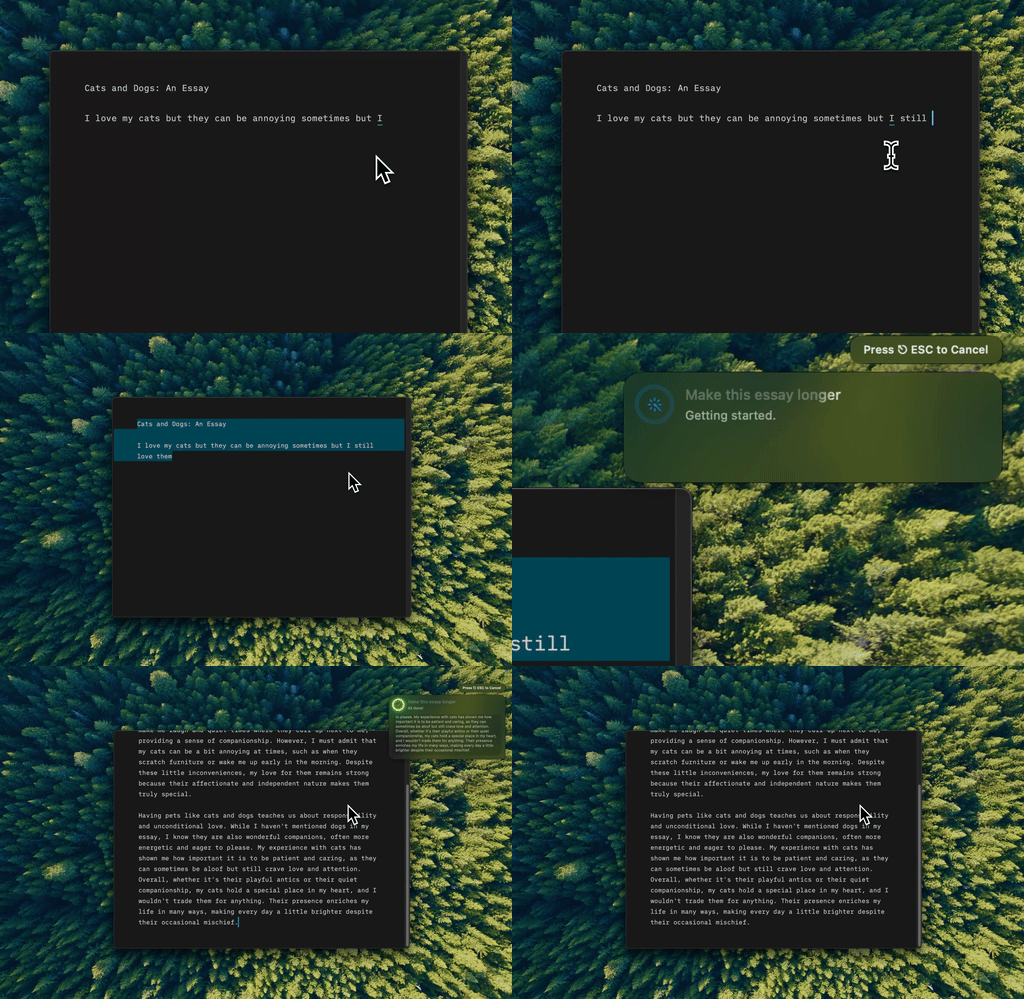
Type Mac — I write the bullets, select them, hit the shortcut, and get back a paragraph in the same window.
Give it your bullets, then the context
The basic move: hand AI your bullets and ask it to expand them into a paragraph. "Expand these bullets" produces filler prose. "Expand these bullets for a client email, apologetic but confident, around 75 words" produces something I can send with one edit.
Tell it not to invent facts
AI will "enhance" your bullets with plausible details you never gave it. If your note says "project delayed 2 weeks," it might add "due to vendor complications" when the real reason was a staffing change. I say so directly now: don't add information that isn't in the original bullets.
Give it a real sample
AI defaults to corporate prose: competent, inoffensive, interchangeable. If I want my own voice in the output, I paste in a paragraph I actually wrote and say "match this style." Same instinct behind keeping your voice intact anywhere you use AI.
Expand first, edit second
A two-step pass beats getting it right in one go. Expand for completeness first, without worrying about quality. Edit for clarity and flow second.
Keep it keyboard-driven
I type the bullets, select them, hit the shortcut, and the expanded version replaces them in place, no switching apps or copying into a chat window. If your notes live in a dedicated app before they become prose, a proper notes system is worth setting up first.
Before I call it done
- I specify word counts when they matter: "expand to about 150 words"
- I tell AI which phrases to preserve verbatim
- I read the result aloud. Padding I hear gets cut, the same pass I'd run to make anything more concise
What turns my notes into paragraphs now
Type Mac is the one still on my Mac for this, chosen over pasting bullets into a chat tab every time:
- It runs on whatever I've already typed, in whatever app I typed it in
- The shortcut is the same one I use for every other rewrite, so I'm not remembering a different tool for "long" versus "short"
- Undo is a real Cmd-Z, not a regenerate button that gives me a completely different paragraph
The honest limitation: it's Mac only, no iPhone app for bullets jotted down away from my desk. Those still need a separate pass later.
Bullets in, paragraph out, one shortcut. Type Mac turns notes into prose wherever you already write them.