
How to Fix Grammar Errors Instantly on Mac (System-Wide)
I ran Grammarly for a month and kept hitting the same wall: it worked in Chrome, it half-worked in a couple of Electron apps, and it went completely blind in Mail, Notes, Slack, and Terminal. I wanted grammar checking that didn't care which app I was typing into, so I went looking for what actually covers all of them.
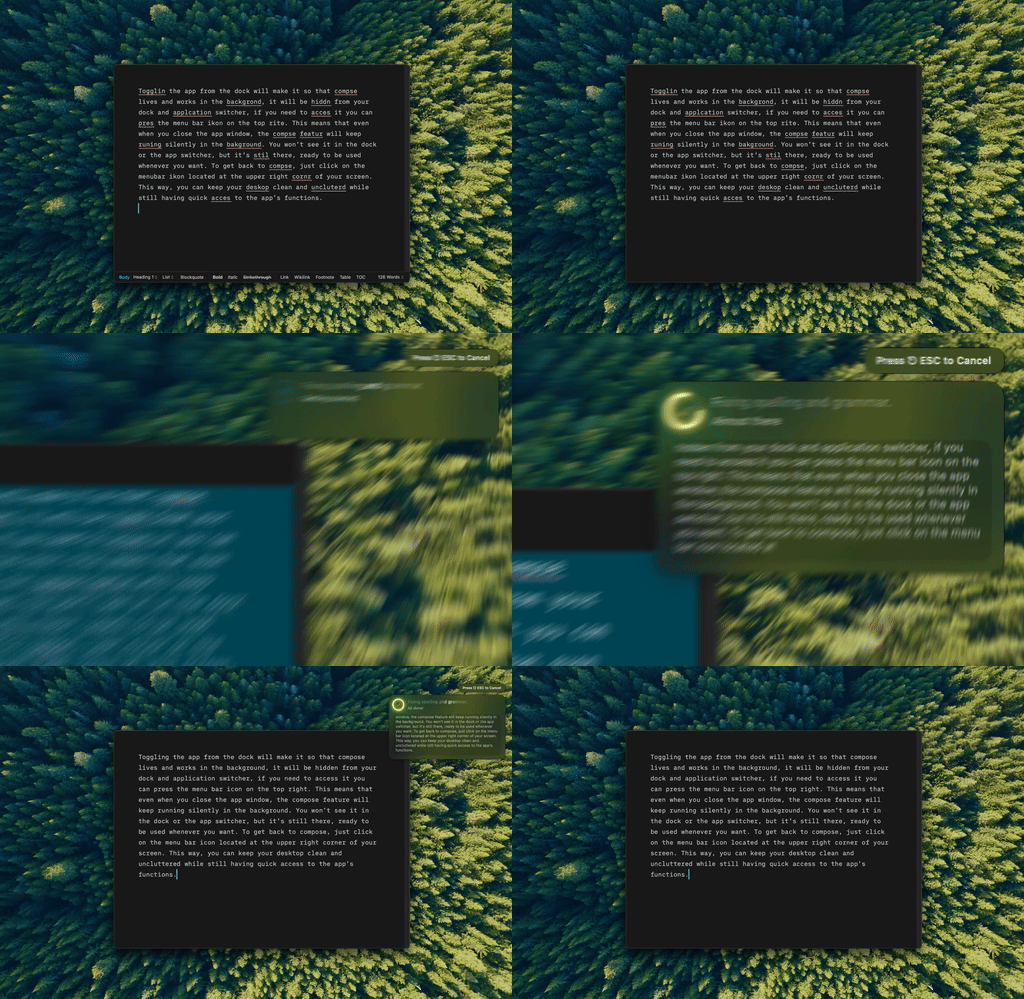
Type Mac fixes grammar anywhere on my Mac. I select text, press a shortcut, and it's done. Every app, every time.
macOS's built-in checker catches typos, nothing else
System Settings → Keyboard → Text Input has automatic spelling correction. Any app's Edit menu → Spelling and Grammar turns on real-time checking. ⌘; jumps to the next misspelling, ⌘: opens the full spelling panel.
It fixes "teh" to "the" but won't flag a confusing sentence, suggest a style change, or rewrite anything with AI. Fine for basic spellcheck, not enough on its own.
System-wide fixes run through macOS Services
Native Mac apps can read selected text across every application through macOS Services and Accessibility APIs. That's what makes true system-wide grammar checking possible: the app registers itself as a Service, so any app with a standard Edit menu can call it. No per-app plugins, no hoping a browser overlay caught the right field — a distinction I went into more in why native apps behave differently from Electron ones.
The workflow: select text, press a shortcut, and the text gets sent to an AI model, corrected, and swapped back into your selection. No copying, no pasting, no switching apps.
A shortcut set I settled on:
| Shortcut | Action |
|---|---|
| ⌘⌥G | Fix grammar |
| ⌘⌥C | Improve clarity |
| ⌘⌥F | Make more formal |
| ⌘⌥S | Make shorter |
Ten minutes to configure, then it works everywhere: Mail, Notes, Slack, VS Code, Messages, even Terminal.
DIY: Automator, Alfred, or Raycast
If you're technical, you can build a Quick Action in Automator that receives text, runs a shell script calling an AI API, outputs the corrected text, and binds to a keyboard shortcut. It works, but error handling is thin and there's no undo. I tried it for a week before giving up on maintaining my own script.
Alfred and Raycast users can wire up something similar through extensions, if those launchers already run your day. For a broader look at keyboard-first tools worth pairing with either one, I put together a rundown of keyboard apps for MacBook Pro.
Layer three tools for full coverage
- macOS's built-in spellcheck: a free background safety net for typos
- A native AI writing app for shortcut-driven grammar fixes and rewrites: handles most of it, and pairs with the broader keyboard shortcuts worth building into muscle memory
- Grammarly or LanguageTool as a browser extension, if you still want real-time highlighting in the browser
Where your text goes matters
System-wide text access is powerful, so know where your text goes. BYOK apps with direct API calls send text straight to OpenAI, Anthropic, Google, or Groq without middleware or third-party storage. Cloud services like Grammarly process, and may store, your text on their own servers.
For legal documents, medical notes, or anything sensitive, BYOK with a direct API connection is the safer default.
If shortcuts aren't working
- Check System Settings → Privacy & Security → Accessibility, and confirm your grammar app is listed and enabled
- Reassign the shortcut if it conflicts with another app
- Some heavily sandboxed or Electron apps don't expose text selection to Services, which limits any system-wide tool no matter how it's built
The fix I settled on
Type Mac is what I kept running. It covers every app I actually write in, the shortcuts became automatic within a few days, and I never touch a browser extension to get grammar fixes in Mail or Slack.
The honest limitation: the first launch asks for Accessibility permission, and until you grant it, nothing works. It's a one-time step, but skip it and you'll assume the app is broken rather than unconfigured.
Fix grammar anywhere on Mac with one shortcut: Type Mac, native, with BYOK support for GPT, Claude, and Gemini.