
Fixing Slack and Discord Messages Before You Send Them
A typo in a Slack message to your team is forgivable. The same typo to your CEO isn't; chat is searchable forever and judged fast. I went looking for a way to catch mine before they went out, and hit the same wall on Slack and Discord: neither is a browser tab, so most tools built for browsers don't reach them.
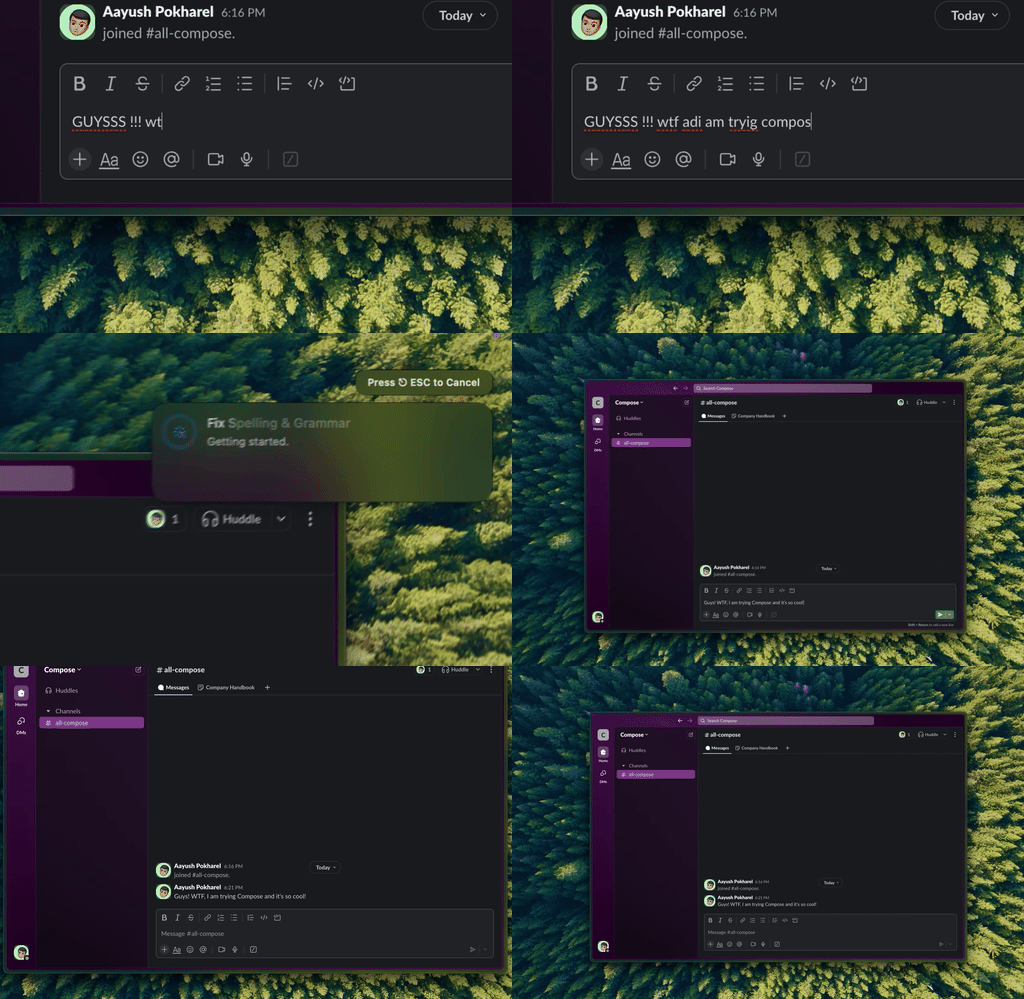
Type Mac — one shortcut fixes the message before it leaves the compose box, in Slack or Discord, same as everywhere else.
Built-in spellcheck catches typos and nothing past that
Slack's is buried under Preferences → Advanced. Discord uses your Mac's own spellchecker. Both catch an obvious misspelling and stop: no wrong-word usage like their and there, no grammar, no tone. Fine for a casual message, not enough for anything that actually matters.
Grammarly's browser extension does nothing here, and that's the part people miss
Slack and Discord's desktop apps are built on Electron, not the browser. Grammarly's free browser extension does nothing there, it only works in a browser tab. Grammarly's separate desktop app does this too, but that's a different install most people never make. Without it, you're pasting into a browser tab to check your message, or sending it raw and hoping.
On-demand beats always-on, even when always-on technically works
Grammarly's desktop app watches every text field, including code blocks and variable names, and slows down casual back-and-forth. What I kept instead: type the message, ⌘A to select, one shortcut, fixed, send. Nothing reading my keystrokes in the background.
Not every message needs the same scrutiny
- Proofread: messages to leadership, client-facing threads, announcements to a large channel
- Quick scan: team discussions, status updates
- Send it: casual chat with people who know you
The same proofread-or-skip call applies to email too.
Pause five seconds before anything that matters
Write it, read it once, send it. I catch more that way than with any tool, purely by not hitting enter immediately.
What to watch for
- Autocorrect mangling names and technical terms
- Sending to the wrong channel or DM, worse than any typo
- Incomplete thoughts that make you look scattered
- No tone in text: "That's great." reads as sincere or sarcastic depending on the reader's mood
What catches my messages before Slack does
A week in, Grammarly's desktop app was uninstalled and the extension had never worked at all. What's still running: a shortcut that fixes selected text wherever I'm typing. Reasons:
- Works identically in Slack and Discord, never depended on either being a browser tab.
- On-demand means it doesn't watch code blocks and variable names I never wanted proofread.
- One tool for Slack, Discord, and email, instead of a different fix per app.
The honest limitation: it needs Accessibility permission the first time, since that's how it reads and replaces text system-wide. Grant it once and it's done.
Type Mac is what's still open. If Slack specifically is where most of your typing happens, there's more worth running alongside it.
A typo to your team is forgivable. Type Mac catches it before it's not.