
Grammarly Free vs Paid: What You Actually Give Up
I ran Grammarly free for over a year before I ever clicked Upgrade, then paid for a month to see what the paywall was hiding. Six weeks in I had my answer, and it wasn't the one the checkout page wants you to land on.
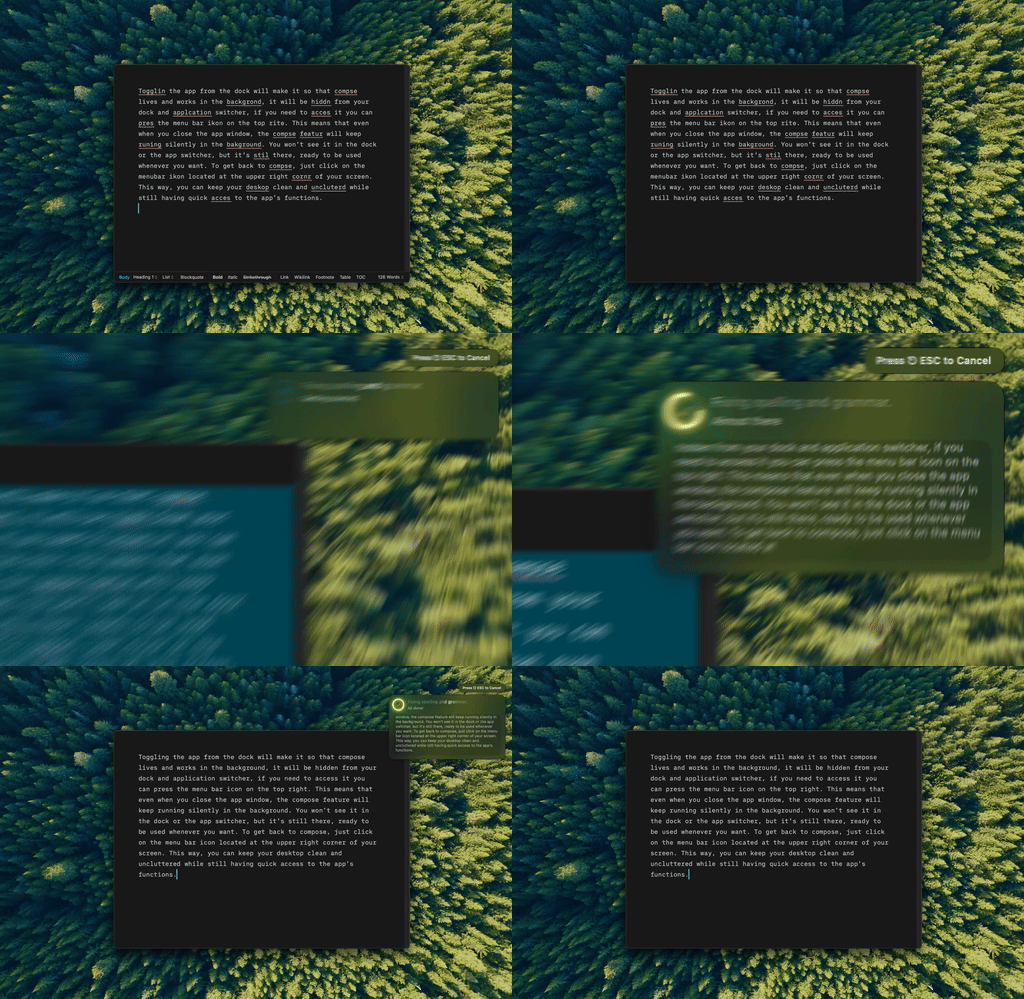
Type Mac — I select the sentence, hit the shortcut, and the fix lands in place. No tab switch to check what Grammarly caught.
What the free tier actually catches
Spelling. Basic grammar and punctuation: subject-verb agreement, missing commas, doubled words. A tone indicator that tells you a message reads as harsh or confident before you send it.
That's most of what people open Grammarly for. If your writing is already clean and you need someone to catch the typo before your boss does, the free tier does that job and stops there, on purpose.
What's behind the paywall
Full-sentence rewrites. Clarity and conciseness suggestions that restructure a sentence rather than flag it. Tone rewriting, not tone detection alone. A plagiarism check against its database.
Premium runs $12–30/mo depending on plan and billing period. That's the real trade: you're not paying to catch more typos, you're paying for a second pass that rewrites instead of one that only flags.
The limit no tier fixes
Grammarly is a browser extension first. Free or Premium, the moment you leave Chrome it goes quiet. On a Mac, that's most of the writing day: Mail, Slack, Notes, Xcode. The desktop app helps a little, but coverage is still uneven the further you get from a browser tab.
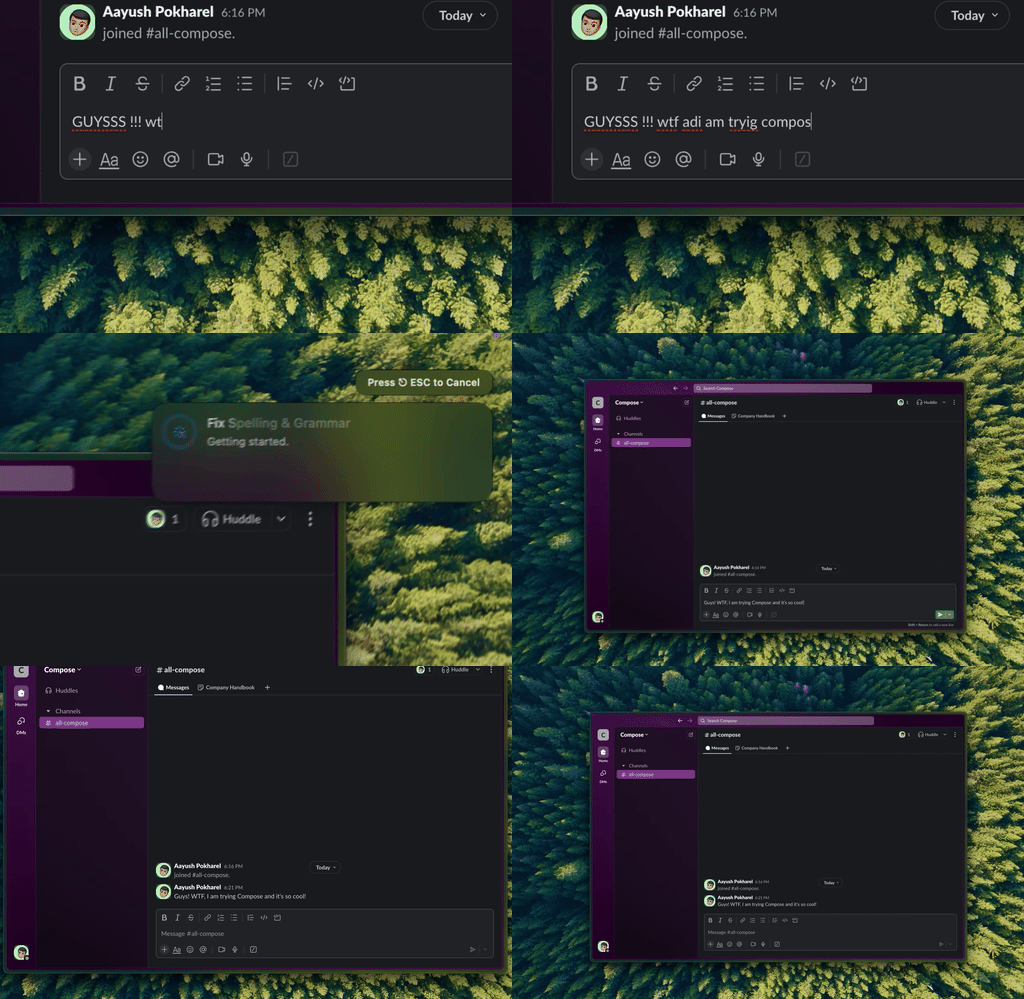
Type Mac, same shortcut, same fix, except this is Slack, where Grammarly's extension has nothing to say.
The free stack that gets you most of the way
| Tool | Cost | Where it works |
|---|---|---|
| macOS built-in checker | Free | Every native app, system-wide |
| LanguageTool | Free tier | Browser-focused |
| Hemingway Editor | Free (web) | Paste-in only |
macOS's own spelling and grammar checker is the most underrated free option on this list. It's already installed, it works system-wide, it runs offline, and it never sends a word of your text anywhere. Turn it on in System Settings → Keyboard, or per app under Edit → Spelling and Grammar, and it runs quietly in the background for the rest of your Mac's life.
LanguageTool's free tier catches contextual errors Grammarly's free tier sometimes misses, and it covers 30+ languages. Hemingway is a different job: paste text into the free web editor and it flags dense, hard-to-read sentences. Useful when something reads clunky and you can't tell why, not a grammar checker on its own.
Stack those three and you've covered typos, contextual grammar, and readability, for free, without a subscription anywhere in the mix.
Paying without the subscription treadmill
The other option is BYOK: bring your own API key and pay per use instead of per month. A rewrite costs a fraction of a cent, and you can watch the bill move in real time instead of trusting a flat monthly number. For more on how that pricing model compares to Grammarly's, I broke down the actual math separately.
What I pay for instead
Type Mac is where I landed. A few reasons:
- It works the same in Mail, Slack, Notes, and Xcode as it does in Chrome, because it isn't a browser extension.
- Rewrites, tone changes, and clarity fixes are all in the same shortcut Grammarly Premium splits across separate suggestions.
- BYOK means I pay OpenAI, Anthropic, Google, or Groq directly, fractions of a cent per use, not a flat $12–30 for coverage that stops at the browser.
The honest limitation: it's paid, and there's no free tier to fall back on the way Grammarly has one. If you only need typos caught, don't pay anyone. macOS already does that for free. But if you know you want the rewrite, paying Grammarly Premium for browser-only coverage is the bad deal, and it's the exact thing that pushed me to switch.
For the fuller side-by-side on privacy and pricing, I also wrote up LanguageTool against Grammarly and the broader field of Mac alternatives separately.
Skip the subscription decision entirely: Type Mac runs system-wide with a 7-day free trial on the yearly plan.