
Help Me Write Not Showing in Gmail? Fixes and Options
If Help me write is not showing in Gmail, check four things: your account type and country, the language that you write in, the Workspace smart features setting, and, on a work or school account, whether your admin turned off Gemini in Gmail. With a personal Google Account, Help me write works only in the US.
Outside the US, a personal account needs a Google AI plan, such as Google AI Plus, Pro, or Ultra. Go through the fixes below in order. If the button still does not appear, the last section shows how to fix and rewrite Gmail drafts in any Mac browser without a Google AI plan.
Why Help me write is not showing in Gmail
| Cause | Fix |
|---|---|
| Personal account outside the US | Get a Google AI plan, or use another method |
| Unsupported language | Write in a supported language |
| Workspace smart features are off | Turn on Smart features in Google Workspace |
| Your admin turned off Gemini in Gmail | Ask your admin |
| The prompt bar is hidden | Click the Help me write icon |
1. Check your account and country
Google lists two ways to get Help me write:
- A personal Google Account: available in supported languages, but only in the US.
- An eligible Google Workspace or Google AI plan: available in supported languages around the world.
Google AI plans also need you to be 18 or older for Gemini in Gmail.
2. Check the language
With an eligible Workspace or Google AI plan, Help me write drafts email in English, French, German, Italian, Japanese, Korean, Portuguese, and Spanish. Google lists no other languages for Help me write.
3. Turn on smart features (Gemini in Gmail not showing)
Gemini features in Gmail need smart features. If you turned them off, Help me write disappears.
- Open Gmail on your computer.
- Click Settings, then See all settings.
- On the General tab, scroll to Google Workspace smart features.
- Click Manage Workspace smart feature settings.
- Turn on Smart features in Google Workspace, then click Save.
On the same tab, also check Turn on smart features in Gmail, Chat, and Meet under Smart features. If you live in the European Economic Area, Japan, Switzerland, or the United Kingdom, these settings are off by default.
4. Ask your admin (work and school accounts)
On Google Workspace editions such as Enterprise Standard and Enterprise Plus, your admin can turn Gemini on or off for each service, Gmail included. The setting is in the Google Admin console under Generative AI > Gemini for Workspace > Feature access. Google turns it on by default, so if you do not see Help me write, ask your admin if it is off for your group.
Some work and school accounts also do not get personalized drafts, which use details from your other emails and Drive files.
5. Find the prompt bar
Help me write is part of the compose window, not a menu.
- Click Compose, or reply to an email, or open a draft.
- Look for the prompt bar at the bottom of the window.
- If you do not see it, click the Help me write icon.
How to enable and use Help me write in Gmail
- Open Gmail on your computer and click Compose.
- Type your message, or leave the field blank.
- Enter your prompt in the prompt bar, for example "Decline the meeting on Thursday."
- Click Create.
- To change the draft, type a new instruction, or click Formalize, Friendly, or Shorten.
- Click Undo or Redo to move between drafts.
Is there a Help me write Gmail shortcut?
Google's help page for Help me write lists no keyboard shortcut. You open it with the icon in the compose window.
Is AI in Gmail free?
In the US, yes: Google lists Help me write for personal Google Accounts in supported languages. In other countries, a personal account needs a Google AI plan. Smart Compose, which suggests text as you type, is part of the smart features in Gmail and needs no plan.
Fix Gmail drafts in any Mac browser with Type Mac
If Help me write is not available to you, or you want the same tool in Gmail and in every other app, use a shortcut on your Mac. Type Mac is a menu bar app that works on selected text in any Mac app, browsers included. It needs no Google AI plan and no smart features setting.
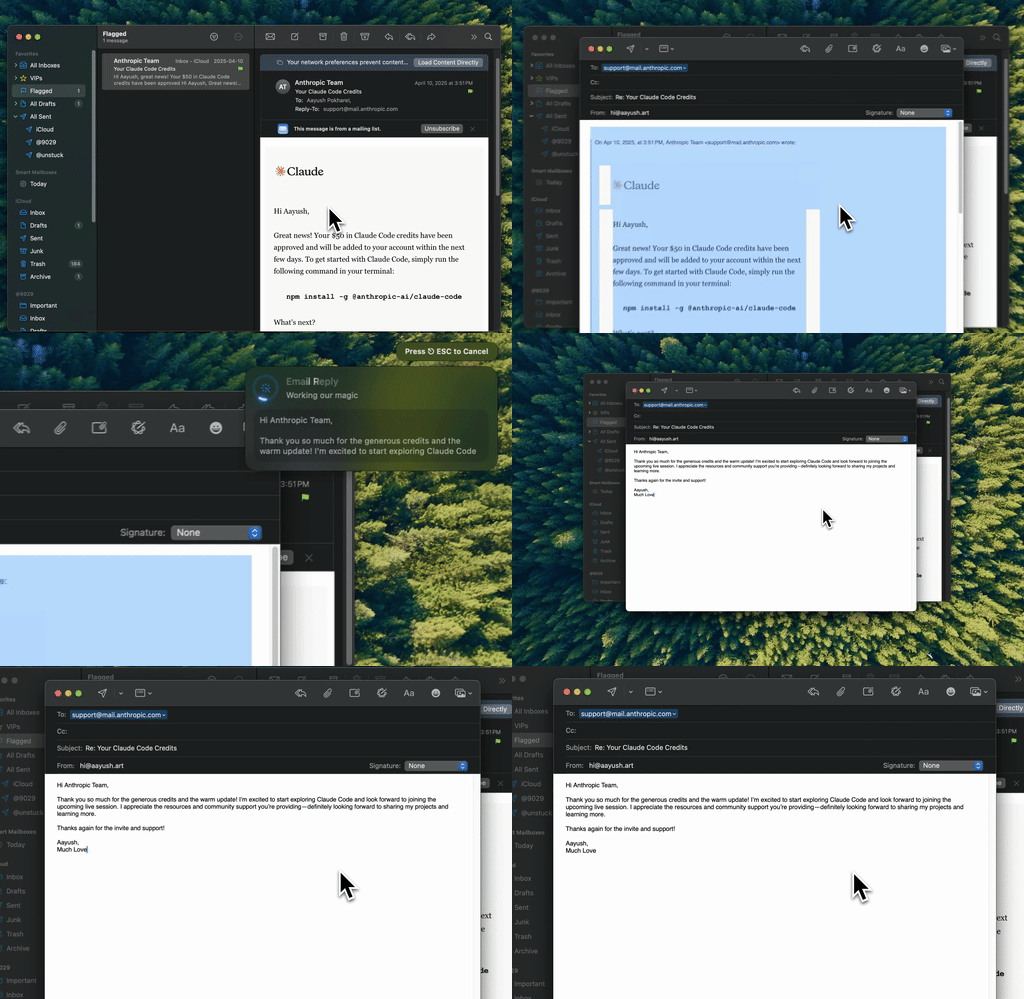
Type Mac: write the draft in Gmail, select it, press the shortcut, and send.
- Open Gmail in Safari, Chrome, or another browser, and write your draft.
- Select the text.
- Press Command-Shift-Return to fix grammar and spelling, or a custom shortcut, such as "more formal" or "shorter."
- Read the new text in the compose window and click Send.
What you get:
- A real keyboard shortcut. You do not look for an icon in the compose window.
- Your own presets. Make shortcuts for the replies that you write each week.
- Your choice of model. Use the built-in model, or add your own API key from OpenAI, Anthropic, Gemini, Groq, or OpenRouter.
- Every app. The same shortcut works in Apple Mail, Outlook, Slack, and Notes.
Know the difference: Help me write can draft from nothing and use details from your inbox. Type Mac works on the text that you write and select.
Type Mac costs $4.99 a month, or $49.99 a year with a 7-day free trial. See the email rewriter for Mac. For tone, read the email tone checker guide. For prompts that turn notes into emails, see how to write professional emails faster with AI. If you also use Apple Mail, read ChatGPT in Apple Mail.
FAQ
Why is Help me write not working on my work account?
Your Google Workspace admin can turn off Gemini in Gmail for your organization or group. Also check that Smart features in Google Workspace is on in your Gmail settings.
Can I use Help me write outside the US?
Yes, with an eligible Google Workspace plan or a Google AI plan. With a personal account and no plan, Google limits Help me write to the US.
Why did Help me write disappear?
The most common cause is that smart features were turned off. Turn on Smart features in Google Workspace in Settings > See all settings > General.
Which languages does Help me write support?
English, French, German, Italian, Japanese, Korean, Portuguese, and Spanish, with an eligible Workspace or Google AI plan.
Sources
- Write emails with Gemini in Gmail (Gmail Help)
- Supported languages for Google Workspace with Gemini (Google Help)
- Smart features and controls for Google Workspace (Gmail Help)
- Manage access to Gemini features in Workspace services (Google Workspace Admin Help)
- Google AI plans (Google One)
Help me write missing? Your shortcut is not. Try Type Mac in Gmail.