
ProWritingAid vs Grammarly for Professional Writers
ProWritingAid or Grammarly? I used both long enough to notice they aren't competing for the same job. Grammarly wants to fix your writing; ProWritingAid wants to teach you to write better. That decides which one fits you, before price even enters it.
How the three stack up
| Type Mac | ProWritingAid | Grammarly | |
|---|---|---|---|
| Price | $4.99/mo, $49.99/yr, or $249.99 lifetime | $399 lifetime, or $120/yr | $144/yr, no lifetime option |
| Best for | Editing in place, any app, any length | Novels, long-form, Scrivener writers | Email, chat, short-form, speed |
| Style depth | Rewrite, tone shift, expand, or condense | 25+ reports (pacing, sentence variation, overused words) | Clarity, tone, conciseness |
| Checking style | On demand: select, press shortcut | Batch: run a full-document analysis | Real-time, as you type |
| Scrivener | Anywhere there's a text field | Deep integration | None |
| AI features | Full rewrites, BYOK: Claude, GPT, or Gemini | Restrained: rephrasing suggestions | GrammarlyGO: full rewrites, tone shifts |
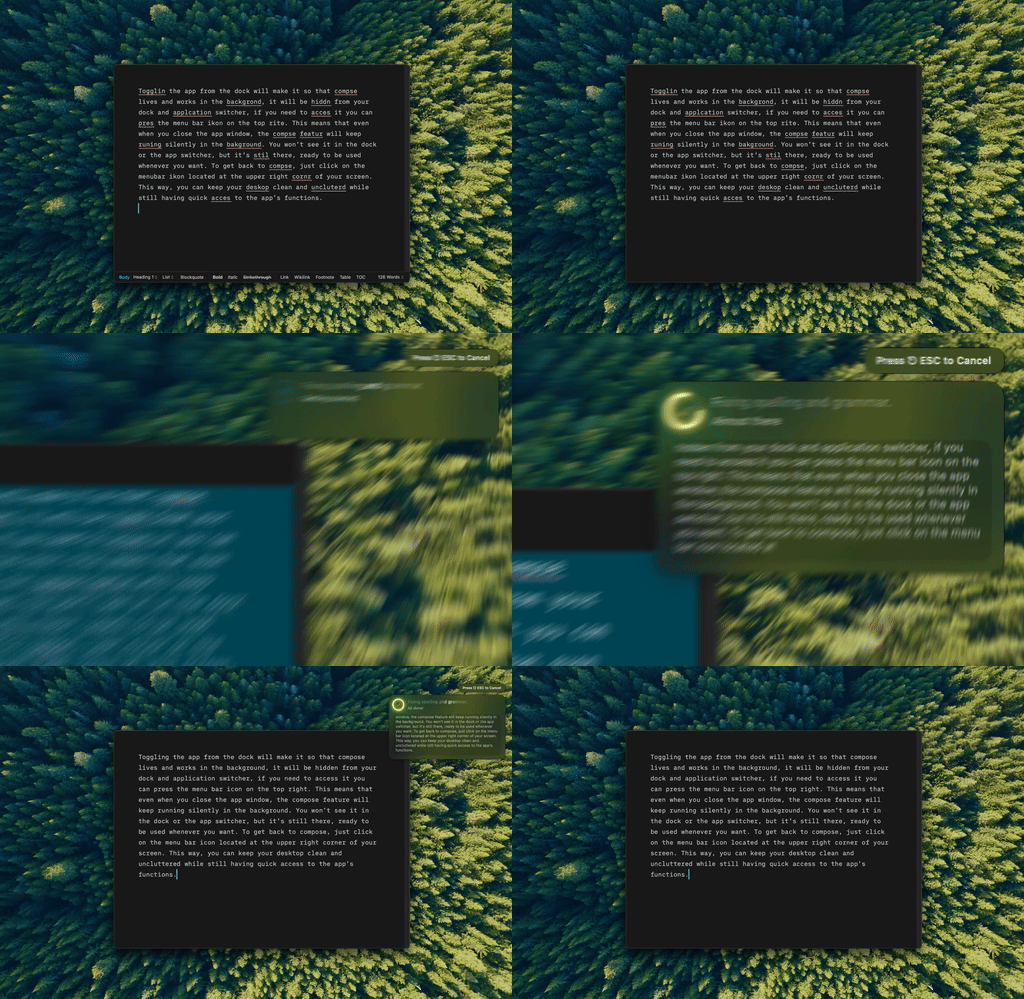
Type Mac — same selection-and-shortcut motion as a typo fix, except this one rewrites the whole sentence.
Both catch typos; only ProWritingAid explains the pattern behind them
Spelling, subject-verb agreement, missing articles, punctuation: tied. Past the basics, ProWritingAid's overused-words report catches crutch words you repeat without noticing, and its pacing analysis flags sections that drag, useful for fiction. Grammarly's clarity and conciseness suggestions fix things fast, without explaining why the problem recurs.
Grammarly checks as you type; ProWritingAid rewards a finished draft
Grammarly suits emails and chat, where speed matters. ProWritingAid is built for batch editing: finish the draft, run the analysis, work through the feedback, which favors novels, long articles, and academic papers. If speed matters more than depth, the actual keyboard shortcuts worth learning are cataloged separately.
Scrivener writers already know the answer: ProWritingAid integrates deeply, Grammarly doesn't touch it. Grammarly wins on reach everywhere else, browser extensions and a Word add-in included; ProWritingAid stays narrower, Scrivener, Word, Google Docs, OpenOffice. Its $120/year plan undercuts Grammarly's $144/year outright, and $399 lifetime wins over five years: $399 versus $720.
Grammarly writes for you; ProWritingAid keeps the pen in your hand
GrammarlyGO (Premium only) handles tone adjustment and full rewrites. ProWritingAid sticks to rephrasing suggestions and style feedback: analysis over generation. Writers who want to improve their own prose, not have AI write it, tend to prefer that restraint.

Type Mac — one shortcut, a full tone change, still my sentence underneath it.
Fiction and Scrivener: ProWritingAid. Short-form and speed: Grammarly.
Some writers run both: Grammarly for daily email, ProWritingAid for serious drafts. Neither solves system-wide access on a Mac. Grammarly's coverage thins out fast beyond browsers (the wider list of what holds up across a Mac covers that), and ProWritingAid isn't built for a quick fix in Slack. If privacy matters more than depth, the LanguageTool comparison is worth reading instead.
Neither one, in the end
Type Mac is what I kept open after the testing ended. It covers the batch-editing habit ProWritingAid taught me (select a paragraph, run one pass, move on) and the real-time speed Grammarly is built for, same shortcut either way. I can ask for a tone shift GrammarlyGO would charge Premium for, or a plain rewrite, and switch models between a synopsis and a Slack reply.
The honest limitation: it edits the sentence you already wrote. It won't draft a synopsis from a blank page the way people assume AI will; you still write the first version. That's closer to ProWritingAid's approach than what most expect from AI.
Type Mac is still installed.
Somewhere between ProWritingAid's depth and Grammarly's speed: Type Mac, one shortcut for both.