
QuillBot vs Grammarly vs ChatGPT: Which is Best for Paraphrasing?
I paraphrase constantly: the same idea for a technical reader, then again for someone who wants two sentences instead of ten. I ran QuillBot, Grammarly's rewrite feature, and Claude and GPT prompted directly against the same paragraphs for a few weeks.
Four ways to paraphrase, side by side
| Type Mac | QuillBot | Grammarly | AI model directly (Claude, GPT) | |
|---|---|---|---|---|
| Price | $4.17/mo annually, BYOK | $9.95/mo Premium, free tier with limits | $12–30/mo (rewriting is a Premium add-on) | Cents per use, BYOK |
| Approach | Select text anywhere, then rewrite, formalize, shorten, or expand | 7 fixed modes (Standard, Fluency, Formal, Simple, Creative, Expand, Shorten) | Conciseness and clarity tweaks | Prompt-driven: describe the output you want |
| Strength | Works in any Mac app, no browser tab | Fast, purpose-built, word-level synonym suggestions | Bundled with grammar checking you're already paying for | Adapts to any register, tone, or reading level |
| Weakness | Mac only | Sentence-by-sentence, can shift meaning unnoticed | Rewriting is a side feature, not real paraphrasing | Copy-paste workflow, consistency varies |
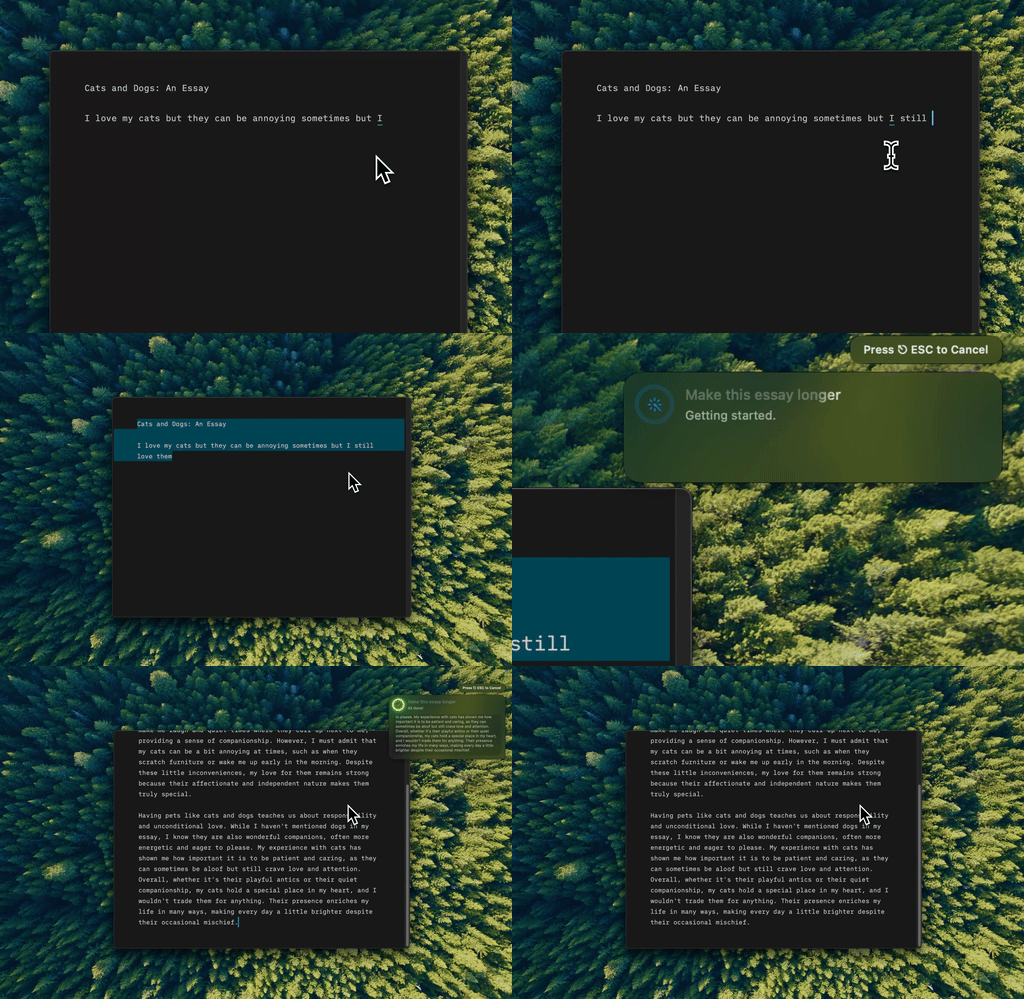
I select the rough version, hit the shortcut, and Type Mac hands back the paragraph expanded and cleaned up.
QuillBot swaps words; it doesn't understand intent
Paste text, pick a mode, get a rewrite. The word-level synonym suggestions help when I'm stuck on one word, but QuillBot works sentence by sentence and misses a document's overall flow. Formal mode kept handing me stiff, over-academic phrasing, a problem I flagged again researching Hemingway Editor alternatives.
Grammarly's rewriting is a bonus, not a reason to subscribe
It tightens wordy sentences well, but gives one version, not three registers. At $12 to $30 a month, that's a side feature bundled with grammar checking, and if grammar checking is the actual draw, the shortcuts are worth knowing: Grammarly keyboard shortcuts you're not using.
A well-written prompt beats a fixed mode
Ask an AI model to "paraphrase this for a 5th-grade reading level" and it does exactly that, no preset modes, only a description of what I want. The trade-off is consistency: the same prompt doesn't always come back the same quality twice, which is where saved context helps.

Type Mac remembers how I write, so the third paraphrase in a session still sounds like me.
Dedicated paraphrasing tools are a shrinking category
QuillBot solved a problem general AI couldn't when it launched. Claude and GPT now paraphrase better in most of what I tested, and they handle everything else too, the same overlap I found comparing Wordtune alternatives.
Students still need QuillBot; I don't
Students paraphrasing sources constantly get a fast workflow from QuillBot's mode-switching, worth the subscription if that's the daily task. More on that in AI tools for academic writing. I wanted something faster: select text anywhere, rewrite it, no paste.
Paraphrasing someone else's work still requires a citation
Running a source through QuillBot or an AI model changes the words, not the ideas. Paraphrasing tools improve your own writing; they don't launder someone else's work through a thesaurus algorithm.
What I paraphrase with now
Type Mac is what I still open weeks later. A few reasons:
- It's the only one on the table that works outside a browser tab, in Mail, Slack, or wherever I'm actually writing.
- BYOK means I get an AI model's flexibility without QuillBot's fixed modes.
- Saved context keeps three paraphrases in a row sounding like the same person wrote them.
- One shortcut instead of picking a mode, waiting for a rewrite, then copying it out.
The honest limitation: it's Mac only, no iPhone version, no Windows version. If you paraphrase from your phone as often as your laptop, QuillBot's app covers that and Type Mac doesn't.
Type Mac: paraphrasing that doesn't stop at your browser.