
How to Uninstall Grammarly on Mac Completely (2026)
To uninstall Grammarly on a Mac, click the Grammarly icon in the menu bar and choose Quit, then open Finder → Applications and move Grammarly Desktop to the Trash. Grammarly's own uninstaller then removes its background processes.
A complete removal has three more parts: the Grammarly for Safari extension, the old Word add-in, and a check of your login items. Uninstalling also does not cancel a paid plan. All steps below come from Grammarly's support pages and Apple Support.
What to remove
| Part | Where it lives | Step |
|---|---|---|
| Grammarly for Mac (Grammarly Desktop) | Applications folder and menu bar | 1 |
| Background helpers | ~/Library/LaunchAgents and ~/Library/Application Support | 2 |
| Grammarly for Safari | Applications folder and Safari Settings | 3 |
| Grammarly for Microsoft Word (add-in) | Word's add-ins | 4 |
| Login items | System Settings | 5 |
| Your account and subscription | grammarly.com | 6 |
How to uninstall Grammarly on Mac
1. Delete Grammarly Desktop
- Click the Grammarly icon in the menu bar and choose Quit.
- Open Finder → Applications.
- Move Grammarly Desktop to the Trash. Older versions use the name Grammarly for Mac.
- Empty the Trash.
If Grammarly is not in Applications, open Finder, press Command-Shift-G, enter ~/Applications, and press Return. Move Grammarly Desktop to the Trash from there.
2. Let the uninstaller clean up, then check
Grammarly for Mac includes a background process named Grammarly Desktop Uninstaller. macOS starts it when files in the Applications folder change. It detects that you deleted Grammarly, removes the other background processes and their files, and stops.
Restart your Mac, then open Finder → Go → Go to Folder and check these paths from Grammarly's list:
~/Library/LaunchAgents/com.grammarly.ProjectLlama.Shepherd.plist~/Library/LaunchAgents/com.grammarly.ProjectLlama.UpdateService.plist~/Library/LaunchAgents/com.grammarly.ProjectLlama.Uninstaller.plist~/Library/Application Support/com.grammarly.ProjectLlama/
If a file is still there after the restart, move it to the Trash.
3. Remove Grammarly for Safari
The Safari extension is a separate app.
- In Safari, choose Safari → Settings → Extensions.
- Select Grammarly and click Uninstall, or deselect its checkbox.
- In Finder → Applications, move Grammarly for Safari to the Trash. Quit it first if it is open.
4. Uninstall Grammarly from Word on Mac
Grammarly discontinued its Word add-in on Mac. If it is still in Word, remove it:
- Open Microsoft Word.
- In the Insert menu, go to My Add-ins.
- Select Grammarly for Microsoft Word, then click the three dots next to it.
- Click Remove.
5. Check login items
Choose Apple menu → System Settings → General → Login Items & Extensions. If Grammarly is under Open at Login, select it and click the Remove button. Also look for Grammarly under App Background Activity.
6. Cancel the subscription and delete the account
Removing the app does not stop billing. To cancel, sign in at grammarly.com, open the Account tab, choose Subscription, and click Cancel Subscription. For App Store purchases, refunds, and account deletion, follow how to cancel a Grammarly subscription.
Can't uninstall Grammarly on Mac?
If macOS says that "Grammarly Desktop" can't be moved to the Trash "because it's open," Grammarly is still running.
- Click the Grammarly icon in the menu bar and choose Quit.
- If that does not work, click the Grammarly icon, choose Settings, open the Customization tab, and turn off Launch at startup.
- Restart your Mac. When macOS asks, choose not to reopen windows after the restart.
- Move Grammarly Desktop to the Trash.
If Grammarly does not respond, choose Apple menu → Force Quit, select Grammarly Desktop, and click Force Quit.
How to remove Grammarly from the Mac menu bar
To hide the icon and keep the app, open System Settings → Menu Bar. Under Allow in the Menu Bar, turn off Grammarly Desktop or Superhuman Apps Manager. To remove the icon for good, uninstall the app with step 1.
How to turn off Grammarly on Mac without uninstalling
- In one app: click in a text field in that app, click the Grammarly icon in the menu bar, and choose Turn off Grammarly.
- For a short time: choose Turn off Grammarly for 1 hour.
- To undo: open Grammarly Settings → Block List and remove the app.
A lighter replacement
If you are leaving Grammarly, you still need a way to fix a typo before you click Send. Type Mac is a native Mac app in the menu bar. It does not watch text as you type. It runs when you select text and press a shortcut, and it puts the result in place.
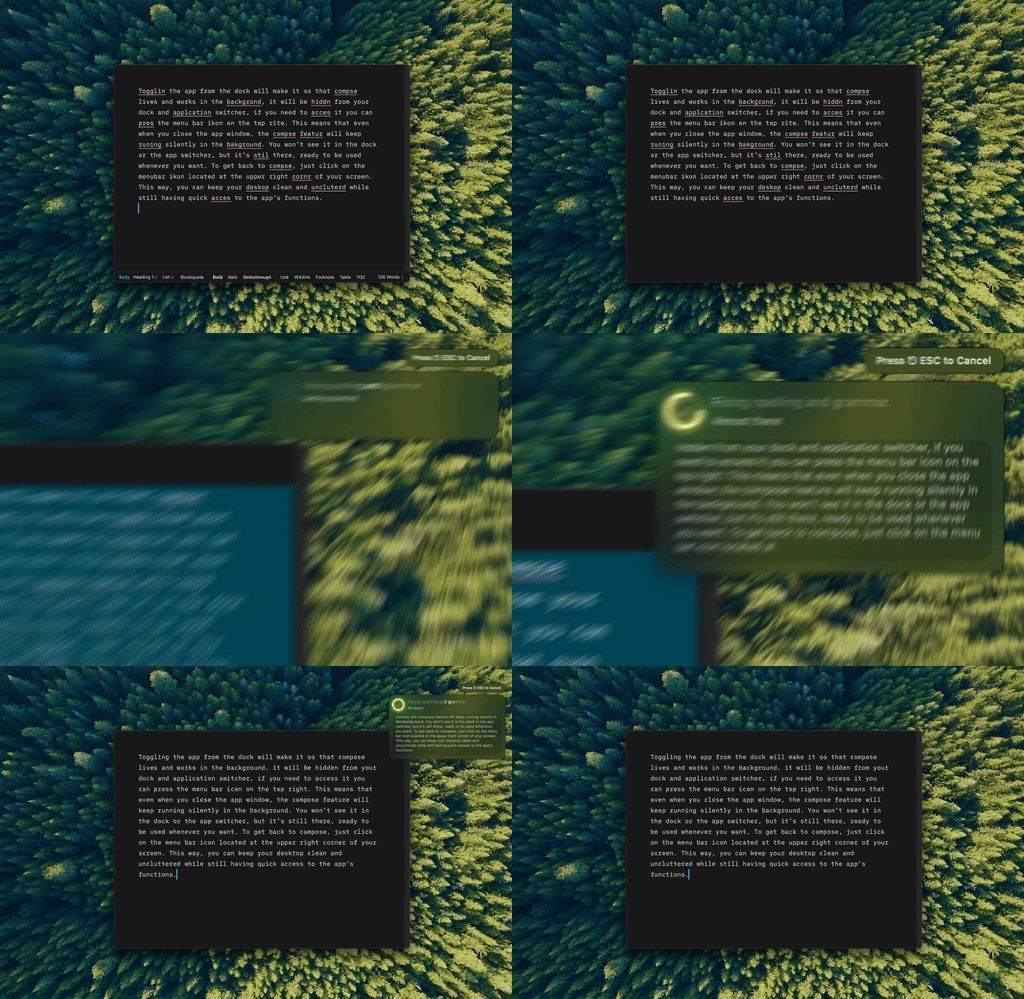
Type Mac: select the text, press Command-Shift-Return, and the fixed version replaces it.
- Works in any app where you can select text: Mail, Slack, Notes, browsers, Word, and Pages.
- Fix, rewrite, change the tone, shorten, lengthen, or translate, each on its own shortcut.
- Choose the model. Use the built-in model, or bring your own key from OpenAI, Anthropic, Gemini, Groq, or OpenRouter.
It does not underline as you type, so it is a different habit from Grammarly. Type Mac costs $4.99 a month, or $49.99 a year, and the yearly plan starts with a 7-day free trial. Read the Grammarly alternatives for Mac first if you want to compare, or see the native Grammarly alternative for Mac.
FAQ
Does deleting Grammarly from Applications remove everything?
It removes the app, and Grammarly's uninstaller process removes its background helpers. The Safari extension and the Word add-in are separate, so remove them with steps 3 and 4.
Does uninstalling Grammarly cancel my subscription?
No. Cancel at grammarly.com under Account → Subscription. If you paid through the App Store, cancel in your Apple Account subscriptions.
Why does Grammarly come back after I restart?
Launch at startup is still on, or Grammarly is still in Login Items. Turn off Launch at startup in Grammarly Settings → Customization, or remove Grammarly from System Settings → General → Login Items & Extensions.
Can I delete Grammarly without admin rights?
Grammarly says that if you have no admin rights, or the app is not in Applications, look in ~/Applications. Press Command-Shift-G in Finder, enter ~/Applications, and move Grammarly Desktop to the Trash.
Sources
- How to uninstall Grammarly for Windows or Grammarly for Mac (Grammarly Support)
- I can't uninstall Grammarly for Mac (Grammarly Support)
- How do I reinstall Grammarly for Mac? (Grammarly Support,
~/Applicationsstep) - Grammarly for Mac's background processes overview (Grammarly Support)
- How do I uninstall Grammarly for Microsoft Word on Mac? (Grammarly Support)
- Grammarly for Safari doesn't appear on Google Docs or other websites (Grammarly Support, removing the Safari app)
- How to choose where Grammarly for Windows and Mac works (Grammarly Support)
- How to cancel your subscription (Grammarly Support)
- Change Login Items & Extensions settings on Mac (Apple Support)
- Get extensions to customize Safari on Mac (Apple Support)
Leaving Grammarly? Try Type Mac and fix text in any Mac app with one shortcut.