
Grammarly vs ChatGPT for Proofreading: Which One Wins?
Grammarly vs ChatGPT comes down to where the edit happens. Grammarly checks your text as you type and marks problems inside the app you write in. ChatGPT rewrites whatever you paste into a chat and follows any instruction you give, but the result stays in ChatGPT until you copy it back.
Pick Grammarly if you want a second reader on every email and message. Pick ChatGPT if you want one passage rewritten for a specific reader. If you want ChatGPT-level rewrites without the copy and paste, a shortcut tool such as Type Mac puts the AI edit in place.
This is the Type Mac blog, so read our view with that in mind. Every fact about Grammarly and ChatGPT below comes from their own pages on November 21, 2026, linked at the end.
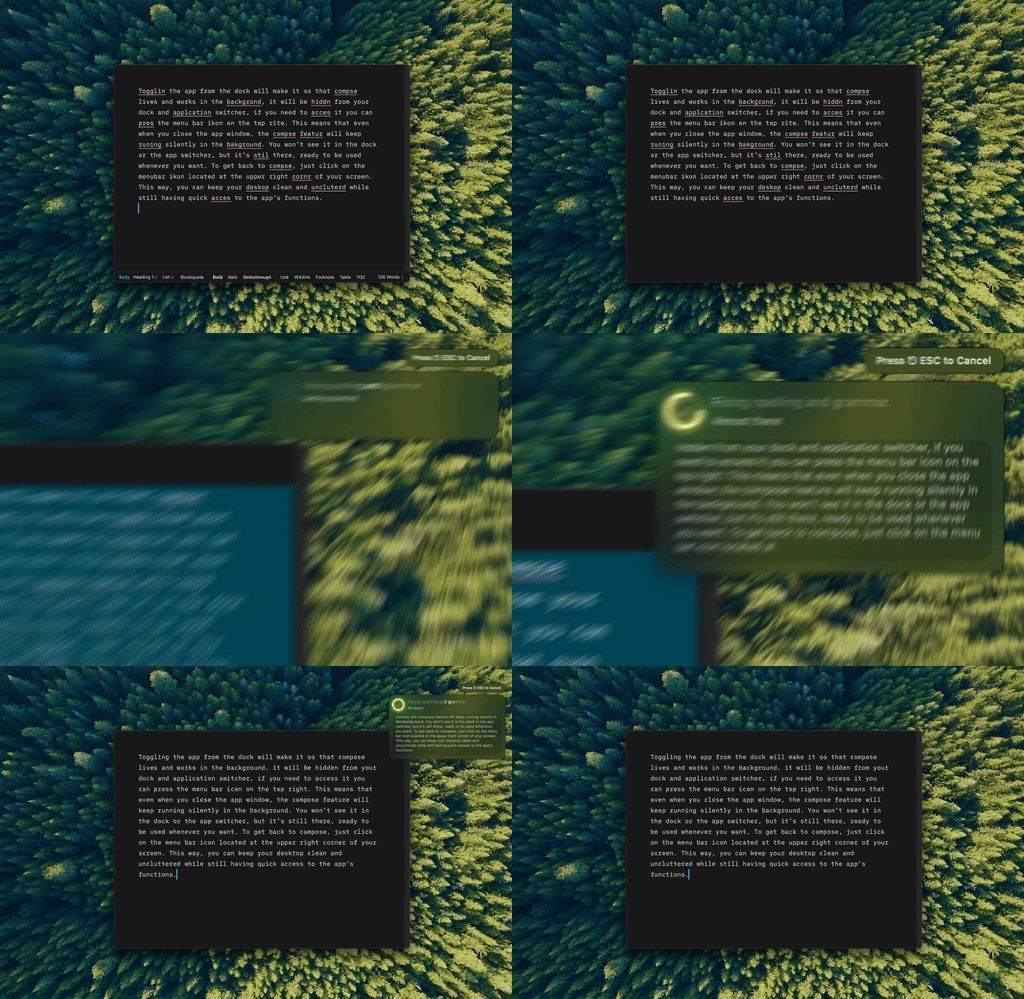
Type Mac: select the text, press the shortcut, and the corrected version replaces it. No chat window.
Grammarly vs ChatGPT at a glance
| Grammarly | ChatGPT | Type Mac | |
|---|---|---|---|
| How it works | Underlines issues as you type | You paste text and ask for an edit | You select text and press a shortcut |
| Where the result lands | In your document | In the chat | In your document |
| Mac app | Grammarly for Mac, macOS 10.15 or later | ChatGPT for Mac, macOS 14 or later | Menu bar app |
| Free plan | Spelling, grammar, tone, 100 AI prompts a month | Unlimited text chats, limited uploads and tools | None; 7-day free trial on the yearly plan |
| Paid price | Pro: $12 a month billed yearly, or $30 billed monthly (USD) | Go, Plus, and Pro, priced in your local currency | $4.99 a month or $49.99 a year |
Grammarly vs ChatGPT for proofreading
Grammarly's strength is that you never have to ask. It reads as you type and underlines what it finds. Red underlines for spelling and basic grammar are free in all 23 languages Grammarly supports. Blue underlines for clarity, fluency, and tone are a Pro feature, and free users can accept 3 of them a day. Grammarly's FAQ says Grammarly for Mac works in Word, Outlook, Apple Mail, and other desktop apps.
ChatGPT has no underlines. It proofreads what you give it, and you set the rules. That is its real advantage: tell it to fix errors only, keep your wording, and list each change, and it follows the brief. The cost is the round trip:
- Select and copy the text.
- Switch to ChatGPT and paste it.
- Type your proofreading request.
- Copy the answer.
- Switch back and paste it over the original.
For one cover letter, five steps is fine. For thirty Slack replies a day, it is the reason Grammarly stays installed.
Grammarly vs ChatGPT for writing and editing
Editing is where the two split further. Grammarly Pro rewrites full sentences and adjusts tone with a click. It includes 2,000 AI prompts per member each month for generating text, and it checks for plagiarism and AI-generated text.
ChatGPT handles open requests: "make this half as long," "rewrite this for an upset customer," "turn these notes into an email." It works on a whole passage, not one sentence at a time. If your draft needs a new structure, not a cleaner copy of the same one, ChatGPT is the stronger editor.
A prompt that keeps ChatGPT from rewriting more than you asked:
Proofread the text below. Fix spelling, grammar, and punctuation only. Keep my words and my tone. Return the corrected text, then a short list of what you changed.
Save it once and paste it in front of every draft. It reads the same in Claude or Gemini if you use those instead.
Is ChatGPT better than Grammarly?
ChatGPT is better than Grammarly when:
- You need a rewrite, not a correction.
- You want to decide what changes and what stays.
- You work on one long piece at a time.
Grammarly is better than ChatGPT when:
- You want errors caught without asking.
- You write many short messages across many apps.
- You need plagiarism or AI-text detection, or a shared team style guide.
So, Grammarly vs ChatGPT, which is better? For proofreading short work text in many apps, Grammarly. For editing one important document, ChatGPT. The two tools do different jobs, and nothing stops you from using both.
The gap neither one closes
Grammarly works in place, but only with its own suggestions. ChatGPT takes any instruction, but it lives in a separate window. Even the ChatGPT Mac app's Option+Space shortcut opens Quick Chat, and the answer still lands in ChatGPT. If that shortcut gives you trouble, read how to fix ChatGPT Option+Space on Mac.
Type Mac closes that gap. Select text in any Mac app, press a shortcut, and an AI model rewrites it in place.
- Fix Writing corrects grammar and spelling with ⌘⇧Return.
- Custom shortcuts run your own prompts, such as the proofreading prompt above, on any selection.
- Model choice: every plan includes a built-in model, or bring your own API key from OpenAI, Anthropic, Gemini, Groq, or OpenRouter.
- Price: $4.99 a month, or $49.99 a year with a 7-day free trial.
What Type Mac does not do: it does not underline as you type, it has no free plan, and it has no plagiarism checker. It runs only on the Mac. If those matter to you, Grammarly is still the right pick, and our Grammarly free vs paid breakdown shows what the free tier covers.
For a third option in the same match-up, read Grammarly vs Claude. For paraphrasing in particular, see QuillBot vs Grammarly vs ChatGPT. Mac users who want to leave Grammarly can start at the Grammarly alternative for Mac page.
FAQ
Can ChatGPT replace Grammarly?
For edits you ask for, yes. ChatGPT does not watch you type, so it cannot replace Grammarly's automatic underlines in your other apps.
Is Grammarly free?
Yes. Grammarly Free costs $0 and includes spelling and grammar checks, tone detection, and 100 AI prompts a month. Grammarly Pro costs $12 USD a month billed yearly, or $30 billed monthly.
Is ChatGPT free for proofreading?
Yes. The free plan includes unlimited text chats with GPT-6, subject to OpenAI's abuse guardrails. The paid plans add usage and features, and chatgpt.com/pricing shows their prices in your local currency.
Does ChatGPT have a Mac app?
Yes. The ChatGPT Mac app needs macOS 14 and runs on Apple silicon (M1 or later) and on Intel Macs.
Can I use OpenAI models inside Type Mac?
Yes. Add your own OpenAI API key, and your selected text goes from your Mac directly to OpenAI. The key stays in the macOS Keychain.
Sources
- Grammarly plans
- How much does Grammarly Pro cost? (Grammarly Support)
- Grammarly languages
- Grammarly for Mac
- ChatGPT pricing
- Downloading the ChatGPT macOS app (OpenAI Help Center)
- Pets and Quick Chat (ChatGPT docs)
Want ChatGPT-quality edits without leaving the app you write in? Try Type Mac with a 7-day free trial on the yearly plan.