
Is Grammarly a Keylogger? What It Sees on Your Mac
Grammarly says no. Its support page answers "Is Grammarly a keylogger?" with "No," and states that "Grammarly does not record every keystroke on your device." Grammarly says it can only access what you type while you actively use one of its products, and that it ignores sensitive fields such as passwords and payment forms on a best-efforts basis.
It does read the text you write where it is active, because it cannot suggest fixes without it. That is true of every writing assistant that works inside other apps, Type Mac included. This post sets out what Grammarly's own pages say, what the macOS permission allows, and how Type Mac handles the same question. This is Type Mac's blog, so every claim about Grammarly links to Grammarly's own documents.
Is Grammarly a keylogger? What Grammarly says
Grammarly describes a keylogger as malicious or surveillance software that records every keystroke without the user's knowledge, and says its product does not fit that description. From its support pages:
- Grammarly "can't access anything you type unless you are actively using a Grammarly product offering."
- On a Mac, a visible Grammarly logo or widget shows when it is active in a text field. You can turn it off for an app or a site at any time.
- It is blocked from read-only and sensitive fields, such as payment forms, passwords, and addresses, "on a best-efforts basis." That wording is not a guarantee.
- Some features record more, but only with your explicit permission and after an in-app notice.
Grammarly Authorship is one such feature. It is off by default. When you turn it on in Google Docs or Word, it collects the text you write in the document, including text you write and then delete, text you paste with its source name, and your prompts to generative AI.
Does Grammarly read everything you type?
No, by Grammarly's account. It reads the text in the field where you write while Grammarly is active there. Grammarly's privacy page says its software "doesn't check text if it's not actively being used." It also says: "Without access to your text, there is no way for our product offerings to provide feedback."
Does Grammarly store your data?
| Question | What Grammarly's pages say |
|---|---|
| Does it keep my documents? | Documents saved in the Grammarly Editor stay until you delete them or your account. |
| Where is data stored? | On Amazon Web Services servers in the United States. |
| Is it encrypted? | TLS in transit and AES-256 at rest. |
| Does it sell my content? | No. "We do not sell your content." |
| Does it train AI on my text? | Product Improvement and Training is on by default for individual accounts. You can turn it off. |
| Do AI vendors train on my text? | Grammarly says it does not allow its LLM providers to train on user content. |
| Can staff read my text? | Only staff authorized to access data needed for their work. |
To turn off training on your writing, open account.grammarly.com/security/privacy (Free and Premium) or account.grammarly.com/admin/data_settings (single-user Pro), and turn off Product Improvement and Training. After that, Grammarly may still use non-content data, such as words written and types of suggestions accepted.
Is Grammarly safe for confidential information?
Grammarly lists a SOC 2 (Type 2) attestation, ISO 27001, 27017, 27018, 27701, and 42001 certifications, HIPAA compliance, and PCI compliance. For Business, Enterprise, and Education accounts bought through its sales team, Product Improvement and Training is off by default.
For confidential work, three steps reduce what Grammarly sees:
- Turn off Product Improvement and Training.
- Turn Grammarly off in apps that hold confidential text: click in the app, click the Grammarly icon in the menu bar, and choose Turn off Grammarly.
- Follow your employer's rules. Many companies decide which writing tools staff can use.
What the macOS permission allows, for any app
Grammarly for Mac needs the permission at System Settings → Privacy & Security → Accessibility. On macOS 27, that setting is named Device Control and Data Access, and System Settings describes it this way: "Apps with this access can view and send email, edit contacts and photos, monitor your keyboard, track websites, record your screen, control any app on your Mac, and more."
That text describes what the permission makes possible, not what a given app does. Third-party assistants that edit text inside other apps ask for it, including Grammarly and Type Mac. What an app does with that access depends on its code and its policy.
Apple is changing the setting. On November 16, 2026, Apple announced that macOS 27.3 splits it into System & App Protection Override and Accessibility, and shows more detail about the data each app can reach. Until then, open the list in System Settings and turn off apps that you do not use.
Is Grammarly safe to download on Mac?
Grammarly's support page says: "No. Grammarly is not malware." It adds that Grammarly "cannot run on your device unless you choose to install it" and that you can uninstall it at any time. Download Grammarly for Mac from grammarly.com/desktop/mac and the Safari extension from the Mac App Store. To remove it later, follow how to uninstall Grammarly on Mac.
How Type Mac handles your text
Type Mac asks for the same macOS permission, so the same question applies to it. Here is what Type Mac does with it.
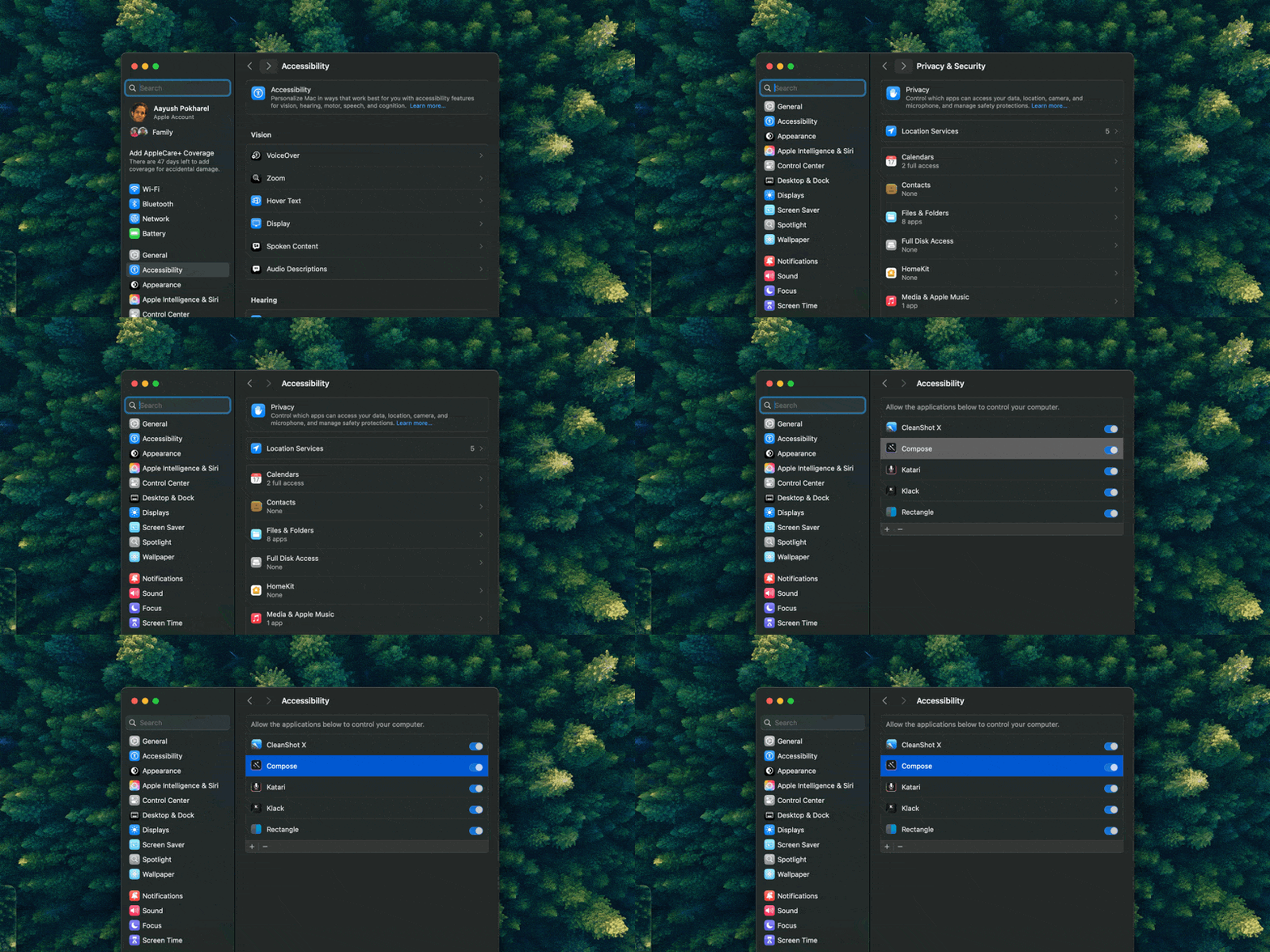
Type Mac asks for the same Accessibility permission. It uses it only to copy the text you select and paste the result.
- Nothing until you press a shortcut. Type Mac does not read text as you type. When you press a shortcut, it copies your selection, sends it to the AI model, and pastes the result.
- No keystroke record. While a request runs, Type Mac watches for the Esc key so you can cancel. It stores no keystrokes.
- Your own key, direct route. With your own key from OpenAI, Anthropic, Gemini, Groq, or OpenRouter, the text goes from your Mac to that provider. Type Mac stores keys in the macOS Keychain. The provider's policy applies to what it receives.
- Built-in model. With the built-in model, the text goes through the Type Mac server to the model and back. The server counts requests and tokens for each license, not the text.
- Usage events, no text. The app sends usage events, such as which shortcut ran, the text length, and the model, to an analytics service. The events do not contain your text.
Plans cost $4.99 a month, or $49.99 a year with a 7-day free trial. See the private Grammarly alternative for Mac, or read which AI writing tools keep your text private.
FAQ
Is Grammarly a keylogger?
Grammarly says no: it "does not record every keystroke on your device," and it reads text only while you actively use one of its products. Its Authorship feature, which is off by default, records more when you turn it on.
Does Grammarly see my passwords?
Grammarly says it is blocked from sensitive fields such as passwords, payment forms, and addresses on a best-efforts basis. To be sure, turn Grammarly off in apps where you type sensitive data.
Can I stop Grammarly from training on my writing?
Yes. Turn off Product Improvement and Training in your Grammarly account privacy settings. Grammarly may still use non-content data, such as writing statistics.
Why does a grammar app need such a broad macOS permission?
macOS has one permission for apps that read and change text in other apps. The permission covers far more than writing help, and macOS shows the same broad description for every app that asks for it, Grammarly and Type Mac included.
Sources
- Is Grammarly a keylogger? (Grammarly Support)
- Does Grammarly's product read everything I write? (Grammarly Support)
- Privacy and security FAQs (Grammarly Support)
- Product Improvement and Training Control (Grammarly Support)
- Introducing Grammarly Authorship (Grammarly Support)
- Can anyone at Grammarly read my text? (Grammarly Support)
- Is Grammarly malware? (Grammarly Support)
- How We Protect Your Privacy and User Trust Center (Grammarly)
- How to deploy Grammarly for Mac (Grammarly Support, macOS 27 setting name)
- Updates to Device Control and Data Access, and Full Disk Access in macOS (Apple Developer, November 16, 2026)
- Allow accessibility apps to access your Mac (Apple Support)
Want a writing tool that reads your text only when you ask? Try Type Mac.