
How to Use ChatGPT in Slack on Mac Without Admin Rights
To use ChatGPT in Slack, your company must set up the @ChatGPT app. OpenAI offers it to ChatGPT Business, Enterprise, and Edu workspaces, and an admin on both sides must install and approve it. Slack's own AI features depend on your Slack plan and on what your admins allow.
If you only want help with the messages that you write, you need neither. On a Mac, type the message in Slack, select it, and press a Type Mac shortcut. The fixed message replaces your draft in the box before you click Send. No bot joins the channel, and no admin step is needed.
How to use ChatGPT in Slack: three options
| @ChatGPT app | Slack AI | Type Mac | |
|---|---|---|---|
| Who sets it up | ChatGPT admin and Slack admin | Included by plan; admins can restrict it | You |
| Plan needed | ChatGPT Business, Enterprise, or Edu | Slack Pro or higher, by feature | Type Mac plan |
| Reads channel history | What it can access in that conversation | What you can access | No |
| Fixes your draft in the message box | No | No | Yes |
Option 1: the ChatGPT app in Slack (@ChatGPT)
The ChatGPT Slack plugin is now @ChatGPT. You mention it in a channel or a thread and ask for help, such as "@ChatGPT, write a short project update based on this thread." It replies in the conversation.
What to know before you ask your admin:
- Setup: a ChatGPT workspace admin connects Slack in the OpenAI admin console. A Slack admin approves the app.
- Plan: it is for ChatGPT Business, Enterprise, and Edu workspaces. The workspace needs credits to use it.
- Channels: someone must add @ChatGPT to the channel. Admins can limit it to selected channels.
- Limits: it does not respond to Slack guests, and it does not work in Slack Connect channels.
- Your account: it runs through a service account. Your saved memories and custom instructions from ChatGPT do not carry over.
- Visibility: replies in shared conversations are visible to everyone in them.
@ChatGPT replaces the earlier ChatGPT app experience in the Slack sidebar. Existing installations keep working for now, but admins must approve new permissions to move to @ChatGPT.
Option 2: Slack AI features
Slack builds AI into its paid plans. Its guide lists these features by plan:
| Feature | Pro | Business+ | Enterprise+ |
|---|---|---|---|
| Conversation summaries | Yes | Yes | Yes |
| Huddle notes | Yes | Yes | Yes |
| Recaps and file summaries | No | Yes | Yes |
| Translations | No | Yes | Yes |
| Canvas content generation | No | Yes | Yes |
| Slackbot, your personal AI agent | Limited preview | Yes | Yes |
Can Slack AI rewrite my message?
Slack's guide to AI features lists no rewrite button for the message box. You can ask Slackbot to write a first draft, and on Business+ and Enterprise+ you can use AI to write or edit content in a canvas. To fix a message that you typed, you copy it out and paste the answer back.
Option 3: connect Slack inside ChatGPT
You can also connect Slack as an app inside ChatGPT, subject to your company's settings. You then work in ChatGPT, not in Slack. This connection does not add @ChatGPT to your Slack conversations.
Fix Slack messages on your Mac with no admin and no bot
Most AI help in Slack is about reading: summaries, recaps, answers from the workspace. The daily job is writing: the reply to your manager, the update for a client channel. Type Mac does that job in the Slack desktop app, and in any other app where you write.
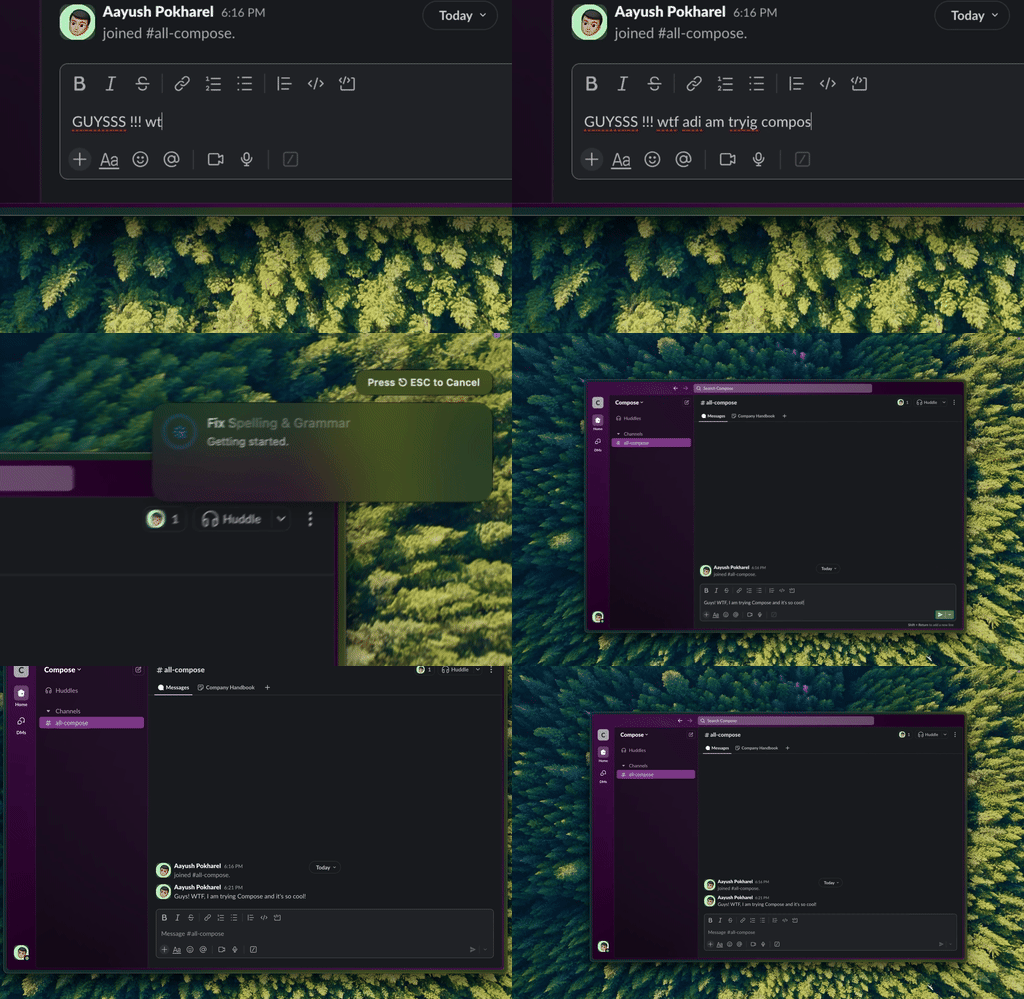
Type Mac: type the message, select it, press the shortcut, then send.
- Type your message in Slack.
- Press Command-A to select the text in the message box.
- Press Command-Shift-Return to fix grammar and spelling, or press a custom shortcut, such as "friendlier" or "shorter."
- Read the new message and press Return to send.
Why this works for Slack:
- No admin, no bot, no channel access. Type Mac is a Mac app that works on the text that you select.
- Slack details stay. Type Mac leaves emoji, @mentions, links, and code as they are.
- Your choice of model. Use the built-in model, or add your own OpenAI API key to use ChatGPT models. Anthropic, Gemini, Groq, and OpenRouter keys work too.
- One shortcut in every app. The same keys work in Mail, Notes, and your browser.
With your own API key, the selected text goes from your Mac to the provider that you choose. Check your company's rules for AI tools before you send work text to any AI provider.
Type Mac costs $4.99 a month, or $49.99 a year with a 7-day free trial. See the Slack message rewriter for Mac. For spell check and send habits, read fixing Slack and Discord messages before you send them. For teams that write in several languages, see how to translate messages in Slack, and for more apps, the best Slack productivity tools.
FAQ
Is there a ChatGPT plugin for Slack?
Yes. OpenAI's app for Slack is @ChatGPT. It is for ChatGPT Business, Enterprise, and Edu workspaces, and admins must set it up.
Can I use ChatGPT in Slack with a free or Plus ChatGPT account?
Not with @ChatGPT. OpenAI makes it available to Business, Enterprise, and Edu workspaces. On a Mac, you can use your own OpenAI API key with Type Mac to fix messages in Slack.
Does Slack AI cost extra?
Slack includes AI features in its paid plans. Which features you get depends on the plan: Pro has summaries and huddle notes, and Business+ and Enterprise+ add recaps, translations, and Slackbot.
Does Type Mac post messages in Slack for me?
No. It replaces the text that you selected in the message box. You read it and send it.
Sources
- ChatGPT with Slack and Microsoft Teams (OpenAI Help Center)
- Using @ChatGPT in Slack and Microsoft Teams (OpenAI Help Center)
- Setting up and managing @ChatGPT in Slack and Microsoft Teams (OpenAI Help Center)
- Guide to AI features in Slack (Slack Help Center)
- How to work with Slackbot (Slack Help Center)
Fix the message, not the workspace settings. Try Type Mac in Slack.