
Notion Grammar Check on Mac: How to Fix Text in Notion
There is no built-in Notion grammar check. The Notion desktop app has a built-in spell check that is on by default, and Notion in a browser uses your browser's spell check. For grammar fixes inside Notion, you need Notion AI, which Notion includes on its Business and Enterprise plans.
On a Mac you have two other ways to check grammar in Notion: the Grammarly for Mac desktop app, which underlines errors as you type, or Type Mac, which fixes the text you select with one shortcut. This guide covers all of them, plus how to turn the underlines off.
Does Notion have spell check?
Yes. In the Notion desktop app, spell check is on by default.
- Turn it off: right-click a word with a red underline and choose Disable spell check.
- Turn it on: right-click any word on a page and choose Enable spell check.
In Notion for web, your browser does the spell check. Turn it on or off in your browser settings.
Notion spell check language
Notion's help pages describe no separate language setting for spell check. The language setting in Settings > Preferences > Language & Time changes the language of the Notion interface. If the underlines are in the wrong language on a Mac, try the system setting: open System Settings > Keyboard, click Edit next to Text Input, and set Spelling to Automatic by Language or to your language.
Does Notion have grammar check?
Not as a separate checker. Notion AI fixes grammar when you ask it to:
- Select the text or the blocks that you want to change.
- Choose Edit with AI.
- Ask Notion AI to fix grammar, change the tone, or make the text shorter or longer.
- Accept or discard the change, or ask Notion AI to try again.
Notion AI is available on the Business and Enterprise plans. Free and Plus users get a limited number of AI responses to try it. Notion lists the Business plan from $20 per member per month.
How to disable grammar check in Notion
First find out where the underlines come from:
- Red underlines in the desktop app: this is Notion's spell check. Right-click a word and choose Disable spell check.
- Underlines in Notion in a browser: turn off spell check in your browser settings.
- Grammarly underlines: click in Notion, click the Grammarly icon in the menu bar, and choose Turn off Grammarly.
Grammarly in the Notion desktop app
The Grammarly browser extension runs inside your browser, so it does not reach the Notion desktop app. For the desktop app on a Mac, you need Grammarly for Mac, a separate app. Grammarly says that app works in hundreds of desktop apps. It needs macOS 11 or later.
Grammarly not working in Notion? Four checks
- Install the desktop app. The browser extension does not reach the Notion desktop app. Get Grammarly for Mac from grammarly.com/desktop/mac and make sure its icon is in the menu bar.
- Allow it in System Settings. Open System Settings > Privacy & Security > Accessibility and turn on Grammarly. On macOS 27, this setting is named Device Control and Data Access, and Grammarly needs it to apply suggestions.
- Check the Block list. Open Grammarly Settings > Block list and remove Notion if it is there.
- Check for a pause. If you chose Turn off Grammarly for 1 hour, wait or turn it back on from the menu bar icon.
For the full list of fixes, see Grammarly desktop not working on Mac.
Notion grammar check with one shortcut
Type Mac is a menu bar app that fixes selected text in any Mac app, the Notion desktop app included. It does not watch what you type. You choose when to run it.
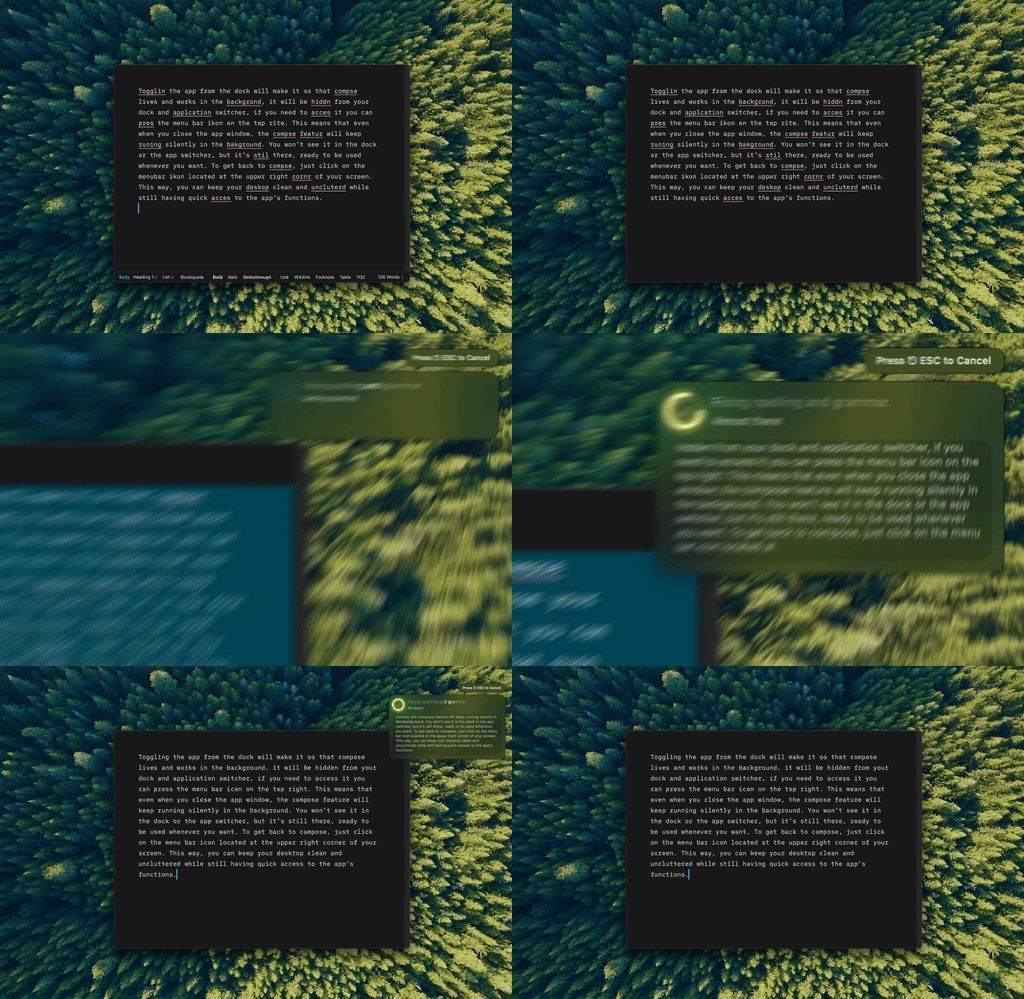
Type Mac: select the text in Notion, press the shortcut, and the corrected text replaces it.
- Select the text that you want to fix. Start with one paragraph.
- Press Command-Shift-Return to fix grammar and spelling.
- Read the result on the page.
- For other edits, make custom shortcuts with your own prompts, such as "Make this clearer for a new teammate" or "Shorten this to three bullets."
What you get:
- Links and mentions stay. Type Mac leaves links, @mentions, emoji, and code as they are.
- The same fix in every app. One shortcut works in Notion, Slack, Mail, and your browser.
- Your choice of model. Use the built-in model, or add your own API key from OpenAI, Anthropic, Gemini, Groq, or OpenRouter.
Notion AI or Type Mac?
They do different jobs. Notion AI works across your workspace: it searches pages, fills databases, and runs agents. Type Mac only edits the text that you select, but it does so in every app on your Mac. If you need grammar fixes and not a workspace assistant, Type Mac costs $4.99 a month, or $49.99 a year with a 7-day free trial.
See the grammar checker for Mac page, read how to fix grammar errors on Mac system-wide, or compare the options for Obsidian grammar check.
FAQ
Does Notion check grammar as you type?
No. Notion checks spelling as you type in the desktop app. For grammar, select the text and use Notion AI, or use Grammarly for Mac or Type Mac.
Can I use Notion AI for free?
Free and Plus users get a limited number of AI responses to try Notion AI. For full use, Notion includes it on the Business and Enterprise plans.
Why are there no red underlines in Notion?
Spell check is off. In the desktop app, right-click a word and choose Enable spell check. In a browser, turn on spell check in your browser settings.
Does Grammarly work in the Notion desktop app?
It works through Grammarly for Mac, the desktop app. The Grammarly browser extension runs only in your browser.
Sources
- Writing and editing basics: spell check (Notion Help Center)
- Notion AI FAQs (Notion Help Center)
- Notion pricing (Notion)
- Notion account settings and preferences (Notion Help Center)
- Grammarly's product offerings (Grammarly Support)
- How to choose where Grammarly for Windows and Mac works (Grammarly Support)
- System requirements for Grammarly for Mac and How to deploy Grammarly for Mac (Grammarly Support)
Clean text in Notion, without a new plan for your workspace. Try Type Mac.