
AI in Apple Notes on Mac: What Works in 2026
Yes, there is AI in Apple Notes on Mac. With Apple Intelligence on, Notes gives you Writing Tools to proofread, rewrite, and summarize selected text, and summaries of audio recordings. On macOS 27 with Siri AI (beta), you can also ask Siri to write or proofread for you.
All of these need a Mac with M1 or later, or a MacBook Neo. To clean up rough notes on any Mac, or with an AI model that you choose, select the note text and press a Type Mac shortcut. The steps for each method are below.
AI features in Apple Notes on Mac
| Feature | What it does | How to open it |
|---|---|---|
| Writing Tools | Proofreads, rewrites, summarizes, makes key points | Select text, Control-click, Writing Tools |
| Write with Siri (macOS 27, Siri AI beta) | Drafts, proofreads, gives feedback | Select text, click Write with Siri |
| Audio summary | Summarizes the transcript of a recording | Double-click the recording, click Summary |
| ChatGPT in Writing Tools | Writes new text from a prompt | Show Writing Tools > Compose |
Image Wand, which turns sketches into images, is on iPhone, iPad, and Apple Vision Pro. Apple does not list it for Mac.
Apple Intelligence also needs the device language and the Siri language set to the same supported language. Apple applies daily usage limits to some features that run on its servers.
Using AI in Apple Notes: clean up a note with Writing Tools
- Open the note and select the text.
- Control-click the selection, choose Writing Tools, then choose Show Writing Tools.
- Choose an option:
- Proofread to fix spelling and grammar.
- Rewrite, or a tone: Friendly, Professional, or Concise.
- Describe a change, such as "turn this into a numbered list."
- Summarize or Key Points for meeting notes.
- Click Done.
If you turned on Siri AI (beta), select the text and click Write with Siri when it appears. Try "Tidy up these notes and format them step by step."
Summarize an audio recording in Notes
- Open a note with a recording.
- Double-click the recording, then click Summary.
- To copy or share the summary, click the button at the top of it.
Apple notes that some languages with Apple Intelligence summaries do not support audio transcription.
Can ChatGPT work with Notes on Mac?
Yes, in two ways:
- The ChatGPT extension. Turn it on in System Settings > Siri > ChatGPT. Then open Writing Tools in a note and click Compose.
- The ChatGPT Mac app. Its Work with Apps feature lists Apple Notes as a supported text editor. Press Option-Space to open the chat bar, and ChatGPT includes the content of the open note with your message. The answer comes back in the chat, so you copy it into your note.
Clean up my notes with AI, in place
Notes are fast to write and hard to read later. Here is a typical one:
mtg w/ design, ship onboarding v2 fri?? blocker = copy not final, sam owns, follow up mon
And the version you want to keep:
Meeting with design: we plan to ship onboarding v2 on Friday. The blocker is the copy, which is not final. Sam owns it. Follow up on Monday.
Type Mac does this change where the note is. It is a menu bar app that works on selected text in any Mac app, Notes included.
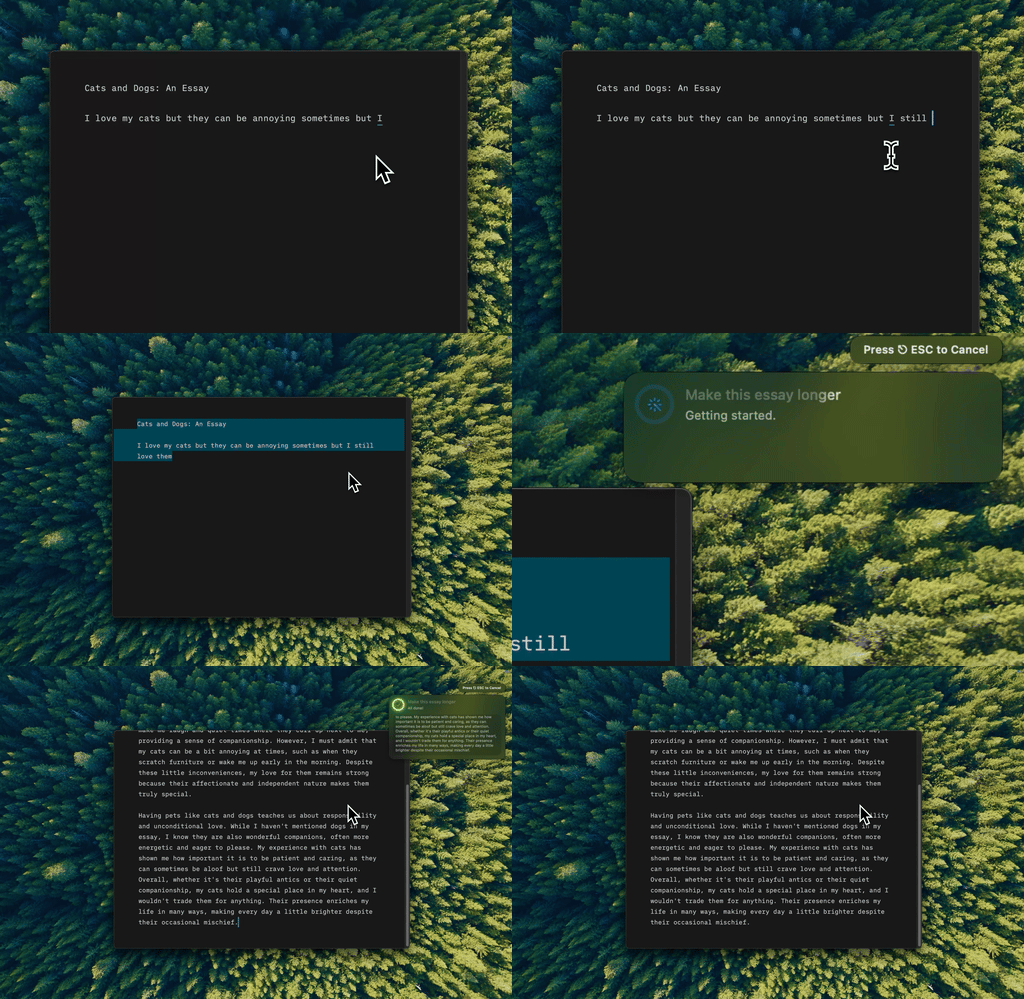
Type Mac: select the rough note, press the shortcut, and the clear version replaces it.
- Select the rough lines in your note.
- Press Command-Shift-Return to fix spelling and grammar, or use the built-in Longer command to expand short notes.
- For a format that you use often, make a custom shortcut. Example prompt: "Turn these notes into clear sentences. Keep every fact. Add nothing."
- Read the result in the note.
What you get:
- Any Mac. Type Mac runs on Intel Macs and does not need Apple Intelligence.
- Your choice of model. Use the built-in model, or add your own API key from OpenAI, Anthropic, Gemini, Groq, or OpenRouter.
- The same shortcut everywhere. Clean a note, then fix the email that you write from it in Mail.
Know the limits: Type Mac does not summarize audio and does not search your notes. It works on the text you select.
Type Mac costs $4.99 a month, or $49.99 a year with a 7-day free trial. See how to rewrite selected text on Mac. For prompts that turn bullets into full paragraphs, read how to expand short notes into full paragraphs with AI. For a system to keep notes in, see building a second brain for writers.
FAQ
Is AI in Apple Notes free?
Yes. Apple Intelligence features in Notes are free on a supported Mac. Apple applies daily usage limits to some features that run on its servers.
Why don't I see Writing Tools in Notes?
Check that your Mac has M1 or later, that Apple Intelligence is on, and that your device and Siri languages match. If you use Siri AI (beta), look for Write with Siri. For more fixes, see Writing Tools not working on Mac.
Does AI in Apple Notes work on an Intel Mac?
No. Apple Intelligence needs a Mac with M1 or later, or a MacBook Neo. On an Intel Mac, use the ChatGPT app with copy and paste, or a shortcut tool such as Type Mac.
Can Apple Notes summarize a note?
Yes. Select the text, open Writing Tools, and click Summarize or Key Points.
Sources
- Create and edit notes on Mac (Apple Support)
- Record and transcribe audio in Notes on Mac (Apple Support)
- Use Writing Tools to write, improve, and summarize content on Mac (Apple Support)
- Siri AI: Write with Siri on Mac (Apple Support)
- Get started with the next generation of Apple Intelligence (Apple Support)
- Work with Apps on macOS (OpenAI Help Center)
Rough notes in, clear sentences out. Try Type Mac in Notes.