
Apple Writing Tools vs Grammarly: Do You Still Need It?
Apple Writing Tools vs Grammarly comes down to your Mac and your work. Writing Tools is free and built into macOS on Macs with M1 or later. It proofreads, rewrites in three tones, and summarizes in 16 languages. Grammarly has a free plan and a Pro plan at $144 a year or $30 a month, runs on Intel Macs too, and adds full-sentence rewrites, tone controls, plagiarism checks, and team features.
If you write on an Apple silicon Mac and mostly need proofreading, Writing Tools covers it at no cost. If you need Grammarly's Pro features, an Intel Mac, or the same tool on Windows, Grammarly still earns its place. This is Type Mac's own blog, so the last section shows a third option. The facts about Apple and Grammarly come from their own pages, checked on November 21, 2026.
Apple Writing Tools vs Grammarly at a glance
Here is Apple Intelligence Writing Tools vs Grammarly, row by row.
| Apple Writing Tools | Grammarly | |
|---|---|---|
| Price | Free with Apple Intelligence | Free plan; Pro is $144 a year or $30 a month |
| Mac you need | M1 or later, or MacBook Neo | macOS 10.15 or newer, Intel or Apple silicon |
| Where it works | Most places you write, including third-party apps and websites | Word, Pages, email apps, desktop apps, and browsers |
| Proofreading | Proofread on request, with an explanation for each change; automatic proofreading on macOS 27 | Spelling and grammar suggestions on the free plan |
| Rewrites | Rewrite, Friendly, Professional, Concise, and Describe your change | "Rewrite full sentences with a click" and tone adjustment on Pro |
| AI text generation | Compose with the ChatGPT extension | 100 AI prompts a month on Free, 2,000 on Pro |
| Languages | 16, including English, French, German, Spanish, Japanese, and Chinese | Pro lists "Write fluently in English" |
| Plagiarism check | No | Pro |
| Team features | No | Style guides, brand tones, and analytics on paid plans |
Is Apple Intelligence better than Grammarly?
Neither one wins every job. Each is better at different things.
Where Apple Writing Tools wins
- Price. It costs nothing on a supported Mac.
- Setup. There is no app to install and no account to create.
- Privacy design. Apple says Apple Intelligence uses on-device processing, and Private Cloud Compute for larger models, without making your data accessible to Apple.
- Languages. Writing Tools supports 16 languages on macOS Tahoe 26 and macOS 27.
- Explanations. Proofread shows each change with the reason for it, and Revert puts your text back.
Where Grammarly wins
- Older Macs. Grammarly runs on macOS 10.15 or newer, so Intel Macs work. Apple Intelligence does not run on any Intel Mac.
- Deeper Pro features. Pro adds full-sentence rewrites, tone adjustment, citation consistency, and plagiarism checks.
- Teams. Paid plans add style guides, brand tones, snippets, and analytics.
- More than one platform. Grammarly has apps for Windows and Mac, and browser extensions.
Apple Intelligence proofread vs Grammarly
The two tools proofread in different ways. Writing Tools works when you ask: select the text, then choose Edit > Writing Tools > Proofread, or open the panel and click Proofread. You see each change underlined, step through the explanations, and keep or revert them. On macOS 27, Apple also lists automatic proofreading, which checks grammar and spelling as you type.
Grammarly gives suggestions in the apps it supports while you write, and you accept or ignore each one. For a long document that you edit in one sitting, Writing Tools' review flow is clear. For many short messages through the day, suggestions as you type ask for fewer steps. This guide shows each Writing Tools action step by step.
Grammarly vs Apple Intelligence on price
| Plan | Cost |
|---|---|
| Apple Writing Tools | $0 |
| Grammarly Free | $0 |
| Grammarly Pro, monthly | $30 a month |
| Grammarly Pro, annual | $144 a year |
If you are on Grammarly Pro only for proofreading, Writing Tools can replace it on an Apple silicon Mac. If you use the Pro rewrites or team features, compare what you use against the free plan first: Grammarly Free vs Paid lists the differences.
Do you still need Grammarly with Apple Intelligence?
Use this check:
- You have an Intel Mac. Keep Grammarly or pick another Intel-ready tool. Here is what works on an Intel Mac.
- You write in a language outside Apple's list. Writing Tools shows "Language Not Supported" for that text.
- You need plagiarism checks or team style guides. Keep Grammarly Pro or a business plan.
- You need proofreading and the occasional rewrite in a supported language. Writing Tools covers it.
A third option: frontier AI models on a shortcut
Writing Tools gives you Apple's models and three tones. Grammarly gives you Grammarly's suggestions. Type Mac gives you the model you choose, with your own instructions, on a keyboard shortcut.
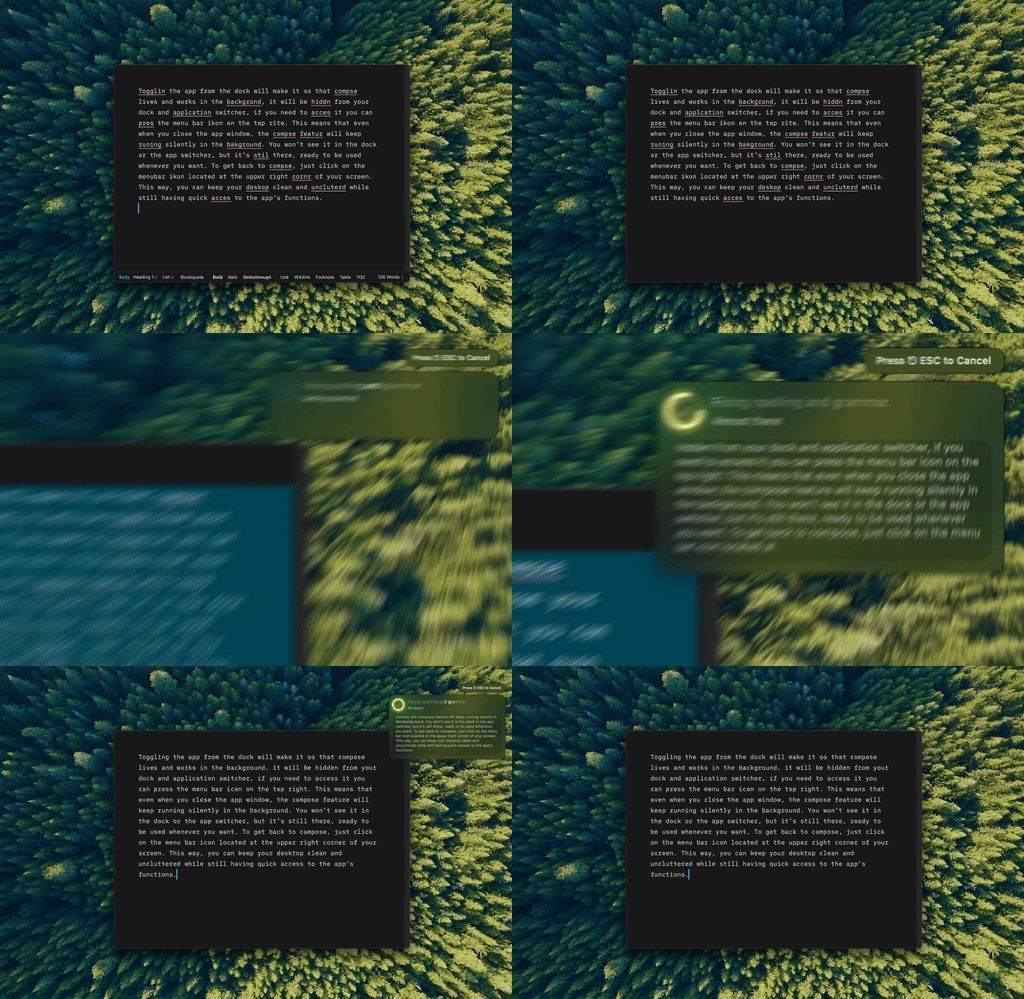
Type Mac fixes, rewrites, and translates the selected text in place, in any Mac app, with one shortcut.
- Your model. Use the built-in model, or add your own key for OpenAI, Anthropic, Gemini, Groq, or OpenRouter, to run models such as Claude, GPT, or Gemini.
- Your instructions. Make unlimited shortcuts, such as "fix grammar only" or "make this formal and short."
- Every app. Any app where you can select text works: Mail, Slack, Notes, browsers, and code editors.
- Any Mac. Type Mac runs on Intel and Apple silicon Macs with macOS Sonoma 14.1 or later.
- Price. $4.99 a month, or $49.99 a year with a 7-day free trial.
Type Mac has limits too. It works on text you select, not as suggestions while you type. It sends text to a cloud model, so it needs an internet connection. It needs Accessibility permission, and it runs only on Mac. For a direct comparison with Apple's tools, read Apple Intelligence Writing Tools vs. Type Mac, or see the Grammarly alternative for Mac.
FAQ
Can Apple Writing Tools replace Grammarly?
For proofreading and basic rewrites on an Apple silicon Mac, yes. For plagiarism checks, team style guides, or an Intel Mac, no.
Does Grammarly work on Intel Macs?
Yes. Grammarly says its Mac app needs macOS 10.15 or newer.
Is Apple Writing Tools free?
Yes. It is part of Apple Intelligence on supported Macs. Apple says some server-based Apple Intelligence features have daily usage limits.
Can I use Grammarly and Writing Tools together?
Yes. They are separate tools. You can keep Grammarly in Word and use Writing Tools from the Edit menu in other apps.
Sources
- Get started with the next generation of Apple Intelligence, Apple Support
- Use Writing Tools to write, improve, and summarize content on Mac, Mac User Guide
- Apple Intelligence, Apple
- Grammarly plans, Grammarly
- Grammarly for Mac, Grammarly
Want stronger rewrites than either one? Try Type Mac with the AI model you choose.