
Microsoft Editor vs Grammarly: Do You Need Both in Word?
Microsoft Editor vs Grammarly in Word comes down to one question: do you write anywhere besides Office? Microsoft Editor is built into Word for Microsoft 365. It checks spelling and grammar for free, and adds clarity, conciseness, and formality suggestions with a Microsoft 365 subscription. Grammarly checks Word too, plus Outlook, Apple Mail, browsers, and other apps, and adds full-sentence rewrites and tone adjustment in its Pro plan.
If you write only in Word and Outlook, Editor is enough, and you do not need both. If your writing day crosses many apps, Grammarly covers more ground. Two things changed recently, and they affect the answer: Microsoft retired the Editor browser extensions, and Grammarly discontinued its Word add-in for Mac. This is the Type Mac blog, so the last section covers Type Mac; the Microsoft and Grammarly facts come from their own support pages on November 21, 2026.
Microsoft Editor vs Grammarly at a glance
| Microsoft Editor | Grammarly | |
|---|---|---|
| Where it runs on a Mac | Word for Microsoft 365, Outlook on the web, Word for the web | Grammarly for Mac: Word, Outlook, Apple Mail, other apps and browsers |
| Free tier | Basic spelling and grammar with a Microsoft account | Spelling, grammar, tone detection, 100 AI prompts a month |
| Paid extras | Clarity, conciseness, formality, and vocabulary refinements with Microsoft 365 | Full-sentence rewrites, tone adjustment, plagiarism and AI-text detection |
| Paid price | Part of a Microsoft 365 subscription | Pro: $12 a month billed yearly, or $30 billed monthly (USD) |
| Languages | More than 20 | 23; advanced suggestions in 6 |
| Browser extension | Retired October 31, 2025 | Available for Chrome, Safari, Firefox, and Edge |
What changed in 2025 and 2026
Microsoft Editor left the browser. Microsoft says the Editor extensions for Edge and Chrome were retired on October 31, 2025, and no longer get updates or support. Their writing features now live in Microsoft Edge's own proofing tools. If you used Editor in Chrome on your Mac, that path is gone.
Grammarly dropped its Word add-in for Mac. Grammarly's support site says it discontinued Grammarly for Microsoft Word on Mac and recommends Grammarly for Mac, the desktop app, to keep working in Word.
So "Microsoft Editor and Grammarly for Word" now means two different things: a checker built into Word, and a separate Mac app that also works in Word.
Microsoft Editor in Word for Mac
In Word for Microsoft 365, Microsoft's help page says to open Editor from the Home tab. The Editor pane groups issues by type, such as Grammar or Clarity, and you step through them with arrows.
To choose what Editor checks, open the Editor pane, select Grammar under Corrections, choose More options (the three dots), then Customize suggestions.
To check another language, select the text and choose Review > Language > Set Proofing Language.
If you own Word 2021 or Word 2024 for Mac, Microsoft describes the classic checker instead: Control-click an underlined word for suggestions, or choose Review > Spelling & Grammar to check the whole document.
Grammarly in Word for Mac
Install Grammarly for Mac and sign in. The Grammarly tab then appears on the right edge of your screen. Grammarly's own Word troubleshooting page lists three rules:
- Use Print Layout. Grammarly does not work in Word's Outline, Draft, or Web layout. Choose View > Print Layout.
- Open one document at a time. With two Office documents open, Grammarly launches in only one of them.
- Check the Block List. Click the Grammarly icon in the menu bar, open Settings, and make sure Word is not on the Block List tab.
If the Grammarly icon is missing from the menu bar, open System Settings > Menu Bar, and under Allow in the Menu Bar, turn on Grammarly Desktop or Superhuman Apps Manager.
Is Microsoft Editor better than Grammarly?
In Word, Editor has the home advantage: no install, no extra account, and a free tier that covers spelling and grammar. Grammarly has the reach: the same checker in Outlook, Mail, Slack, and your browser, plus rewrites and tone adjustment in Pro. Neither is better at everything.
- Pick Editor if you write in Word and Outlook, already pay for Microsoft 365, and want nothing else running.
- Pick Grammarly if you write across many apps, want one style guide for a team, or need plagiarism checks.
- Running both in Word gives you two checkers on the same text, so you review the same sentence twice.
Microsoft Editor vs Copilot
Copilot is Microsoft's AI writing layer in Word, and it works in Word for Microsoft 365 for Mac. Microsoft says Copilot can rewrite selected text, adjust its tone, make it more concise, or give alternate versions, and it can edit in place in the document. It needs an eligible Microsoft 365 subscription or a Microsoft 365 Copilot license, and some features roll out gradually by platform and license.
Editor finds issues sentence by sentence. Copilot rewrites on request. If you want AI rewrites inside Word, Copilot is the Microsoft answer. Our post on Copilot in Word for Mac covers setup.
Word grammar check not working on Mac?
Work through these steps in order:
- Choose Word > Preferences > Spelling & Grammar, and turn on Check spelling as you type and Check grammar as you type.
- Select the text and set the right language with Review > Language > Set Proofing Language.
- Choose Tools > Spelling and Grammar > Reset Ignored Words and Grammar, so Word checks issues you skipped before. This resets only the open document.
- Check your internet connection. Microsoft lists it as a requirement for Editor's style refinements.
- If Grammarly is the one that is missing, switch to Print Layout and close extra documents.
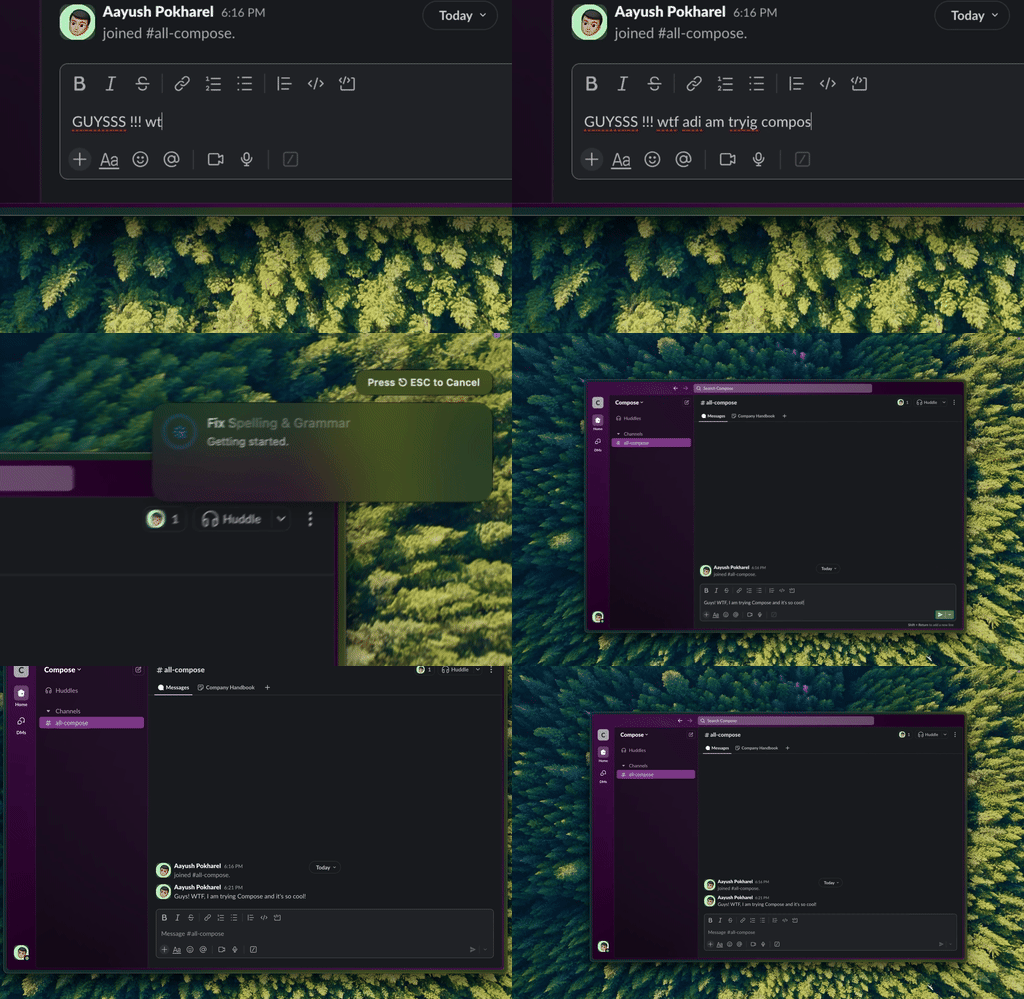
Type Mac: the same shortcut you use in Word, here in Slack.
The limit both share
Editor stays in Office and Edge. Grammarly reaches further, but it works through its own panel and suggestions. Type Mac takes a different approach: select text in Word, Slack, Mail, Notes, or a browser, press a shortcut, and an AI model replaces the selection with the corrected or rewritten text.
- Fix Writing (⌘⇧Return) corrects grammar and spelling.
- Custom shortcuts run your own instructions, such as "make this more formal."
- Models: a built-in model on every plan, or your own OpenAI, Anthropic, Gemini, Groq, or OpenRouter key.
- Price: $4.99 a month, or $49.99 a year with a 7-day free trial.
Type Mac does not underline errors as you type, and it has no free plan. For more on checkers, read our Grammarly alternatives for Mac, the Grammarly price breakdown, or the grammar checker for Mac page.
FAQ
Is Microsoft Editor free?
The basics are. Sign in with a free Microsoft account for spelling and grammar checks. Refinements such as clarity, conciseness, and formality need a Microsoft 365 subscription.
Does Grammarly still work in Word on a Mac?
Yes, through the Grammarly for Mac desktop app. The separate Grammarly add-in for Word on Mac is discontinued.
Is the Microsoft Editor Chrome extension still available?
No. Microsoft retired the Editor extensions for Chrome and Edge on October 31, 2025. Edge now has the writing features built in.
Do I need both Microsoft Editor and Grammarly?
No. If you write only in Word and Outlook, Editor covers spelling and grammar. Add Grammarly only if you want the same checks in other apps or need its Pro features.
Sources
- Check grammar, spelling, and more in Word (Microsoft Support)
- Microsoft Editor checks grammar and more (Microsoft Support)
- Microsoft Editor browser extension retirement (Microsoft Support)
- Draft and add content with Copilot in Word (Microsoft Support)
- Grammarly for Microsoft Word on Mac was discontinued (Grammarly Support)
- Grammarly doesn't appear in Microsoft Word (Grammarly Support)
- Grammarly for Mac
- Grammarly plans
Want one fix shortcut for Word and every other app? Try Type Mac free for 7 days on the yearly plan.