
AI in Pages on Mac: How to Rewrite and Proofread Faster
AI in Pages on Mac comes in three forms: Writing Tools from Apple Intelligence, Write with Siri on macOS 27 with Siri AI (beta), and an assistant that comes with an Apple Creator Studio subscription. Writing Tools is free on a Mac with Apple Intelligence and works on any text that you select in your document.
To proofread or rewrite a paragraph, select it, Control-click, and choose Writing Tools > Show Writing Tools. If your Mac cannot run Apple Intelligence, or you want your own tone and a different AI model, use a system-wide shortcut such as Type Mac. All the steps are below.
How to use Writing Tools in Pages on Mac
- Select the text that you want to change.
- Control-click the selection, choose Writing Tools, then choose Show Writing Tools.
- Choose an option:
- Proofread to fix grammar and spelling.
- Rewrite for a new version. For a tone, click Friendly, Professional, or Concise.
- Describe a change to type your own request, such as "make this sound less formal."
- Summarize or Key Points for a short version of long text.
- Click Done.
Writing Tools needs Apple Intelligence: a Mac with M1 or later, or a MacBook Neo, with the device language and Siri language set to the same supported language.
Pages also has its own grammar check on every Mac. Choose Edit > Spelling and Grammar > Check Grammar With Spelling, then Check Document Now. Press Command-Semicolon to jump to the next error. Grammar errors show with a green underline.
Write with Siri in Pages on macOS 27
On macOS 27 with Siri AI (beta) turned on, Apple routes writing help through Siri. Select the text, then click Write with Siri when it appears. Ask for what you want: "Proofread this," "How's this sound?", or "Condense this to key points."
Siri AI is available in English, French, Japanese, Korean, Portuguese, and Spanish to start. It is not available to users under 13, and Apple applies daily usage limits.
The Pages assistant in Apple Creator Studio
Pages 16 adds an assistant (beta) for Apple Creator Studio subscribers. You type a request in a sidebar, and it can write and rewrite text, suggest a structure, review your document, and change the layout.
- Click the assistant button in the toolbar to open it.
- It needs a Mac with Apple silicon, macOS 27 or later, and iCloud.
- Your subscription includes a monthly usage allowance. Choose Pages > Intelligence Features > Show Usage to check it.
Apple Creator Studio costs $12.99 a month or $129 a year after a one-month free trial in the US, and $2.99 a month or $29.99 a year for students and educators. Pages itself stays free.
Can you use ChatGPT in Pages?
Yes, through the ChatGPT extension for Apple Intelligence:
- Open System Settings > Siri, click ChatGPT, and click Set Up.
- In Pages, Control-click in your text and choose Show Writing Tools.
- Click Compose, describe what you want, and press Return.
The ChatGPT Mac app's Work with Apps feature does not list Pages, so the app route is copy and paste.
Limits of the built-in AI in Pages
| Limit | Writing Tools | Creator Studio assistant |
|---|---|---|
| Intel Mac | Not supported | Not supported |
| Cost | Free | Subscription and usage allowance |
| Tone choices | Friendly, Professional, Concise, or a typed request | Typed request |
| Needs macOS 27 | No | Yes |
| Works outside Pages | Most apps | Apple Creator Studio apps only |
For more on this tradeoff, see Apple Intelligence Writing Tools vs. Type Mac. A full walkthrough of each Writing Tools option is in how to use Writing Tools on Mac.
Rewrite your own text in Pages with Type Mac
Type Mac is a menu bar app that works on selected text in any Mac app, Pages included. You write the paragraph. Type Mac fixes it or rewrites it in the tone that you set, and the new text replaces the selection.
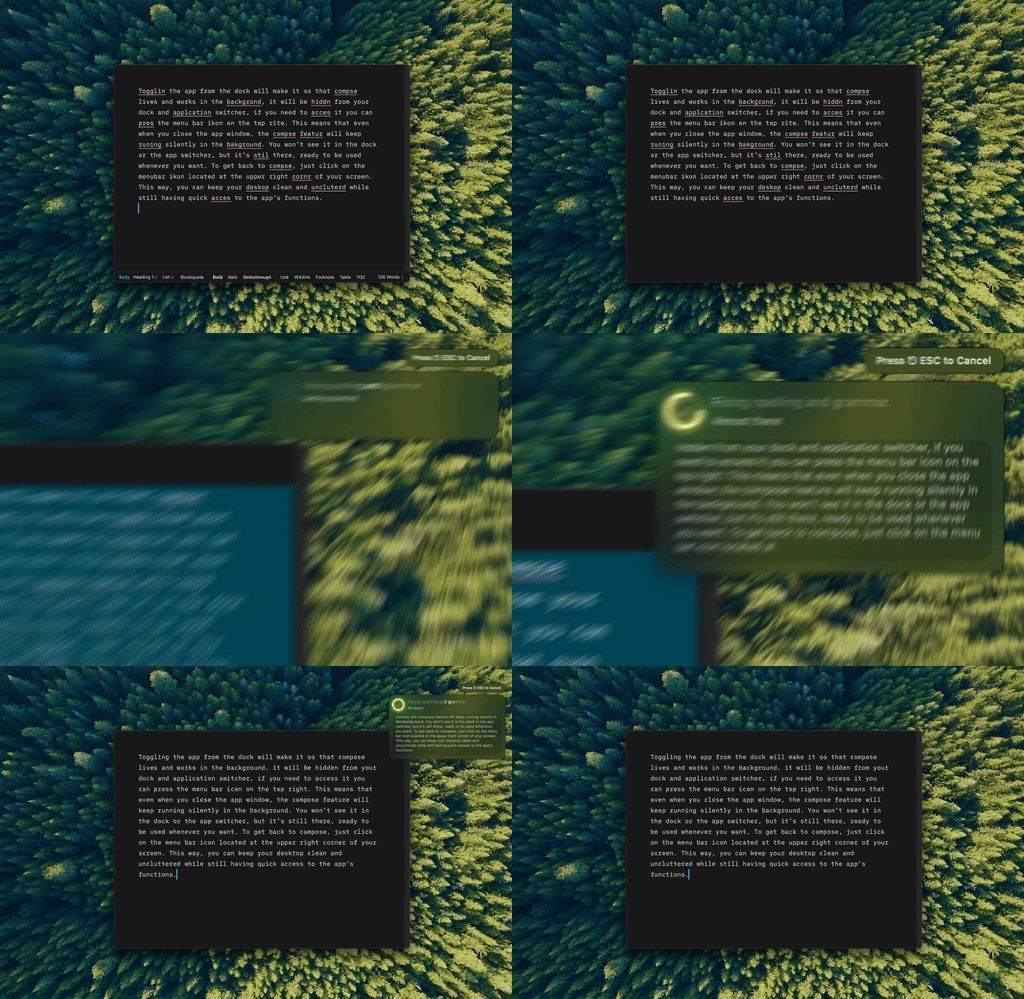
Type Mac: select a paragraph in Pages, press the shortcut, and keep writing.
- Select a sentence or a paragraph that you wrote.
- Press Command-Shift-Return to fix grammar and spelling.
- For a tone that the presets do not cover, make a custom shortcut with your own prompt. Examples for students: "Keep my words, fix only grammar," or "Rewrite in the past tense and the third person for a lab report."
- Read the change before you move on.
Why writers add it next to Writing Tools:
- Your tone, saved. A custom shortcut runs the same instruction each time, so you do not type it again.
- Your choice of model. Use the built-in model, or add your own API key from OpenAI, Anthropic, Gemini, Groq, or OpenRouter.
- Memory. Type Mac can remember how you write and use that context in every shortcut.
- Any Mac. It runs on Intel Macs and does not need Apple Intelligence.
Type Mac costs $4.99 a month, or $49.99 a year with a 7-day free trial. Students get 20% off with a .edu email. See the Apple Writing Tools alternative page. If you use Grammarly in Pages now, read how to use Grammarly in Pages on Mac first.
FAQ
Does Pages have AI?
Yes. Pages supports Apple Intelligence Writing Tools, Write with Siri on macOS 27 with Siri AI, and an assistant for Apple Creator Studio subscribers.
Is AI in Pages free?
Writing Tools and Write with Siri are free on a Mac with Apple Intelligence, with usage limits on some features. The Pages assistant needs an Apple Creator Studio subscription.
Why don't I see Writing Tools in Pages?
Check that your Mac has M1 or later, that Apple Intelligence is on, and that your device and Siri languages match. If you use Siri AI (beta), look for Write with Siri instead.
Does Pages check grammar without AI?
Yes. Turn on Edit > Spelling and Grammar > Check Grammar With Spelling. Grammar errors show with a green underline.
Sources
- Use Writing Tools to write, improve, and summarize content on Mac (Apple Support)
- Siri AI: Write with Siri on Mac (Apple Support)
- Check spelling in Pages on Mac (Apple Support)
- Use the assistant in Pages on Mac and Use Apple Creator Studio intelligence features in Pages (Apple Support)
- Apple Creator Studio (Apple)
- Get started with the next generation of Apple Intelligence (Apple Support)
- Work with Apps on macOS (OpenAI Help Center)
Your words, your tone, one shortcut. Try Type Mac in Pages.