
Apple Intelligence ChatGPT on Mac: Setup and Fixes
Apple Intelligence ChatGPT on Mac works through the ChatGPT extension. On macOS 27, open System Settings > Siri, click ChatGPT, then click Set Up. On macOS Tahoe 26, open System Settings > Apple Intelligence & Siri, click ChatGPT below Extensions, then click Set Up. After setup, Compose in Writing Tools uses ChatGPT to write new text from a description.
If the ChatGPT option is unavailable, the cause is your region, your age, a Screen Time limit, a company policy, or Apple Intelligence itself. The fixes are below.
How to use Apple Intelligence ChatGPT on Mac
You do not need a ChatGPT account. If you have one, free or paid, you can connect it.
macOS 27
- Open System Settings, then click Siri in the sidebar.
- Click ChatGPT, click Set Up, then follow the onscreen instructions.
- If you use Siri AI (Beta), click Set Up Extensions, click ChatGPT, then turn on Use Extension.
- Choose whether to sign in with a ChatGPT account.
macOS Tahoe 26
- Open System Settings, then click Apple Intelligence & Siri.
- Below Extensions, click ChatGPT, click Set Up, then click Next.
- Click Enable ChatGPT to use it without an account, or click Use ChatGPT with an Account and follow the onscreen instructions.
To keep your requests in your ChatGPT chat history, sign in to a ChatGPT account. Apple says that with a paid ChatGPT account, your Mac can use advanced ChatGPT capabilities more often.
Compose with ChatGPT on Mac
- Click in a text field where you write.
- Control-click the text field, then choose Show Writing Tools.
- Click Compose.
- Describe what you want ChatGPT to write. Choose Include All Text or Selected Text, then press Return.
- If ChatGPT asks for more details, enter a response and press Return, or continue without details.
- Rewrite the result, use ChatGPT's suggestions, or revert to your original text.
You can also choose Edit > Writing Tools > Compose. For the other Writing Tools actions, see how to use Writing Tools on Mac.
Does Apple Intelligence Writing Tools use ChatGPT?
Only for Compose, and only after you turn on the extension. Proofread, Rewrite, the tones, and Summarize are Apple Intelligence features. Apple's guides document ChatGPT in Writing Tools for Compose.
Apple also says that you choose what content to send to ChatGPT. Here is what Apple documents about a request:
- What goes to ChatGPT: your request and attachments, plus limited data such as your time zone, country, device type, language, and the feature you use.
- What does not: Apple obscures your IP address from ChatGPT. Without a ChatGPT account, OpenAI receives no information tied to your Apple Account.
- Storage and training: without an account, OpenAI must not store your request or the response unless the law requires it, and must not use your request to train its models.
- With an account: your ChatGPT account settings and OpenAI's privacy policies apply.
Apple Intelligence ChatGPT greyed out or not working
| Cause | What you see | Fix |
|---|---|---|
| Region | A message that the extension isn’t available in this region | The extension is available only where the ChatGPT app and service are available |
| Age | The extension is not offered | You must be at least 13, or the minimum age in your country |
| Screen Time | "Access to ChatGPT integration features has been restricted on this Mac." | Allow extensions in Screen Time |
| Company policy | "Certain capabilities are managed by your organization and cannot be changed." | Ask your IT team |
| Apple Intelligence off | No Writing Tools at all | Turn on or fix Apple Intelligence first |
| No connection | A message asks you to connect to the internet to compose | Connect, then try again |
| Daily limit | "You’ve reached your daily limit" for advanced capabilities | Wait, or sign in with a paid ChatGPT account |
| Account problem | "Unable to Authenticate" | Sign in again in the ChatGPT settings |
Allow ChatGPT in Screen Time
- macOS 27: Open System Settings > Screen Time > Content & Privacy > Intelligence & Siri, and allow access to Apple Intelligence features, which include Intelligence Extensions.
- macOS Tahoe 26: Open System Settings > Screen Time > Content & Privacy > Intelligence & Siri, then turn on Intelligence Extensions.
On a child's account, Screen Time on macOS 27 notes that extensions are not available for users under 13.
Check Apple Intelligence first
The ChatGPT extension works through Apple Intelligence. If Apple Intelligence is missing on your Mac, ChatGPT is missing too. These are the reasons Apple Intelligence does not show, including the language, region, and Intel Mac rules.
Turn ChatGPT off
On macOS 27, open System Settings > Siri, click ChatGPT, then turn off Use ChatGPT. With Siri AI, click Extensions, click ChatGPT, then turn off Use Extension. On macOS Tahoe 26, the same switch is in Apple Intelligence & Siri.
The limit: one model, extra steps
The ChatGPT extension gives Writing Tools one outside model, for one job. Compose opens a panel, asks for a description, and writes new text. Writing Tools has no option to proofread or rewrite your text with Claude, Gemini, or another model.
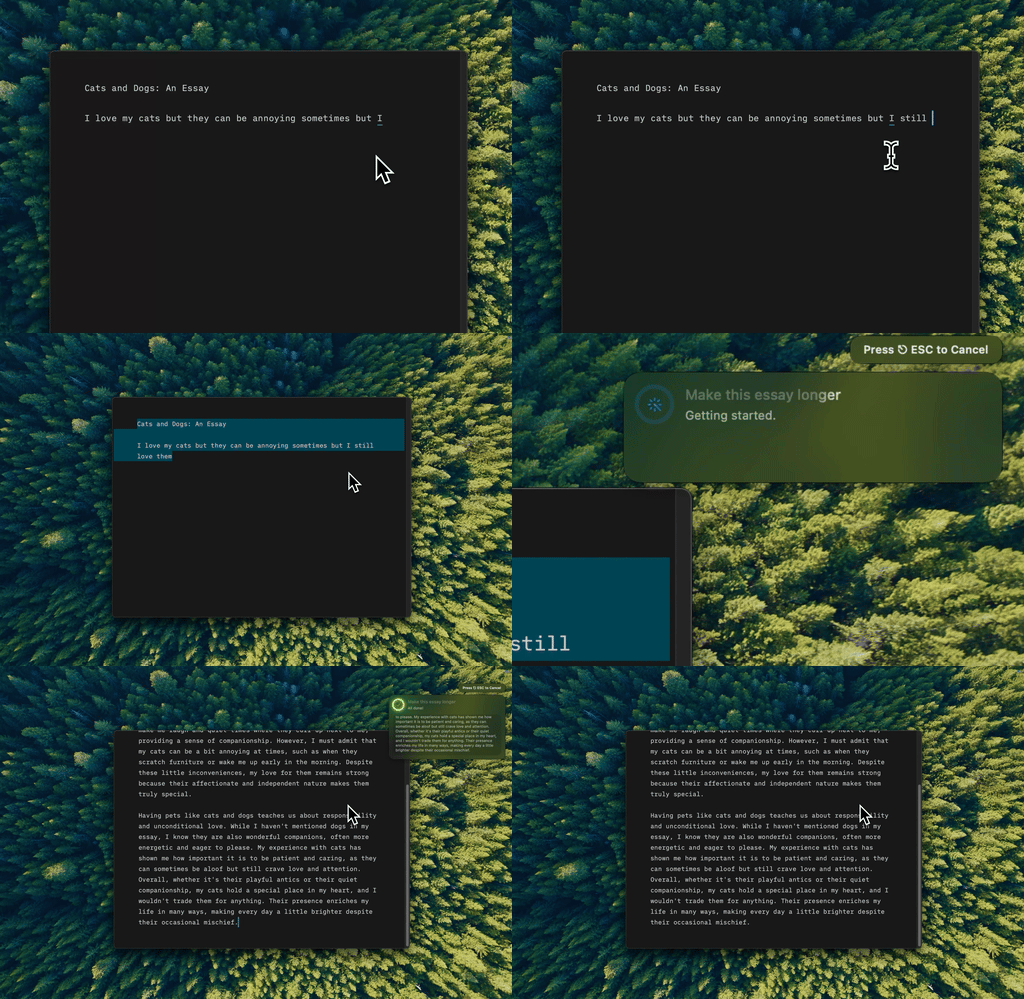
Type Mac runs the AI model you pick on the selected text, in any Mac app, with one keyboard shortcut.
Type Mac puts the model choice on your keyboard:
- Pick the model. Use the built-in model, or add your own key for OpenAI, Anthropic, Gemini, Groq, or OpenRouter. OpenRouter gives you access to more than 300 models.
- One shortcut, in place. Select text, press your shortcut, and the result replaces the selection.
- Any job. Expand notes, fix grammar, change the tone, shorten, or translate, each with your own instruction.
- Every app. Mail, Slack, Notes, browsers, and code editors all work the same way.
- Your keys stay on your Mac. Type Mac stores your API keys in the macOS Keychain. With your own key, the text goes from your Mac to the provider you pick, and that provider's terms apply.
Type Mac runs on Intel and Apple silicon Macs with macOS Sonoma 14.1 or later. Plans are $4.99 a month, or $49.99 a year with a 7-day free trial. To choose a model per job, read ChatGPT vs Claude vs Gemini for writing, or see the BYOK writing assistant for Mac.
FAQ
Do I need a ChatGPT account for Apple Intelligence?
No. You can use the extension without an account. Sign in only if you want your chat history saved, or to use a paid plan.
Is ChatGPT in Apple Intelligence free?
You can use it without a ChatGPT account and without a payment. Apple says that a paid ChatGPT account lets your Mac use advanced ChatGPT capabilities more often.
Can I use Claude or Gemini in Writing Tools?
Apple's Mac User Guide documents ChatGPT as the extension for Compose in Writing Tools. To use Claude or Gemini on selected text, use an app that connects to those models.
Why is ChatGPT not showing in Apple Intelligence settings?
Check four things: the ChatGPT service is available in your region, you are 13 or older, Screen Time allows extensions, and your Mac is not managed by a policy that blocks it.
Sources
- Turn on ChatGPT on Mac, Mac User Guide (macOS 27)
- Use ChatGPT with Apple Intelligence on Mac, Mac User Guide (macOS Tahoe 26)
- Use Writing Tools to write, improve, and summarize content on Mac, Mac User Guide
- Change Intelligence & Siri settings in Screen Time on Mac, Mac User Guide
- Block access to Apple Intelligence features in Screen Time on Mac, Mac User Guide (macOS Tahoe 26)
- Get started with the next generation of Apple Intelligence, Apple Support
Want more than one AI model on your Mac? Try Type Mac and pick GPT, Claude, or Gemini for each job.