
Correct My English Sentence: A Faster Way on Mac
When you search "correct my English sentence," you want the fixed version now. A web checker gives you one, but you can also fix the sentence yourself with five checks: the verb tense, the subject and verb, the articles (a, an, the), the prepositions, and the word order. These five cover the errors that non-native writers make again and again.
Below are 10 frequent errors, each with a corrected version. After that, the faster way on a Mac: correct the sentence in the app where you write it, with one shortcut.
How to correct an English sentence in 5 checks
- Find the verb. Is the tense right for the time you mean?
- Find the subject. Does the verb agree with it: "he works," not "he work"?
- Check each noun. Does it need "a," "an," "the," or nothing?
- Check each preposition. Does the verb or adjective take "in," "on," "at," "about," or none?
- Read the word order. Is a question in question order? Is an indirect question in normal order?
10 common English errors, corrected
| # | Error | Wrong | Correct |
|---|---|---|---|
| 1 | Missing article | "I have meeting at 3." | "I have a meeting at 3." |
| 2 | Extra article | "She works in the marketing." | "She works in marketing." |
| 3 | Uncountable noun | "Can you send me more informations?" | "Can you send me more information?" |
| 4 | Subject and verb | "The list of tasks are long." | "The list of tasks is long." |
| 5 | Present perfect | "I have finished it yesterday." | "I finished it yesterday." |
| 6 | Since and for | "I am working here since 2022." | "I have worked here since 2022." |
| 7 | Wrong preposition | "I'm interested about this role." | "I'm interested in this role." |
| 8 | Extra preposition | "Let's discuss about the budget." | "Let's discuss the budget." |
| 9 | Indirect question | "Can you tell me where is the office?" | "Can you tell me where the office is?" |
| 10 | Missing subject | "Is possible to change the date?" | "Is it possible to change the date?" |
Why these errors happen
Most of them come from the grammar of your first language:
- Articles (1, 2): Many languages have no articles, or use them in different places. In English, a single countable noun needs "a" or "the." A general idea, such as "marketing" or "life," needs none.
- Uncountable nouns (3): "Information," "advice," "feedback," "equipment," and "furniture" have no plural in English. Write "some advice" or "a piece of advice."
- Agreement (4): The verb agrees with the main noun, "list," not with the nearest noun, "tasks."
- Tenses (5, 6): Use the simple past with a finished time ("yesterday," "last week"). Use the present perfect for something that started in the past and continues ("since 2022," "for three years").
- Prepositions (7, 8): Learn them with the word: "interested in," "depend on," "good at," "arrive at" a place. Some verbs take none: "discuss," "contact," "enter," "attend."
- Word order (9, 10): In an indirect question, the subject comes before the verb. English sentences need a subject, even an empty "it."
Two more errors that checkers miss
Some sentences are correct grammar and still wrong.
- False friends. "Actually" means "in fact," not "currently." "Eventually" means "in the end," not "possibly." A Spanish or French speaker who writes "Actually, I work at Acme" means "Currently, I work at Acme."
- Translated phrases. "Please revert back to me" is common in some offices, but most readers expect "Please reply" or "Please get back to me."
These sit between "correct" and "natural." To work on that layer, read how to sound more native in English.
Correct my English grammar: the problem with web checkers
A web checker fixes one sentence well. The cost is the round trip: select, copy, open the browser tab, paste, wait, copy the result, go back, paste again. If you write 30 messages a day in English, that is 30 round trips, and you start to skip the check on the short ones. The short ones are the Slack messages your manager reads.
Fix my English sentence where I write it: Type Mac
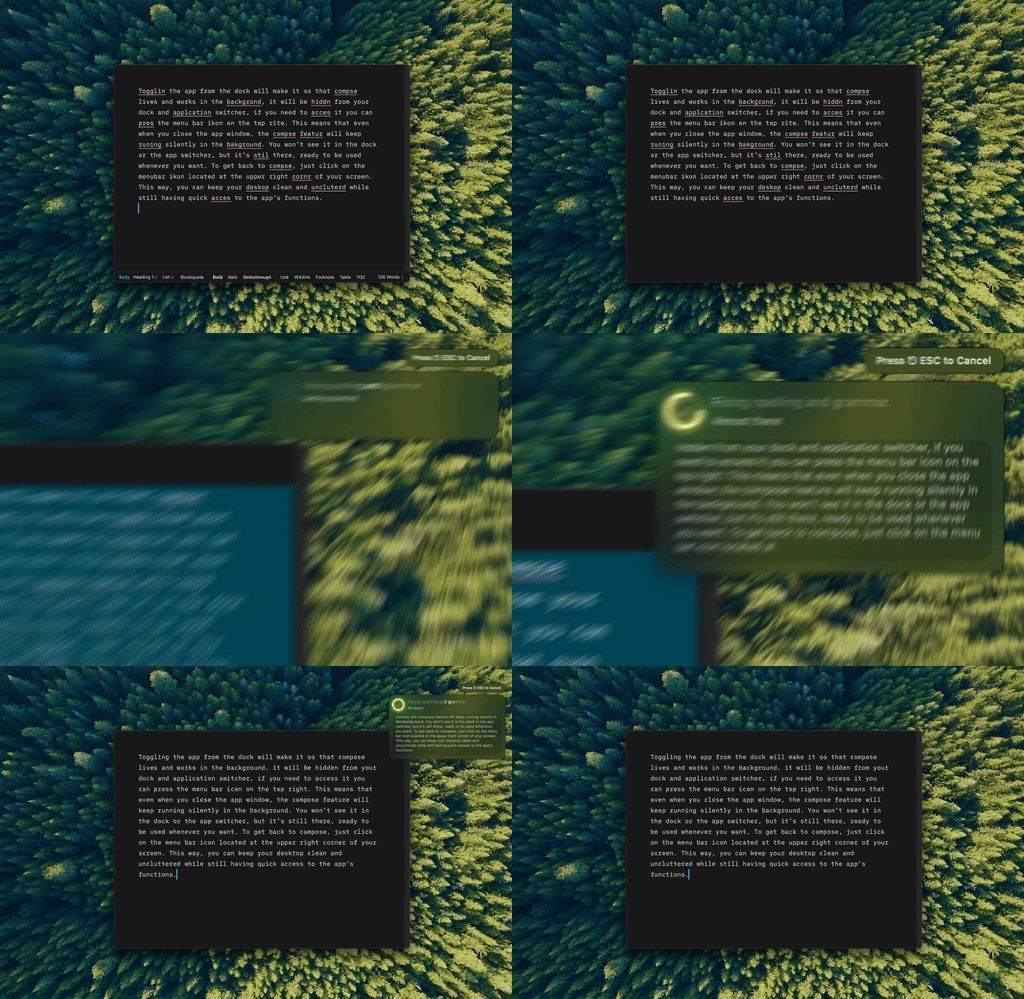
Type Mac: select the sentence, press one shortcut, and the corrected English replaces it in place.
Type Mac is a Mac menu bar app that corrects English in the app where you write. Select a sentence or a full paragraph in Mail, Slack, Notes, a browser, or any app where you can select text, then press Command-Shift-Return. The Fix Writing command corrects typos, grammar, punctuation, and word order, and keeps your meaning and your tone. The corrected text replaces your selection.
- No round trip. The check takes one shortcut, so you run it on short messages too.
- Your meaning stays. Fix Writing corrects the sentence and does not add or remove information.
- Learn as you go. Read the corrected sentence before you send it. Each change shows you one rule from the table above.
To improve a sentence beyond correct grammar, add a custom shortcut with the prompt "Rewrite this in clear, natural English. Keep my meaning." Use it for emails and documents that matter.
Plans cost $4.99 a month, or $49.99 a year with a 7-day free trial. For more on writing in English as a second language, read AI tools for non-native English speakers and how to fix grammar on Mac system-wide. The write better English on Mac page shows the app.
FAQ
How can I correct my English sentence for free?
Run the five checks above: tense, subject and verb, articles, prepositions, and word order. The macOS grammar check (Edit > Spelling and Grammar > Check Grammar With Spelling) also flags some errors for free.
Which English errors are hardest to see?
Articles and prepositions. They are short words, the sentence still makes sense without them, and the rules differ from most other languages.
Can a grammar checker fix word choice?
A basic checker fixes grammar and spelling. Word choice, such as false friends and translated phrases, needs a tool that rewrites full sentences, or a native reader.
Will a correction tool change what I mean?
It can. Read the result before you send it. Type Mac's Fix Writing command is set to keep your meaning and tone and to add no information, but a quick read catches any change to a name or a number.
Correct your English where you write it. Type Mac fixes the sentence in any Mac app with one shortcut.