
LanguageTool Alternatives: 7 Options for Mac Writers
The best LanguageTool alternative depends on what you want to replace. For a free, open-source checker that runs on your Mac, use Harper (English only). For natural rewrites in major European and Asian languages, use DeepL Write. For the closest like-for-like checker, use Grammarly. For AI rewrites and translation in any Mac app, with your choice of model, use Type Mac.
Below are seven options, with the facts each vendor states on its own pages as of November 21, 2026. This is the Type Mac blog, and Type Mac is on the list, so weigh our view of it with that in mind.
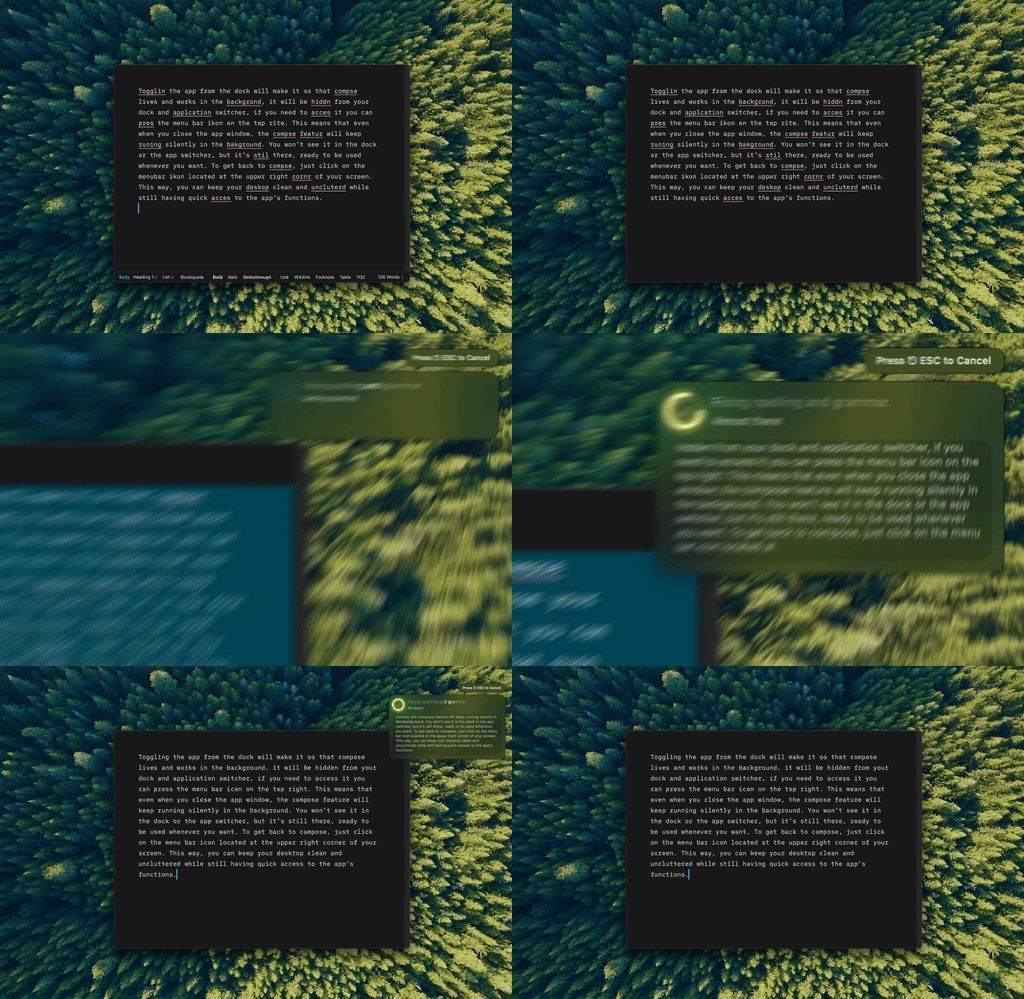
Type Mac: select a sentence in any language, press the shortcut, and the fixed text replaces it.
What the LanguageTool Mac app does today
Know what you are replacing first. LanguageTool says its Mac app checks spelling, grammar, and style in more than 30 languages. It underlines errors inline in Apple Mail, Messages, and Notes, and in Microsoft Word, Slack, and Teams as a beta. In all other apps, you send text to the LanguageTool Editor with a shortcut.
The app needs an internet connection for its checks and Accessibility permission to work across apps. You can use it without an account. Premium comes with a 14-day money-back guarantee, and its price shows on languagetool.org/premium for your region, so this post gives no number.
If you only want a privacy comparison of the two big checkers, read LanguageTool vs Grammarly. This post is about everything else.
LanguageTool alternatives compared
| Tool | Cost | Languages | How it works on Mac |
|---|---|---|---|
| Harper | Free, open source | English only | Local checks, Harper Desktop works system-wide |
| DeepL Write | Free tier; Write Pro priced by region | 11 options in DeepL's help center | DeepL for Mac app and shortcut, macOS 15 or later |
| Grammarly | Free; Pro $12 a month billed yearly (USD) | 23; advanced suggestions in 6 | Underlines as you type in apps and browsers |
| Apple Writing Tools | Free | 16 Apple Intelligence languages | Built in on Macs with M1 or later |
| QuillBot for Mac | Free app; Premium priced by region | Not stated for the Mac app | Widget inside supported apps |
| Raycast AI | Pro from $8 a month billed yearly (USD) | Not stated | Quick Fix replaces text in place |
| Type Mac | $4.99 a month or $49.99 a year | No fixed list; depends on the AI model | Select text, press a shortcut, any app |
1. Harper: the free, open-source LanguageTool alternative
Harper is a free grammar checker under the Apache-2.0 license. Every check happens on your computer, with no cloud round trips, no telemetry, and no large language model. Harper Desktop runs system-wide on macOS, and Harper also ships for Chrome, Firefox, Obsidian, VS Code, Neovim, and other editors.
The limit is language. Harper supports English only, in its American, British, Canadian, Australian, and Indian varieties. If you write in German or French, Harper does not replace LanguageTool.
2. DeepL Write: natural rewrites
DeepL Write returns a full improved version of your text instead of one fix at a time. DeepL's help center lists Chinese, English (UK and US), French, German, Italian, Japanese, Korean, Portuguese, and Spanish, with styles and tones outside Chinese, Japanese, and Korean. Without an account you can improve up to 1,500 characters at a time.
On a Mac, DeepL for Mac (macOS 15 or later) improves the selected text with Ctrl+⌘+C and shows the result in the DeepL window. Read DeepL Write vs Grammarly for the full comparison.
3. Grammarly: the closest replacement
Grammarly works the way LanguageTool does: underlines as you type, in apps and browsers. Spelling and basic grammar checks are free in 23 languages. Clarity, fluency, and tone suggestions are paid, in English, Spanish, French, German, Portuguese, and Italian. Grammarly Pro costs $12 USD a month billed yearly, or $30 billed monthly. See the Grammarly price breakdown.
4. Apple Writing Tools: built in
Apple Intelligence includes Writing Tools at no cost on Macs with M1 or later, and Apple lists automatic proofreading as a macOS 27 feature. Apple lists support for English, Danish, Dutch, French, German, Italian, Norwegian, Portuguese, Spanish, Swedish, Turkish, Vietnamese, Chinese (simplified and traditional), Japanese, and Korean, and says some features differ by region and language. It does not run on Intel Macs. For a full comparison, read Apple Writing Tools vs Grammarly.
5. QuillBot for Mac: rephrasing in supported apps
QuillBot's free Mac app adds a widget to Notes, Messages, Slack, Teams, Word, Outlook, WhatsApp, and other supported apps, with inline grammar suggestions and rephrase options for each sentence. It does not work in browsers. Details are in our QuillBot for Mac guide.
6. Raycast AI: Quick Fix in a launcher
If you already use Raycast, its Quick Fix command corrects the selected text in any focused app and replaces it in place. The default trigger is a double press of the right Shift key. Raycast AI needs a paid plan: Pro costs $10 a month, or $8 a month billed yearly, with 500 AI credits a month. Quick Fix always spends Raycast AI credits. Read Raycast AI alternatives for the details.
7. Type Mac: AI rewrites in every language you write
Type Mac is the pick for Mac users who write in more than one language and want rewrites, not only rule-based checks. Select text in any app, press a shortcut, and the result replaces your selection.
- Fix Writing (⌘⇧Return) corrects grammar and spelling.
- Translate and other custom shortcuts run your own instructions, such as "translate to German" or "make this formal."
- Model choice: a built-in model on every plan, or your own OpenAI, Anthropic, Gemini, Groq, or OpenRouter key.
- Price: $4.99 a month, or $49.99 a year with a 7-day free trial.
What it lacks next to LanguageTool: no free plan, no underlines as you type, and no Windows or browser version. See translate selected text on Mac for how translation works.
Which LanguageTool premium alternative to pick
- You want free and private: Harper, if you write in English.
- You want natural phrasing in a European or Asian language: DeepL Write.
- You want the same checker experience with more polish: Grammarly.
- You have an Apple silicon Mac and light needs: Apple Writing Tools.
- You write in several languages in many apps and want AI rewrites: Type Mac.
FAQ
Is there a free LanguageTool alternative?
Yes. Harper is free and open source, and Apple Writing Tools is free on Macs with M1 or later. Grammarly, DeepL Write, and QuillBot also have free plans with limits.
Is there an open-source alternative to LanguageTool?
Yes. Harper is open source under the Apache-2.0 license and runs all checks on your device. It supports English only.
Does LanguageTool have a Mac app?
Yes. LanguageTool for macOS underlines errors in Apple Mail, Messages, and Notes, with Word, Slack, and Teams in beta. It needs an internet connection.
Which LanguageTool alternative works offline?
Harper. It runs every check on your computer with no cloud requests.
Sources
- LanguageTool for macOS
- LanguageTool Premium
- Harper
- About DeepL Write (DeepL Help Center)
- DeepL for Mac
- Grammarly languages
- How to get Apple Intelligence (Apple Support)
- QuillBot for macOS
- Raycast AI Commands and Quick Fix (Raycast Manual)
- Raycast pricing
Writing in more than one language? Try Type Mac free for 7 days on the yearly plan.